Pricing
Shopify Pricing and the Full Cost of Running a Store
Shopify pricing as of October 2026: Basic, Grow, and Advanced monthly and annual rates, Shopify Payments fees, upgrade thresholds, and first-year cash estimates.

I would start on the least expensive plan that covers your payment method and staff accounts, then upgrade only when processor savings or a needed feature justifies it. Plan names are not growth stages. In US dollars with annual billing and standard online card rates on Shopify Payments, Basic is $29 a month, Grow $79, Advanced $299, plus apps, domain, and processing. Monthly billing costs more and makes sense when volume is unproven.
My main reservation is prepaying before sales volume is dependable, even though annual billing lowers the platform fee. I would commit to annual billing only when cash on hand and full-term demand justify tying up that money.
Prices and fees are from Shopify’s official pages as of October 2026; community reports are anecdotal, not measured.
US plan prices and annual cash commitments
Shopify’s US plans have two price schedules depending on how you choose to pay. On Shopify’s pricing page, Basic is $39 per month billed monthly, Grow is $105, and Advanced is $399. With annual billing, those same plans are $29, $79, and $299 per month, meaning $348, $948, and $3,588 respectively leave your account at the start of each billing year. The monthly rates are also listed on Shopify’s POS pricing page, so these are standard published prices, not a temporary promotion.
| Plan | Monthly billing | Annual billing | Annual prepayment |
|---|---|---|---|
| Basic | $39/month | $29/month | $348/year |
| Grow | $105/month | $79/month | $948/year |
| Advanced | $399/month | $299/month | $3,588/year |
The annual rate is cheaper per month, but it is not automatically the better deal. It requires paying the full year up front, so the real question is whether that cash is better kept available for inventory, marketing, or an uncertain launch. If you have the working capital and expect the store to run for the full year, annual billing lowers your fixed platform cost. If cash flow is tight or you want to keep options open, monthly billing costs more in total but avoids locking money up before you know what volume will justify it. Treat it as a cash-timing decision, not as a discount you should always take.
Plus is a separate case. It starts at $2,300 per month, and Shopify’s own cost guide ties that figure to a three-year term. That is not one of the annual-billing tiers above, and $2,300 is not a one-year prepayment. Read the contract’s exact term and cash schedule before budgeting for Plus, because the invoice amount depends on the agreed payment structure.
The rates above are the current published schedule, not a promise about future renewals. Use them as a planning starting point, then recheck the contract at renewal time. Leave trial credits and first-year signup promotions out of steady-state cost estimates, because they do not carry into the renewal invoice.
Separate the bill into fixed variable and one time costs
Sort costs into three groups before comparing plans: fixed recurring, variable per-order, and one-time. The plan is only part of the first group.
Fixed recurring costs run monthly or yearly regardless of sales: platform plan, app subscriptions, and domain renewal. Hosting and SSL are included in every core plan, so don't add them as separate lines. A custom domain is separate; a $2/month domain adds $24/year, and a $40/month total app allowance adds $480/year. Treat each paid app as its own contract: the right number depends on what your store actually needs, and the allowance is a planning cap, not one specific app.
Variable costs scale with orders, led by payment processing. Tie this line to expected order volume rather than a flat percentage guess. One-time costs are quoted per project for setup, design, migration, or custom code, and they land only in the first year, such as a $1,200 build quote.
Community reports show why app spending belongs in the budget but should be requirement-based, not an arbitrary allowance. One Reddit user self-reports using Shopify for about seven years, finding it worth the effort and paying for one reviews app (Reddit: long-time Shopify user’s appraisal). Another self-reports trouble finding translation and invoice software that fit their own workflow, not that native tools fail for everyone (Reddit: merchant’s invoice workflow frustration). Neither supports an average app bill or a claim that paid apps are unavoidable. The first shows a lean app stack can work; the second shows a specific need can justify one more subscription if the native option doesn't fit.
Unit discipline prevents double counting: plan per month, app per month, domain per year, processing per order, POS Pro per location per month, and setup as a total. POS Pro is optional on Shopify’s POS pricing page at $89 per location per month billed annually; online-only stores don't need it. Prices here are USD for US stores. Outside the US, re-run the same categories with local plan prices and processing rates.
Shopify Payments and external processor fees
Shopify's processing charges have two separate layers. With Shopify Payments, a US store pays the published online card rate. With an external gateway, it pays the gateway's own fee plus a separate Shopify third-party transaction fee. The card rates are on Shopify's pricing page, the third-party schedule is on Shopify's POS pricing page, and the applicability rules are in Shopify's transaction fee help article.
| Plan | Shopify Payments online card rate | Shopify third-party fee per eligible order |
|---|---|---|
| Basic | 2.9% + $0.30 | 2% |
| Grow | 2.7% + $0.30 | 1% |
| Advanced | 2.5% + $0.30 | 0.6% |
These are headline rates for US standard online cards. The third-party fee is a percentage with no fixed per-transaction amount, and its base is the discounted product total plus tax and shipping. On a $96 base (an $80 product after discount, $6 tax, $10 shipping), Basic adds $1.92, Advanced about $0.58. The gateway then charges its own fee under its own contract, which may use a different base or minimum, so do not assume it applies the same percentage to the same amount.
Exemptions narrow when the third-party fee applies. Orders through Shopify Payments, PayPal, or manual/POS methods generally avoid it, but the PayPal exemption requires Shopify Payments as the primary provider. For stores created on or after 12 May 2025, a separate fee also applies to the amount paid with store credit or gift cards, not to other parts of a mixed-payment order. Refunds do not bring back Shopify's fee; whether the gateway returns its own fee depends on that gateway's terms. That raises the true cost of returns and matters when you compare processors.
Which route is cheaper depends on the gateway quote, plan, and order mix. Compare the gateway's fee plus the applicable Shopify fee against Shopify Payments' published rate using your actual order size, tax-plus-shipping base, and payment mix. A low headline gateway percentage can lose once Shopify's fee and the gateway's fixed per-transaction fees are included. If a regional provider is required, its higher total can still be worth paying for the ability to take those orders, but that is a business decision, not a signal to ignore the fee difference. For what each core plan includes beyond payments, see our full Shopify review.
Three store budgets under the same assumptions
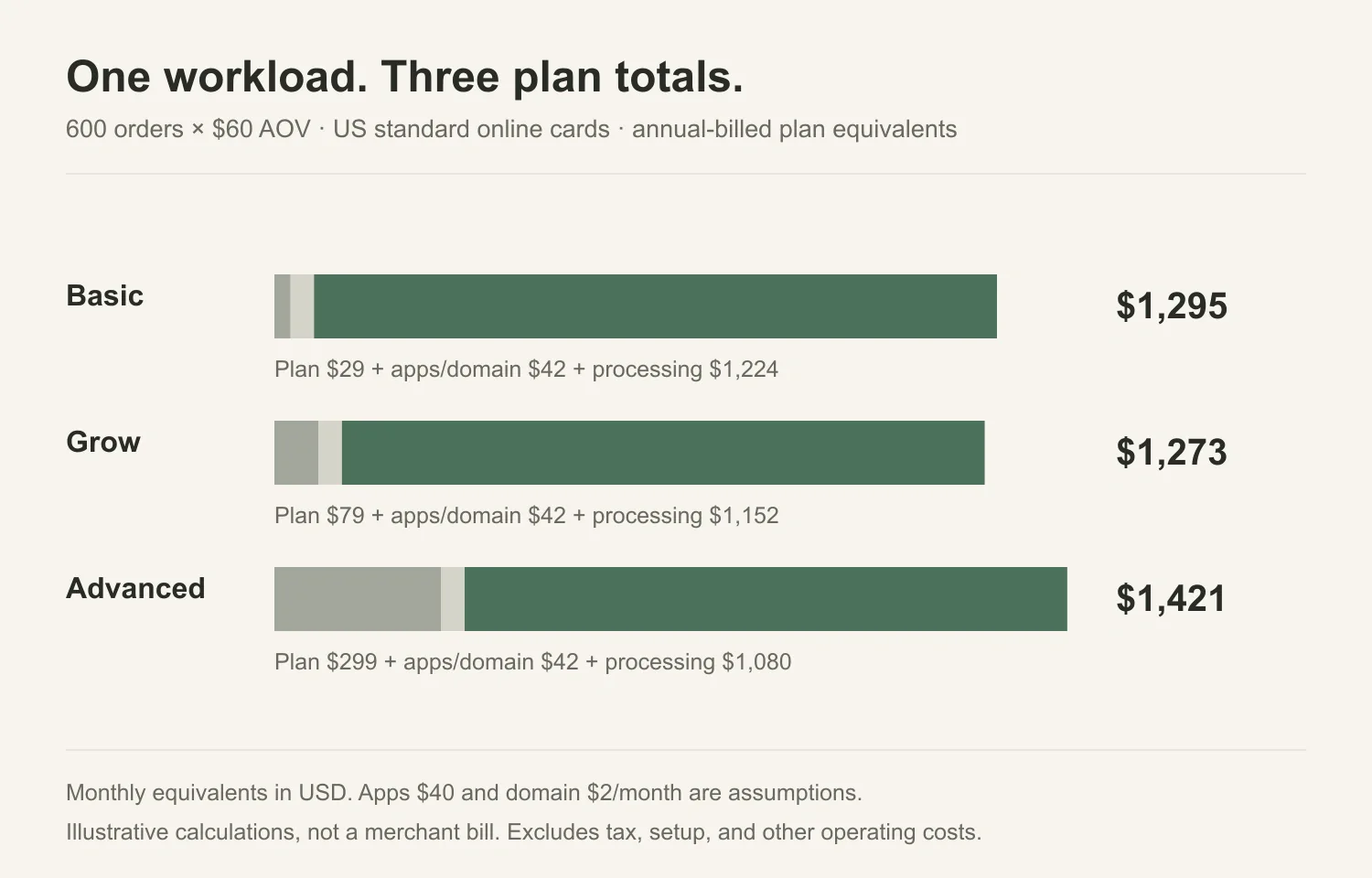
A single budget does not tell you when to upgrade. One consistent comparison method: take one month of operations, assume all orders are US standard online cards processed through Shopify Payments, use annual billing for the plan, and hold app and domain costs the same on every plan. The applicable card rates are the US standard online rates from Shopify's pricing page.
Then the monthly-equivalent cost is:
plan fee (annual prepayment ÷ 12) + apps and domain + (card rate × eligible volume) + ($0.30 × number of orders)
where eligible volume is orders times average order value, and every order qualifies for the standard card rate. Apps are set at $40/month and the domain at $2/month on all three plans, so those lines are constant. All table values are rounded to whole USD.
| Orders/month | AOV | Eligible volume | Basic | Grow | Advanced |
|---|---|---|---|---|---|
| 200 | $60 | $12,000 | $479 | $505 | $701 |
| 600 | $60 | $36,000 | $1,295 | $1,273 | $1,421 |
| 2,000 | $60 | $120,000 | $4,151 | $3,961 | $3,941 |
These are monthly equivalents in USD, not an actual single monthly invoice. The plan line is the annual prepayment divided by 12; the processing line follows the order counts and arrives as per-order deductions or invoices. The calculations are illustrative, exclude tax and other charges, and are not a promise of your results.
The $0.30 flat fee matters more at smaller baskets. At a $60 average order it adds 0.5% to the effective rate; at a $20 average order it adds 1.5%, so compare by average order value rather than headline percentages.
Within these scenarios, the crossovers are real but narrow. At 200 orders, Basic is cheapest because its higher processing rate applies to a small base, while Advanced's fixed plan premium outweighs its rate advantage. At 600 orders, Grow beats Basic by about $22/month; at 2,000 orders, Advanced edges out Grow by about $20/month.
The shared app and domain lines cancel out in any plan-to-plan comparison, so these gaps come from plan fees and card rates. A plan-specific app or service cost, or a shift in payment mix or average order value, can move them.
The annual prepayment also changes cash timing: at 600 orders, switching from Basic to Grow requires about $600 more upfront in plan fees, while the modeled saving is about $264 in the first year. If you can fund that and expect the volume to continue, the lower rate is worth acting on; if volume is uncertain or cash is tight, the margin may be too thin.
Staff access can override the calculation before order volume is considered. Basic includes no additional staff accounts, so adding a staff user makes Grow the practical starting point. The owner's own login and eligible Shopify Partner collaborators do not count against that limit: Shopify's collaborator documentation treats collaborators as partners granted access, not staff users. Decide who needs a staff login first, then run the calculation among the remaining candidates.
Upgrade thresholds depend on billing and payment mix
The cheapest plan depends on order volume and how much of it runs through Shopify Payments at US standard online card rates. When every order qualifies for those rates, the $0.30 per-transaction fee is the same on Basic, Grow, and Advanced, so it drops out of an upgrade comparison. Only the plan fee difference and the rate difference decide the crossover.
With annual billing, Basic’s plan fee is $50/month lower than Grow’s while Grow’s card rate is 0.2 percentage points lower. That rate gap saves $2 per $1,000 of eligible volume, so Grow recovers its extra plan cost at $25,000/month. Grow-to-Advanced needs $110,000/month because the plan fee jump is $220 and the rate gap is again 0.2 points. Monthly billing widens both gaps and moves the thresholds to $33,000 and $147,000. These are the Shopify pricing page rates applied to an illustrative US store.
| Upgrade | Annual billing threshold | Monthly billing threshold |
|---|---|---|
| Basic → Grow | $25,000/month eligible volume | $33,000/month |
| Grow → Advanced | $110,000/month | $147,000/month |
Read "eligible volume" narrowly: orders processed as US standard online cards through Shopify Payments in the billing term shown. The thresholds are not a blended rate across payment methods. If a meaningful share uses PayPal, manual/POS payments, or another gateway, each method has its own rate or exemption, so these numbers do not apply. Do not add an external gateway’s fee to the published Shopify Payments rate and compare the sum as though the calculation were the same.
A concrete check works. At $40,000/month of eligible card volume, Grow is about $30/month less expensive than Basic under annual billing, and the gap grows with volume. Advanced would not pay for itself on card-rate savings until $110,000/month, so the more useful question is what Advanced buys before then: more staff account allowance (up to 15 versus 5) and a lower Shopify third-party transaction fee for stores that need an external gateway.
B2B needs care too. Advanced does not raise the active B2B catalog cap above Grow’s three; B2B checkout and storefront are delivered contextually through Shopify Markets, per the B2B plan features guide. Checkout customization is limited on lower plans and fuller on Plus, so that operational need can justify an earlier upgrade even when fee math says stay put.
Wholesale retail and automation can change the price floor
The volume thresholds above only compare payment math. Operational needs can force a higher plan no matter how little you sell, so check them before comparing volumes.
Staff access can set the plan floor. Shopify's pricing page lists no additional staff accounts on Basic, five on Grow, and fifteen on Advanced. These are admin accounts, separate from the owner's login and from POS register roles. A business that needs an additional staff login starts at Grow, which adds $600/year over Basic at annual billing. The owner's own access does not force that upgrade, and eligible Partner collaborators get access without counting against the staff limit, per Shopify's collaborator documentation.
Automation is narrower. Flow is free on all core plans, but its Send HTTP Request action is limited to Grow, Advanced, and Plus. That is a specific action, not a statement that all automation requires Grow. Other apps and integrations may cover similar needs on Basic. Custom partner app tasks are Plus-only, which is a separate constraint.
B2B pushes higher. The B2B plan features guide says Basic, Grow, and Advanced share a total of three active B2B market catalogs, and those catalogs require new Shopify Markets. Plus offers unlimited catalogs and direct company/catalog assignments. Deposit requirements are Plus-only, so a wholesale business that needs deposits starts at Plus, around $2,300 per month on a three-year term.
Retail is an optional line. POS Pro is $89 per location per month billed annually. It is one route to extra register features, not the only way to sell in person, and it sits outside the core plan comparison.
| Requirement | Minimum plan |
|---|---|
| Additional admin staff login | Grow |
| Flow Send HTTP Request action | Grow |
| More than three total B2B market catalogs | Plus |
| B2B deposits | Plus |
Run this filter first, then compare the monthly equivalent among the surviving plans. A store needing one extra admin login chooses Grow and then uses the volume math to see if Advanced pays off. A wholesale operation needing deposits is on Plus regardless of volume, because no lower plan supports that requirement.
Build the first year cash forecast
A cash forecast shows when money leaves, not just how much. Under annual billing, Shopify bills the full plan year when that billing cycle starts: $348 for Basic, $948 for Grow, or $3,588 for Advanced per the official pricing page. Setup invoices follow the schedule in the quote, often a deposit before launch and the balance later.
Use the 200-order Basic scenario from the section above. Recurring platform-side costs for the year are $5,748: $348 prepaid plan, $480 apps billed monthly, $24 annual domain, and $4,896 card processing deducted with each sale. Add an assumed $1,200 setup quote, and the first-year total is about $6,948. That is an annual estimate, not a launch-day cash requirement.
The cash you need before launch depends on billing dates and activation dates, not a single formula. The plan prepayment is due when its annual billing begins; the domain appears at registration or renewal; and apps bill on their own monthly cycles. In this example, the prepaid plan and any setup deposit typically arrive before or near launch, but specifics come from the quote and each service's chosen dates. Processing for card sales is withheld from payouts as orders flow, so early cash needs track expected volume; other payment setups may differ.
There is no universal cash minimum. A workable approach is to confirm the store activation date, plan renewal date, app billing dates, and the deposit schedule before setting launch-week cash. You can deliberately choose app start dates to spread outflows, though do not delay a domain the store requires to operate.
This remains a platform-side estimate, not a full cash forecast. Product costs, shipping labels, advertising, tax remittances, payroll, and other operating lines have their own timing and must appear as separate lines in your complete forecast. Leaving them out of this number is fine; leaving them out of your real budget is not.
Renewals also need a separate line. Use the published annual rate as the baseline and confirm the actual rate in the contract at renewal. If order volume grows, recalculate processing from the new expected volume instead of repeating last year's total.
For a view of how a self-hosted platform changes the cash-flow shape, see our PrestaShop pricing article.
Choose the cheapest plan that meets the actual requirements
Set the floor from your actual staff, automation, and B2B needs. Basic has no additional staff accounts; Grow allows five, Advanced 15. Flow’s Send HTTP Request is Grow/Advanced/Plus, and B2B deposit terms are Plus-only. The transaction fees are exact conditional comparisons: on US standard online cards, Basic is 2.9% plus $0.30, Grow 2.7% plus $0.30, Advanced 2.5% plus $0.30, with the published plan prices under annual or monthly billing. Forecast uncertainty is a separate judgment.
When a native feature is missing, compare app costs against maintaining a custom build. In a September 2026 app-versus-build thread, a developer argued paid apps buy maintenance. That frame avoids moving up a plan for one workflow.
Revisit when a real input changes: a new staff login, a B2B deposit need, or a sustained shift in card volume or payment mix. Otherwise, the cheapest eligible plan is the reasonable default. Plan names describe tiers, not needs.
Related reading
- Shopify review: platform capabilities beyond the price sheet
- PrestaShop pricing: self-hosted cost shape and server responsibilities
- WooCommerce pricing: WordPress-based cost comparison for merchants who want ownership