Review
Shopify Review for Ecommerce Teams Choosing a Platform
A Shopify review for ecommerce teams based on official docs and community reports: plan limits for staff, checkout, B2B, app costs, payment fees, and exit path.

I would recommend Shopify to retailers who want to pay for hosting and platform upkeep so they can focus on selling, provided they accept that plan rules will gate some of the work their own store needs. That trade is fair when running the technology is not the business you are in.
The appeal is concentration: storefront, checkout, payments, inventory, and order tools arrive in one subscription, per Shopify’s platform overview. For a team that would rather budget for operations than manage servers, this removes a real burden.
My reservation is tier creep. When a higher plan exists mainly to unlock a single workflow or checkout setting, I would question whether that monthly jump earns its keep. This review draws on official documentation and anecdotal community reports checked on 20 October 2026, not on hands-on merchant testing.
Who should choose Shopify
The cleanest match for Shopify is a merchant who wants to delegate server upkeep. Shopify’s pricing page includes hosting and SSL in the subscription, converting routine infrastructure chores into a predictable payment.
Code ownership flips the calculation. Teams that want to shape every layer of their stack, especially checkout, should check plan limits before committing. Checkout customization is limited on lower plans and fuller on Plus, and self-managed platforms give you control of code and hosting.
| Preference | My view | Reason |
|---|---|---|
| Prefer paying to avoid upkeep | Shopify fits | Hosting and SSL are included |
| Want code and checkout control | Self-managed platforms deserve a closer look | Lower-plan checkout customization is limited; fuller control is gated to Plus |
| One business-critical capability is gated | Verify that gate before you subscribe | The higher tier may exist mainly to unlock that workflow |
Two community accounts illustrate why this is a fit question, not a universal verdict. One commenter reports using Shopify for about seven years and says it is worth the effort, running on one paid reviews app seven-year user, one paid app. Another commenter reports frustration finding invoice software that matches their own workflow invoice software matching frustration. Both are self-reported experiences, and both point the same way: Shopify suits stores whose needs stay close to native workflows, and becomes harder to justify when a specialized process drives the choice.
A subscription is not inherently a bad deal because self-managed stores also carry plugin updates, security monitoring, and platform upkeep. The real comparison is which model lets your team focus on product and customers instead of infrastructure. Settle that preference before comparing monthly fees.
Catalog structure for ordinary retail
Shopify organizes a product as a parent record. Size and color options form variants, and inventory is tracked per variant official variants guide.
A t-shirt in three sizes and two colors becomes six variants. The inventory count for a medium blue shirt is stored on that variant, so when a buyer chooses it, the system draws from that specific stock record. That is the granularity an apparel seller needs. The model earns credit for keeping a sellable size and color combination attached to its own inventory record.
Category metafields add useful structure here. Shopify lets you connect category metafields to variant options, so consistent details can be reused across a line instead of retyped per variant.
For a given SKU line, the core question is whether each combination can be managed without being confused for another. For ordinary retail, the variant model answers that cleanly. Related products stay under one parent record, and orders and inventory views get a stable reference for each option.
For products that do not behave like fixed-size options, start with concrete requirements: does an order need engraving text or build-to-order specifications, and does a choice change the price after selection? Before committing, I would map a few actual product requirements to that structure and see what expresses comfortably. For a configuration-heavy catalog, that mapping is the central test.
Automation: generous inside, gated at the edge
Free Flow is the part of the package I rate most generously. It is available on Basic, Grow, Advanced, and Plus at no extra charge, and its trigger-condition-action model lets a store encode routine rules in Shopify's own language official Flow documentation. That placement deserves credit.
An illustrative example: when an order is created, if the order total is over $500, apply a high-value order tag. Staff could then filter those orders and attach follow-up work, and the rule stays visible in Shopify instead of living in a spreadsheet.
The official Help Center links this video. It explains the workflow idea, not current plan entitlements.
The friction appears at the boundary. The Send HTTP Request action, which delivers flow data to an external system, is limited to Grow, Advanced, and Plus. A Basic subscriber can automate internal steps but cannot reach their own endpoint through this action. That is a specific gate, not a rule that all external integrations require Grow.
The action sends requests to whichever URL you configure, with the HTTP method, headers, and body you specify. Authentication is optional and depends on the receiving service; Shopify lets you store secrets such as tokens or passwords for that purpose official Send HTTP Request reference. So setup still hinges on what the receiver expects, but a plain public endpoint can work without credentials.
A single business-critical outbound request can justify a higher tier; frequency alone does not determine value. Compare the work removed against the extra subscription cost. The packaging still bothers me, but that is a pricing complaint, not a refusal to pay when the economics work.
Custom partner app tasks are Plus-only, and API-governed usage limits vary. The true automation cost therefore depends on what you connect and how often. My advice is to map the rule that matters most first, then confirm which plan level hosts its required action before committing.
Staff allowances and the checkout gate
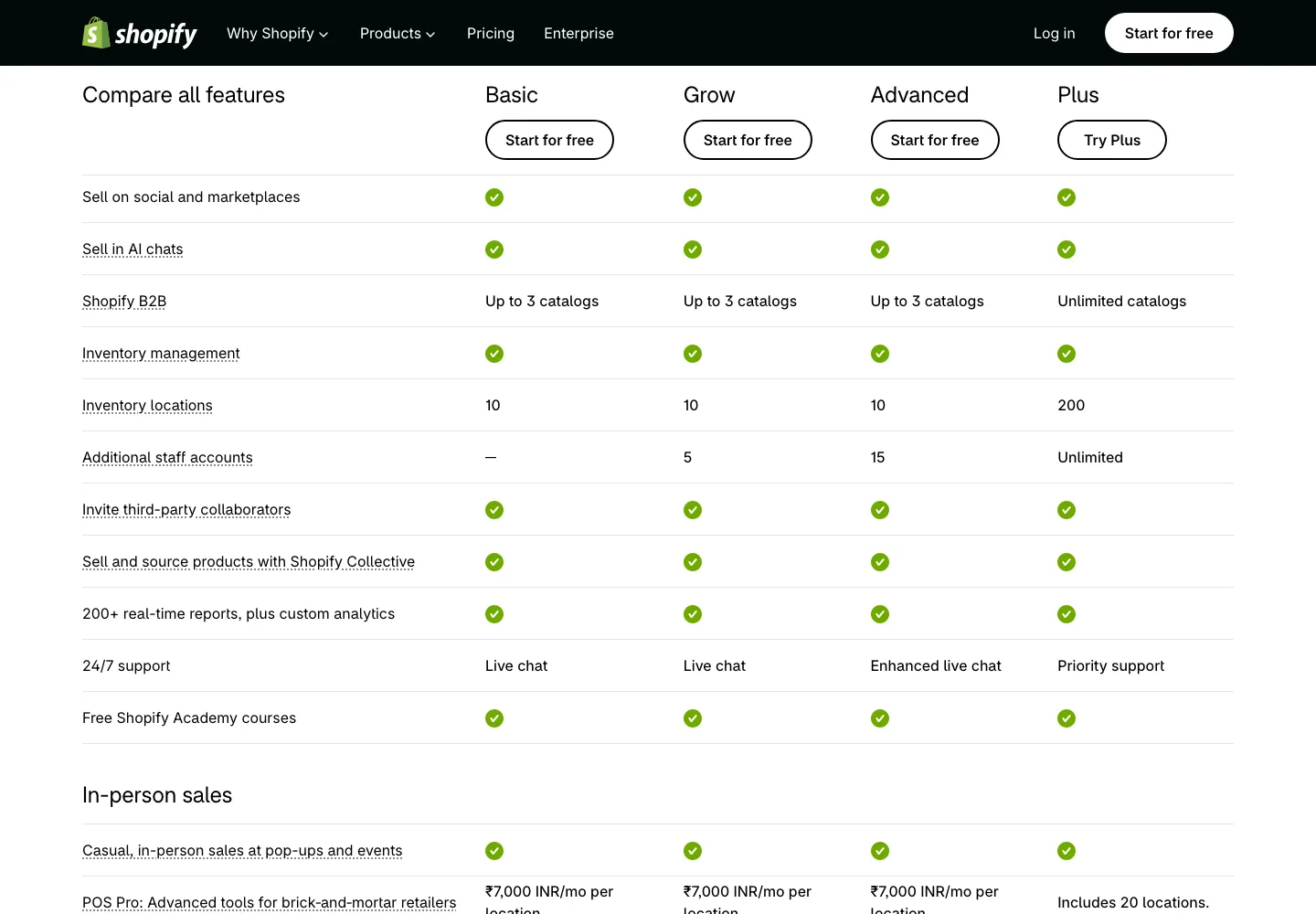
The strongest reason I treat the plan ladder as a commercial decision, not just a feature list, is the staff allowance. Basic includes no additional staff accounts, Grow adds up to 5, and Advanced up to 15, per Shopify's pricing page.
Take the concrete case of an owner adding one employee who needs admin access. That single seat pushes the subscription from US$29 to US$79 per month, the US-dollar monthly price when billed annually. I understand why tiers bundle limits, yet I would rather pay a per-seat fee than upgrade the whole plan. A new employee should add cost roughly proportional to their access, not force a jump that also reshapes other plan features.
| Plan | Additional staff accounts |
|---|---|
| Basic | None |
| Grow | Up to 5 |
| Advanced | Up to 15 |
| Plus | Unlimited |
Not every outside person consumes a seat. Collaborators are Shopify Partners you grant access to, and they do not count against the staff allowance, per the collaborator documentation. What they can do still depends on the permissions you assign, and their access is restricted: collaborators cannot use the Shopify POS app or the Point of Sales channel. So an agency can be added without taking a staff seat, yet it remains bound by the permissions granted and these restrictions, not a full administrator.
The heavier gate is checkout customization. On Basic, Grow, and Advanced, checkout customization is limited, while the fuller toolkit sits on Plus.
For most stores, I would first define the one checkout change the business actually needs. If that change falls within what the lower plans permit, there is no reason to move. If the required change is beyond those limits, the relevant question is whether Plus's fuller access covers that exact change. If it does not, neither plan level removes the ceiling, and I would weigh a self-managed platform instead of paying more for the same limitation. The exact checkout change determines the plan; not every custom request requires Plus.
Wholesale: a small pilot fits below Plus
B2B is available on Basic, Grow, and Advanced, and each of those plans can assign up to three active B2B market catalogs in total, per Shopify's plan feature documentation. That still makes a small wholesale pilot genuinely worth considering on a lower plan, provided the buyer structure stays simple.
A concrete allocation shows how the ceiling works. Two catalogs can sit inside one B2B Market, and a third can live in another Market, consuming the full allowance without requiring three separate markets. For a merchant testing wholesale, that covers a domestic audience and one export region and uses all three catalog assignments, so no catalog assignment remains. Lower-plan B2B catalogs require the new Shopify Markets experience, so the planning question is catalog count, not market count.
The Plus gate appears at control boundaries. Lower plans keep net terms for buyers. What is Plus-only is direct assignment of companies or locations to catalogs, along with deposit requirements, per the same plan feature documentation. I would not upgrade to Plus just to add a second catalog. When company-specific catalog assignments or deposits become the core requirement, Plus is a plan to price against alternatives, not automatically worth any price.
Apps extend the platform at an added running cost
The strength of Shopify’s app store is its reach. Apps let a store extend the hosted platform with third-party tools rather than building every feature itself Shopify’s hosted commerce platform. That breadth helps a business evolve, yet it also moves responsibility to the store owner. Paid apps can add recurring charges, and each app’s data and export terms need checking before you depend on it; fee structures vary by app, so there is no single pricing rule.
I would not refuse apps on principle, nor adopt one just because a listing exists. The useful test is whether its specific job justifies the recurring cost, or whether a built-in setting or Flow rule covers the gap. Anyone who resents app subscriptions should also weigh the developer view posted on the Shopify Community: paying for an app pays someone else to maintain it, while custom code puts updates, security, and debugging on your team.
The choice still depends on your team and time horizon Shopify Community developer advice on app versus custom builds. So the real comparison is ongoing app charges versus your own maintenance time. A paid add-on earns its keep when it solves a durable job I do not want to build or babysit; a native feature usually wins when the gap is small or temporary.
Point of sale follows the same test. Core plans include POS access for casual selling, and POS Pro is a separate optional add-on at $89 USD per month per location billed yearly Shopify POS pricing page. I would add it only after naming the specific workflows the basic toolkit cannot cover.
Payment fees and portability
I weigh payment cost as a total bill, not just a monthly rate. When an external provider handles payments, Shopify adds its own third-party transaction fee on top of the provider's charges, and the rate varies by plan third-party transaction fee documentation. Documented exemptions cover defined scenarios, including Shopify Payments and manual/POS payments.
Using Shopify Payments only removes that third-party layer for eligible payments under those exemptions, and card processing fees still apply. Stores created on or after May 12, 2025 can also incur third-party fees on gift-card/store-credit amounts. When the fee applies, it is based on discounted product price plus tax plus shipping, and refunding an order does not bring it back.
Before picking a tier, I would compute the blended cost per order: my provider's rate plus Shopify's third-party fee. The official pricing page and the Shopify pricing breakdown show the rates and scenarios. A provider chosen for regional compatibility or a better negotiated rate can still be right, even if the combined cost is higher, when the coverage it provides matters more. My reservation is not that external providers are wrong; it is that their advertised rate is incomplete until Shopify's layer is added.
Portability is the second thing I check before trusting a platform with a business-critical workflow. Orders export to CSV, but the export represents historical order information, not current product data, per the order export documentation. Current products, subscriptions, and theme configuration are separate records that need their own migration paths. That distinction should force a migration checklist.
A clear hypothetical example draws out the question. If a store runs a subscription app for recurring plans and a loyalty app for points balances, moving platforms might produce a CSV of past orders, while active subscription relationships and reward balances may stay inside the app vendor's database. The open questions are where each active record is held, whether that app offers an export path, and whether the destination platform accepts it.
I would ask those questions before relying on any add-on. Paying for hosting convenience is a fair trade; learning later that a core tool has no clean exit is not.
Where the recommendation lands
For standard retail, I would shortlist Shopify when delegating hosting and accepting documented plan boundaries is a tradeoff worth paying for. That trade suits a team whose priority is selling, not maintaining infrastructure, and it is why the subscription earns its place despite the gates reviewed above.
Buyers who deliberately prioritize code and hosting control should look at self-managed options like WooCommerce or PrestaShop instead, while acknowledging those choices move plugin updates, security monitoring, and server coordination back onto the owner. Neither option is a promise of less work, only a different allocation of it.
After weighing positive and negative merchant reports, the buyer's required workflows carry the decision. An unusual integration alone would not push me out of Shopify. A required workflow that no documented plan level satisfies would.
The one unresolved need that would reverse my recommendation is a checkout flow with a mandated custom step beyond what the published limits allow. The required outcome is the test: I would ask Shopify to demonstrate that exact flow on the relevant plan before committing, rather than assume the tier ladder covers it or that every custom checkout need automatically forces Plus. If the flow works, Shopify remains my practical pick for standard retail.