Pricing
WooCommerce Pricing Beyond the Free Core Plugin
WooCommerce pricing analysis that itemizes costs beyond the free core plugin: hosting, domains, extensions, processing, labor, and three illustrative annual budgets.

The free core plugin is a genuine cost advantage, but only if you treat it as a component, not a whole budget. I would approve a WooCommerce plan when you have itemized hosting, domain, selected extensions, payment processing, and your own labor before launch; I would reject a free-store budget that leaves those costs unpriced. Recurring billing, live carrier quotes, and complex product setups may require paid extensions or custom work, so scope each feature rather than assuming the core covers it.
This analysis uses the official WooCommerce pricing page and documentation, checked on October 20, 2026, plus community accounts from store owners and developers. Vendor-published ranges are guidance, not independent market averages or quotes. Those accounts also suggest the tradeoff: the core remains flexible, but the effort and maintenance sit with you. What changes a buying decision is whether you are prepared to pay for that work, not whether the plugin itself is free.
The core plugin is free and the store still has a budget
The WooCommerce pricing page lists the core plugin as free and open source for WordPress. That license carries no monthly platform subscription, no revenue share, and no surcharge for choosing a third-party payment gateway. Hosting, domain registration, processing fees, extensions, and maintenance are separate costs, so a budget should start from the store’s required features, not from the word free.
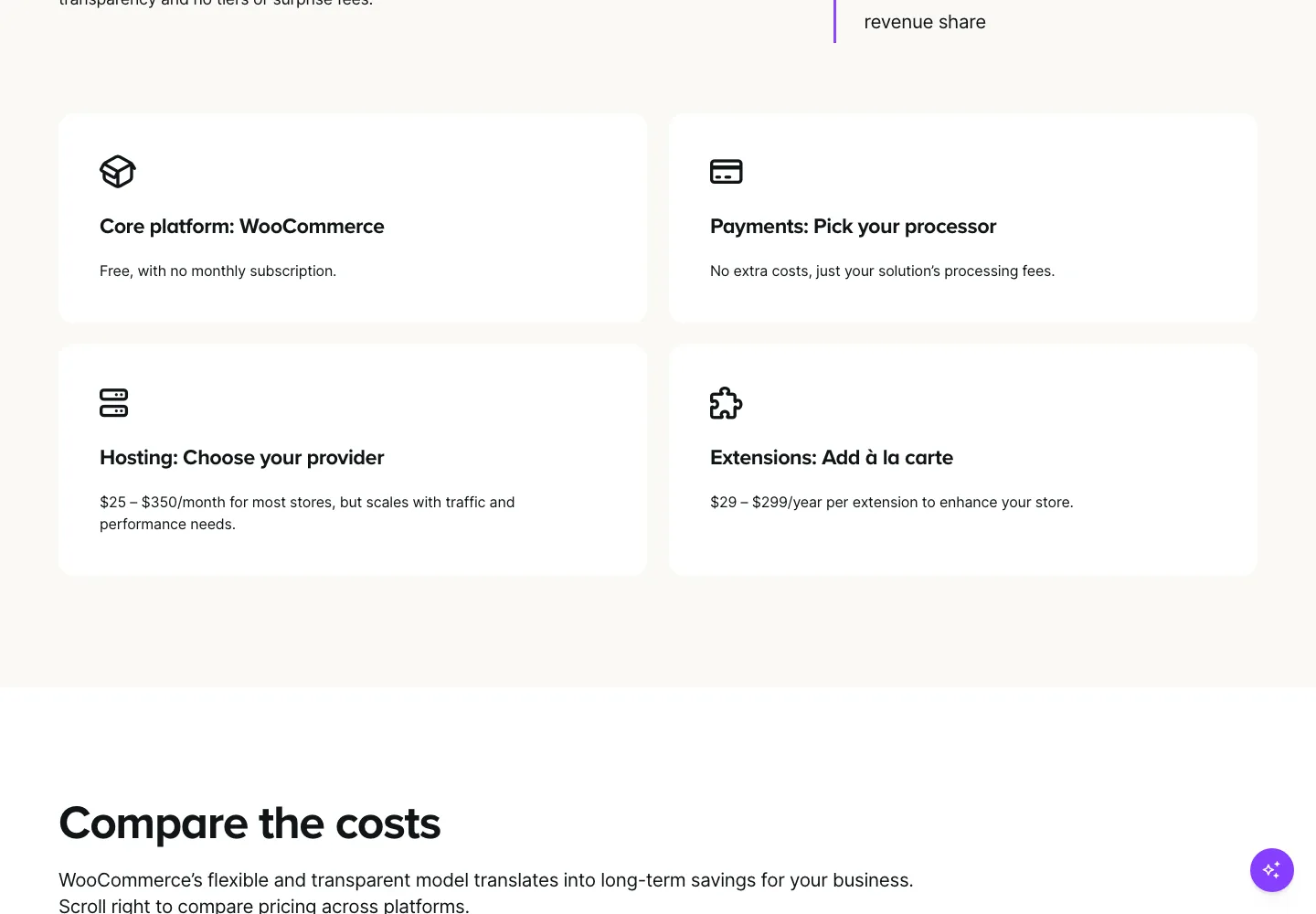
Ordinary variable products, such as a size/color item, are native to the core product editor; they do not force a paid add-on. Advanced configurators, recurring billing, and live carrier quotes are different cases: some routes use an extension, some rely on a gateway or carrier service, and some require custom development. Check the available route before treating any add-on as mandatory. Vendor guidance on that page places hosting around $25-$350 per month and extensions at $29-$299 per year each. Extension renewals therefore belong in the ongoing budget, not the one-time build.
The easiest cost to omit is ownership. Official update guidance describes backups, staging, compatibility checking, and verifying store behavior after each update. Someone must perform that work. If no team member can handle it, the budget needs paid help. A lean store can still have a short bill: hosting, domain, processor, a small set of chosen extensions, and that ownership cost. The free core can support a lean plan, but it is not the entire plan. Every required feature needs a chosen route and a cost line, including labor; otherwise the free core defers the most predictable expense.
Hosting and extension ranges have different units
The two headline ranges on the WooCommerce pricing page use different periods. Hosting guidance runs roughly $25–$350 per month, while extension guidance runs $29–$299 per year per extension. Convert before comparing: $25 per month is $300 per year, while a $99 extension license is already $99 for its renewal year. One is recurring infrastructure; the other is an annual license tied to a specific paid product.
Treating the extension range as one annual allowance for all add-ons will understate the stack. Five paid licenses, for example a booking calendar, loyalty program, product configurator, live shipping quote service, and email marketing integration, total $495 per year at an assumed $99 average license, or $1,495 at $299. The range describes each product's license, not the whole stack. Free extensions exist, and license terms vary by product, so the total depends on which paid products you select rather than on how many plugins you have installed.
The figures are vendor guidance, not confirmed quotes, market averages, or contractual ceilings. Your actual hosting bill follows traffic, storage, and support level, and each paid extension carries its own renewal terms. I would not read either number as a cap on what a store needs to spend; they mark where to start asking for quotes.
The test that changes a buying decision is whether you can name the paid products and sum their renewals as a recurring line. If the answer requires vague "extensions" spending instead of named licenses and a maintenance owner, the free core has not yet produced a realistic plan. Treat the published ranges as the start of a quote request, not a budget ceiling.
Price the features the store actually needs
Start with the catalog types the free core genuinely handles. The official product editor documentation lists simple, grouped, external/affiliate, and variable products, with virtual and downloadable settings, plus inventory controls and upsell/cross-sell links. Variable products go further: each variation can carry its own price, stock, images, and shipping. So a store selling shirts by size and color gets that behavior without a paid add-on. A configurator that builds a custom item from conditional rules is a separate requirement; scope it separately rather than assume the free core reaches it or that any specific paid plugin is mandatory.
Shipping has a similar boundary. Core methods are flat rate, free shipping, and local pickup, and only the first eligible zone applies, top to bottom, per the official shipping zones guide. Naming zones in the right order is configuration work, not a platform bug. Live carrier quotes and automated multi-carrier rating at checkout require a carrier service or additional software. That extra piece may be free, included with a plan, or paid, so add it to the feature list only when checkout really needs real-time ratings.
Recurring billing is a scoping decision, not always a paid item. If you select WooCommerce Subscriptions, it is a paid annual extension with supported gateway requirements and customer subscription management; price that choice in the product's current currency and renewal quote. Confirm gateway compatibility before budgeting, and treat the annual license as an ongoing renewal commitment.
A small template keeps these decisions honest. For every non-core feature, list the extension or service name, license price, covered sites, renewal period, and support level. Each license then appears as a distinct annual cost rather than one vague allowance. One store owner in a community discussion reports that a short, selected plugin stack can be flexible but is not the easiest managed experience, and those upkeep hours belong in the running budget alongside renewals. This feature list feeds the budgets that follow.
Three illustrative operating budgets
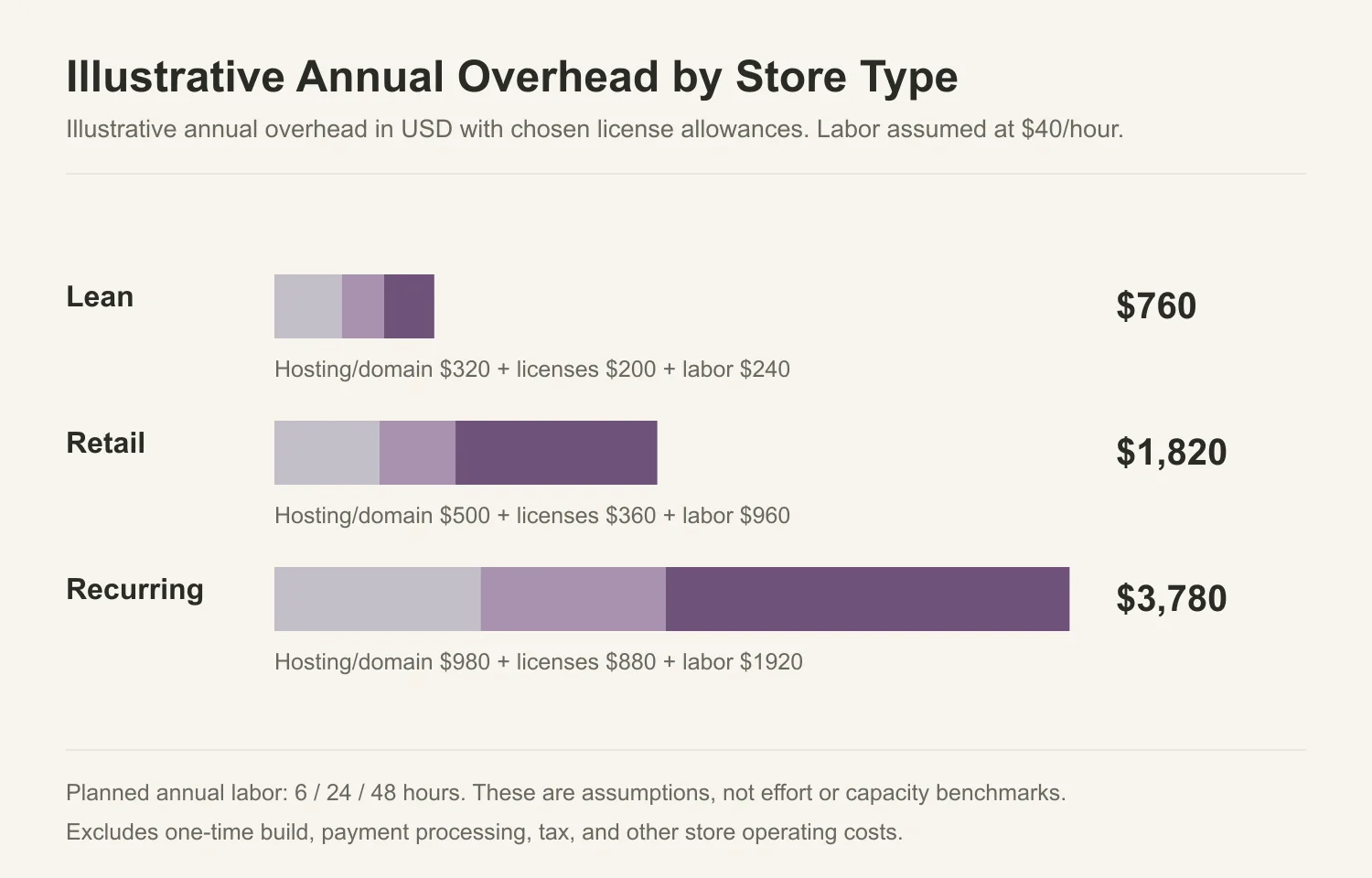
A budget is easier to compare when every row uses the same assumptions. The three scenarios below are illustrative arithmetic in USD, not quotes, market averages, or capacity promises. Each combines recurring categories from earlier sections, hosting, domain, extension allowance, and labor, into an annual overhead figure. The one-time build is kept separate and added when you want a first-year total before payment processing.
| Scenario | Annual overhead | One-time build |
|---|---|---|
| Lean | $760 | $500 |
| Retail | $1,820 | $1,500 |
| Recurring | $3,780 | $3,000 |
Those overhead figures come from explicit inputs. Every row assumes $20 per year for a domain. Hosting is $300 for lean, $480 for retail, and $960 for recurring annually. Extension allowances are $200, $360, and $880. Labor assumes 6, 24, and 48 hours per year at $40 per hour, producing $240, $960, and $1,920. The sums are $760, $1,820, and $3,780. Builds are $500, $1,500, and $3,000.
The labor hours are planned allowances, not effort or capacity estimates. They show how a budget changes as you assign more routine work; they do not predict actual hours for any store. If your hourly cost differs from $40, recalculate that line before comparing rows.
Labor is priced because the work is real maintenance, not because the hours are measured. A developer's account notes implementation is the developer's job, and an owner running a working store stresses plugin and theme quality plus technical expertise. Neither supplies a reliable hour count, so treat the allowances as assumptions, not forecasts.
The extension allowances are totals for the licenses you select, not per-extension vendor guidance or a named license quote. The lean allowance represents a small licensed stack; the recurring allowance represents a heavier stack because that row models selected paid functionality, such as a paid annual subscription extension. Recurring business does not inherently require paid extensions if another route works, but this scenario budgets for that chosen route. The rows assume core catalog and core shipping zones for standard operations, so some extensions are conveniences while others may be business-critical requirements. Core shipping zones are documented in the official shipping zones guide.
Keep the one-time build separate so renewal years do not get inflated by setup. Builds cover theme setup, configuration, data import, and launch checks. If fixed costs stay the same and no project or price change adds work, a renewal year starts at the overhead figure alone. Payment processing is excluded and handled in the next section.
Processing changes with cart value and order volume
Payment processing is the budget line that scales most directly with sales, but not the only one. The illustration below assumes 2.9% of every transaction plus $0.30 per order. That rate is a hypothetical input for comparison, not a quote from WooPayments or any specific gateway; your actual processor may apply a different blended rate, fixed fee, or monthly minimum. Other costs that can grow with traffic, hosting, support, extension usage, and labor, are held fixed here.
The two parts behave differently. The percentage grows with cart value; the fixed fee does not. At a $50 average order value, each order costs $1.45 in percentage fees plus $0.30, so $1.75. At 300 orders per month, processing is $525 monthly and $6,300 yearly. Adding the $1,820 retail overhead from the budgets above gives $8,120 recurring; adding the $1,500 one-time build yields $9,620 in the first year.
Order volume is then a straight multiplier. At the same $50 AOV, 1,000 orders per month make $1,750 monthly and $21,000 yearly. That single line can exceed all other illustrative operating costs combined, so high-volume merchants should weight the rate heavily when choosing a gateway.
Cart value decides how much the fixed fee hurts. $0.30 is 2% of a $15 cart and 0.2% of a $150 cart. The total effective rate is about 4.9% on $15 and about 3.1% on $150, so a low-AOV store carries more processing burden per sale. Compare gateways at your actual average order value rather than a headline rate alone.
The calculation only becomes useful with your own numbers. Use your actual monthly orders, average cart value, and the gateway's published fee terms, because contracts add fees beyond a simple percentage that are not always monthly charges. If AOV or volume changes, rerun the math; processing moves with sales even when the software stack stays steady.
Maintenance and upgrade work need separate scopes
Maintenance combines two different kinds of work. Routine upkeep repeats: applying security patches, reviewing plugin updates, checking order sync, confirming backups work. Upgrade projects have a defined start and end: moving to a newer PHP version, migrating to high-performance order storage (HPOS), or re-testing a customized theme after a major WooCommerce release. Mixing them hides where time goes and can make a one-off project look like a recurring expense.
The official update guide directs site owners to back up before updating, test on staging, confirm compatibility, and verify behavior after going live. It also says infrastructure and extension updates require an owner; nothing self-maintains. That time is a cost whether a vendor bills for it or your own staff performs it; an internal hour has opportunity cost, and restoration testing is part of the work. A backup you have never restored is an assumption.
HPOS shows why migrations deserve their own scope. Per the HPOS documentation, HPOS is the default for new installations from WooCommerce 8.2. Existing stores must sync when switching, and an incompatible extension can disable the switch under Settings > Advanced > Features. Planning the sync, confirming extension support, and testing on staging is a project, not a patch.
PHP is a future obligation, not a current failure. The official advisory from 29 September 2026 says WooCommerce 11.6, planned for February 2027, will require PHP 8.1+. Stores on PHP 7.4 or 8.0 get a warning, but current versions still work there. That gap is your planning window. Stage a move toward PHP 8.3+ if your stack supports it, and complete it before the floor rises. A compatibility notice is not a security endorsement, and reaching the new minimum is not proof every plugin still works.
Customization is the same kind of project. A store owner in a 2026 discussion said WooCommerce brought sales but found the theme/editor experience frustrating and needed custom work to get the desired UX. Reshaping the storefront is one-off project work, not the recurring chore of applying updates, and mixing them hides a one-off cost. That account does not prove platform-wide bugs or that every store needs paid development; it just marks where customization belongs in the budget.
Price upgrades by quoted hours, not by estimated ranges. If a provider quotes specific tasks, multiply those hours by the agreed rate. One reserved hour per month for routine upkeep is 12 hours a year, $480 at the $40/hour assumption used in this article. If you keep that work inside your own team, the same 12 hours is still a cost, just not an invoiced one. Quote each project by name and keep it outside any fixed maintenance retainer; otherwise an upgrade is funded by whatever remains after routine work.
First year cash and renewal year commitments
The $9,620 retail first-year total is an arithmetic sum, not one invoice and not an upfront cash balance. The $1,500 build is payable according to the contract; milestones are one common example but not a fixed rule. Hosting bills monthly or yearly; domain registration returns yearly; extension renewals fall on the dates each product sets; payment processing is settled as sales happen. Add the amounts to a cash calendar, not to a single launch-day budget.
That total also depends on the volume assumption behind it: 300 orders per month at a $50 average order value produces $6,300 in processing over the year. Fewer orders lowers processing at a fixed average cart value; a higher average cart value raises processing at a fixed order count. A different processing rate would also change the cash requirement while the software stack stays fixed. Rerun the calculation with your own sales inputs before treating $9,620 as the store's cost.
The core plugin carries no annual license fee today. The WooCommerce pricing page describes it as free and open source for WordPress. Paid extensions set their own renewal rules.
WooCommerce Subscriptions, for example, is a paid annual extension with product-specific gateway requirements and customer subscription management, per its product page. Each chosen extension may renew automatically, require manual renewal, or define lapsed access differently. Read each product's license terms rather than assuming one rule, and budget from the stated renewal price instead of a first-year promotional amount.
Payment processing remains outside the license schedule. Gateway charges settle per sale, not on renewal dates, so they belong in cash flow but not in the extension renewal column. If a hosted bundle looks cheaper at first glance, compare the same workload and renewal year. Our Shopify pricing breakdown shows hosted plans still leave apps, processing, and sometimes domain setup as separate bills.
For planning, split the forecast into two rows. Year one holds the one-time build and every recurring item; the renewal row holds only recurring items, with renewal dates and the volume assumption written beside them. Treat quoted amounts as estimates until confirmed.
Choose a budget from the required stack
Approve a self-managed proposal only when the itemized budget includes hosting, every license from the required stack, the person accountable for update labor, and realistic payment-volume assumptions. Do not scale to a larger scenario beyond the required features. Treat each annual license as a recurring commitment in the quote.
Hosted plans move infrastructure and core upkeep into the monthly subscription, but your selected apps and processing remain separate charges. Compare the same workload across both routes: list what updates, staging, and compatibility work someone must run per the official update guidance. Which option wins depends on whether that assigned labor fits your operations.
My advice turns on that operational question. I would support a self-managed budget when the feature list is scoped and someone can complete update and compatibility work. I would prefer a hosted plan when that capacity is missing, provided the paid apps still match the same required stack. A free core with no maintenance owner is not a realistic low-cost plan; it is a deferred labor bill.