Comparison
Big Cartel vs Shopify for a growing catalog
Compare Big Cartel vs Shopify costs, catalog limits, and payment fees. Use matched store budgets and an editable workbook to price your setup.

For a US maker comparing Big Cartel vs Shopify, start with what will change after the next product drop. At 55 listings, you’ve passed Big Cartel Platinum’s 50-product limit. Diamond is one way to keep the shop you already run: its monthly subscription is $30 versus Shopify Basic’s $39. If a requirement such as a specific checkout integration forces the move, use the Shopify review to check that requirement before budgeting.
For a three-month season, Platinum at $15 per month costs $45 in subscription fees. Basic at $39 costs $117 for the same span. Either comparison changes if a paid app, payment mix, or extra plan is necessary.
The Big Cartel cost workbook lets you change those assumptions. The budgets use official pricing checked on November 19. The catalog and migration checks are a shortlist for your store.
Big Cartel vs Shopify at a glance
The table describes the decision boundaries for ordinary online selling. US subscription references exclude tax, paid extras, promotions, and processing unless stated. Annual figures are monthly equivalents requiring an annual commitment.
| Decision | Big Cartel | Shopify |
|---|---|---|
| Free starting plan | Gold, up to five products | Trial offers are not a permanent free full-store plan |
| Entry paid subscription | Platinum, $15 monthly or $144 yearly | Basic, $39 monthly or $348 yearly |
| Higher catalog tier | Diamond, up to 500 products | Unlimited products on the compared store plans |
| Product cap on entry paid plan | 50 products | No equivalent product-count cap |
| Photos on entry paid plan | Five per product | Check media and theme requirements for the actual product |
| Platform transaction charge | No Big Cartel transaction fee | Additional fee can apply with an external payment provider |
| Payment processing | Connected Stripe or PayPal pricing | Shopify Payments or a supported external provider |
| Custom domain | Paid Big Cartel plan | Supported; domain purchase remains separate |
| In-person selling | Paid-plan capabilities need a separate check | Included casual POS; advanced POS can add cost |
| Best starting question | Does the catalog fit the plan and its tools? | Which requirement pays for the extra platform? |
Big Cartel’s plan comparison lists five, 50, and 500 products across Gold, Platinum, and Diamond. Shopify’s pricing page supplies its current subscription and plan boundaries. Do not treat the two entry prices as complete bills.
If you are still choosing among general storefront builders, use the Shopify, Squarespace, and Wix comparison. This page stays with the maker-catalog decision between Big Cartel and Shopify rather than reproducing a wider vendor list.
Compare the complete recurring bill
Big Cartel Platinum costs $15 on monthly billing or $144 upfront for a year, equivalent to $12 per month. Diamond costs $30 monthly or $288 yearly, equivalent to $24 per month. Gold is the limited free option. The official Big Cartel pricing page separates the billing selections and the introductory trial from ongoing prices.
For the US reference used here, Shopify Basic is $39 monthly or $29 per month billed yearly. Grow is $105 monthly or $79 per month billed yearly. Those annual equivalents correspond to $348 and $948 for a year before tax and extras. Use the Shopify pricing guide when the wider plan calculation matters.
| Plan | Monthly billing | Annual commitment | Annual monthly equivalent |
|---|---|---|---|
| Big Cartel Platinum | $15 | $144 | $12 |
| Big Cartel Diamond | $30 | $288 | $24 |
| Shopify Basic | $39 | $348 | $29 |
| Shopify Grow | $105 | $948 | $79 |
Now compare the same fictional store: 100 online orders a month at a $40 goods ticket, with zero shipping and tax collected in this example. Standard US domestic card processing at 2.9% plus $0.30 produces $146 in fees. That is the standard Stripe assumption for Big Cartel and the quoted standard Shopify Payments rate for Basic, not a promise that every payment costs the same.
On monthly subscriptions, Platinum plus those fees totals $161, while Basic totals $185. The gap is $24. On annual equivalents, the totals are $158 and $175, a $17 monthly-equivalent gap. A $20 paid app can therefore change a comparison that looked settled from the headline subscriptions alone.
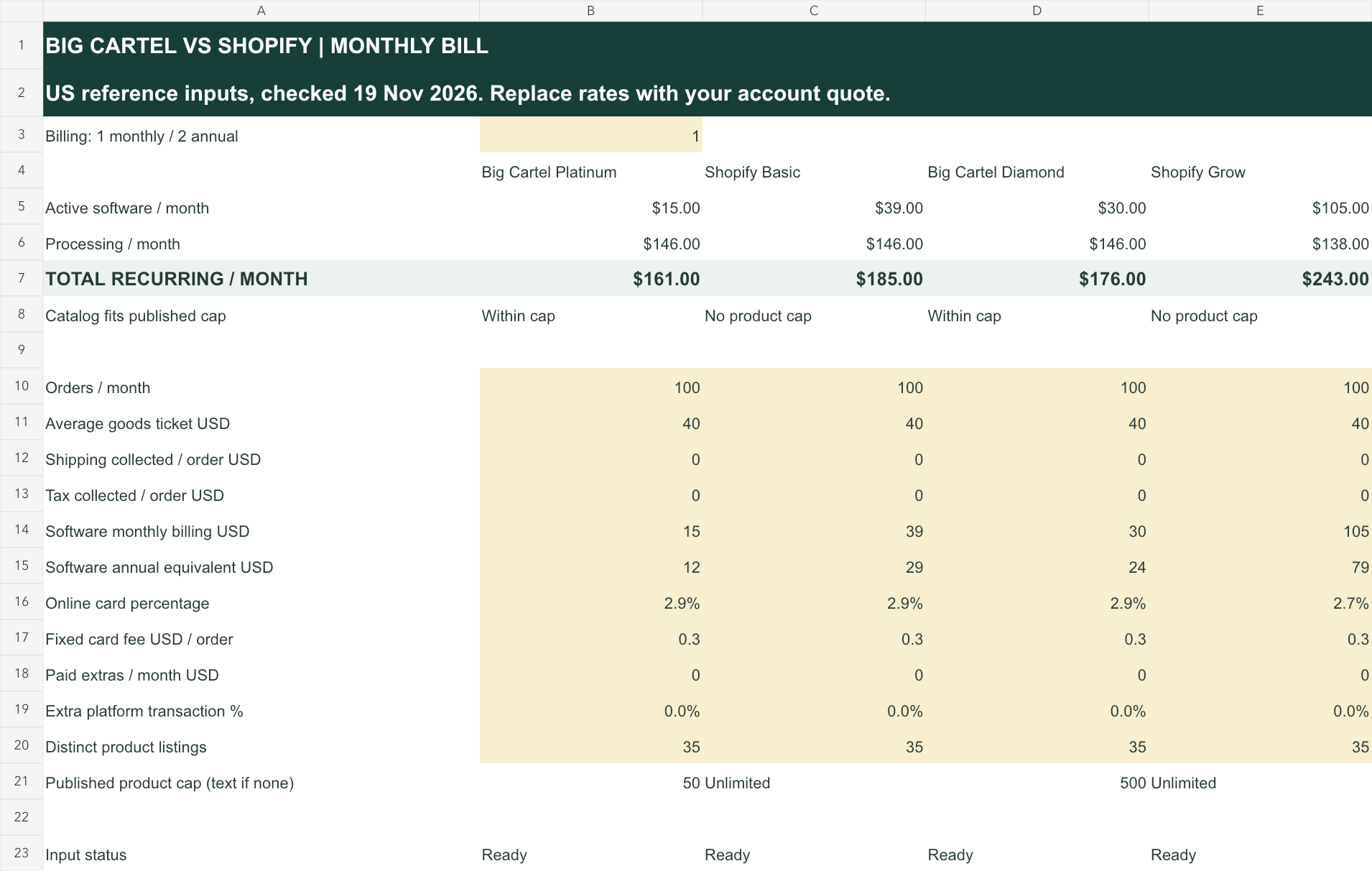
The workbook keeps apps, shipping collected, tax collected, rates, and an extra platform percentage editable. Charges collected at checkout can affect the processing base even when they are not product revenue. Use the same base on both sides rather than giving one platform a smaller payment amount.
The example excludes domain purchase, premium themes, refunds, disputes, international cards, currency conversion, and labor. It also assumes Shopify Payments for Shopify. If your store needs an external provider, enter the applicable additional platform fee instead of comparing that setup with the default zero-extra-fee model.
These are merchant budgets, not rate quotes or settlement statements. Open the cost workbook, replace the inputs, and preserve the actual billing terms. Annual equivalents make recurring costs comparable; they do not make an upfront invoice payable month by month.
Three months of Platinum cost $45 on monthly billing, compared with $144 paid upfront for a year. Basic costs $117 for three months or $348 upfront.
Paid extras can reverse a small subscription difference. Suppose a required Big Cartel addition costs a hypothetical $20 a month, while the qualifying Shopify setup needs no matching extra. Platinum’s monthly software-plus-extra cost becomes $35 against Basic’s $39. On annual equivalents, the same comparison becomes $32 against $29. That is a $4 advantage on one billing choice and a $3 disadvantage on the other, before processing. Enter the actual required additions on both sides; the example does not establish that either platform needs a particular app.
Fit the catalog before the plan
Count distinct product listings first, then inspect variants and media separately. A product listing is not the same thing as every possible size-and-color combination. Your stock keeping unit (SKU) structure should describe sellable variations without disguising a larger catalog as a handful of confusing products.
Consider a fictional maker with 35 product listings. Platinum’s 50-product cap leaves room for 15 more listings. A planned 20-product release would move the catalog to 55, so the current entry plan would no longer fit. Diamond might still be the smaller suitable step; moving to Shopify is not the only response.
At 55 listings, compare Diamond with Basic rather than comparing an ineligible Platinum bill. On monthly billing, the subscription difference is $9, not $24. On the annual equivalents, it is $5, not $17. The plan you must buy matters more than the cheapest plan in the vendor’s table.
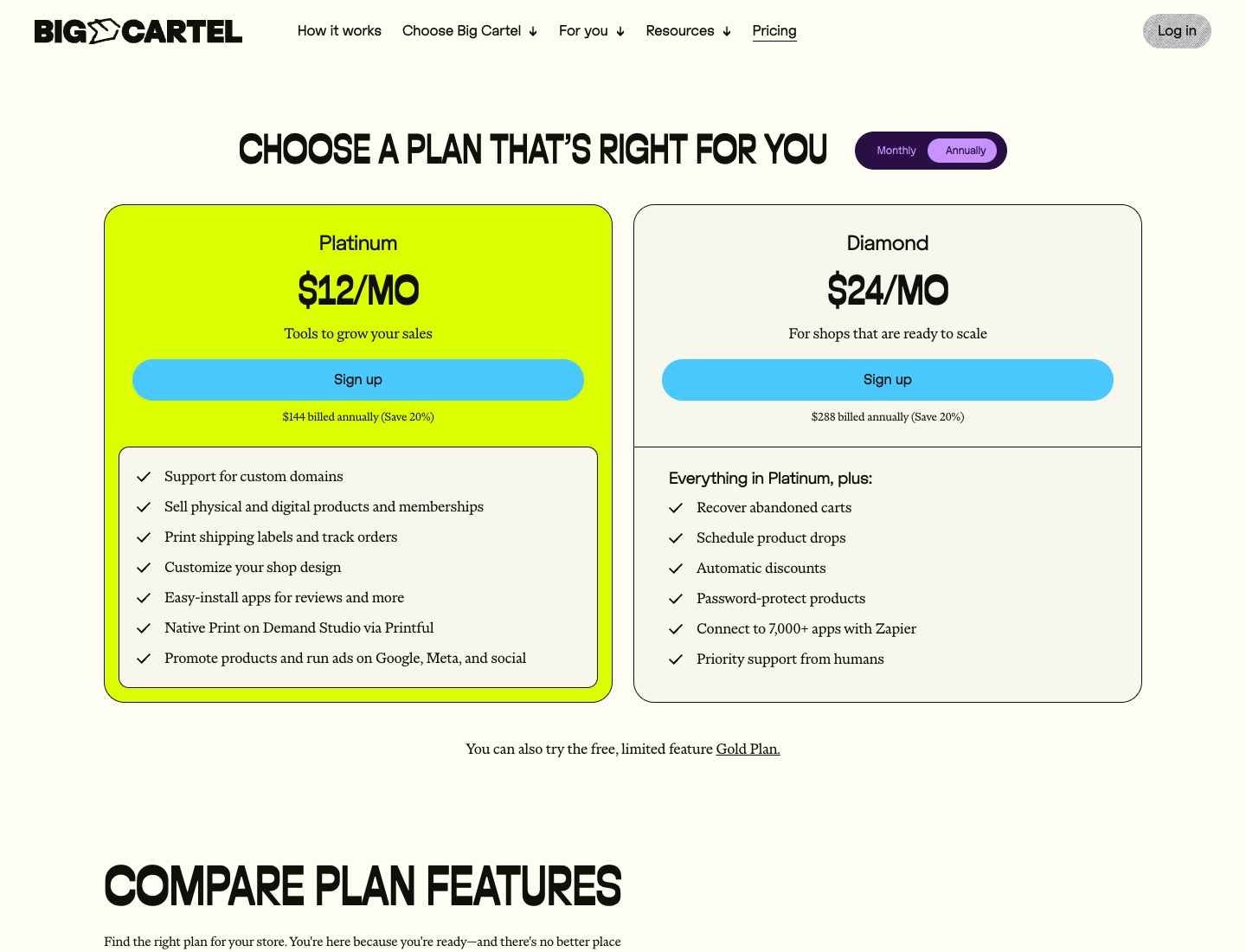
Big Cartel’s current feature comparison also lists one image per product on Gold, five on Platinum, and 25 on Diamond. A visual product can hit a media requirement before it hits a product-count cap. Check the actual listing presentation, not only the number of catalog rows.
Shopify documents product options and variants separately from the product list. Its variant documentation explains how option combinations identify versions of a product. If your catalog relies on a complicated set of options, demonstrate that product in the intended store and connected apps before importing everything.
The workbook flags a Big Cartel catalog count above the entered plan cap. That flag establishes only a simple eligibility issue. It does not test bundle behavior, customer personalization, subscriptions, or a print-on-demand connection. Those are separate requirements to verify with a representative product.
Check the checkout and payment mix
Big Cartel states that it does not charge its own transaction fee; Stripe or PayPal processing charges still apply. Its processing-fee explanation distinguishes the two. “Zero transaction fees” should not become “free payments” in a store budget.
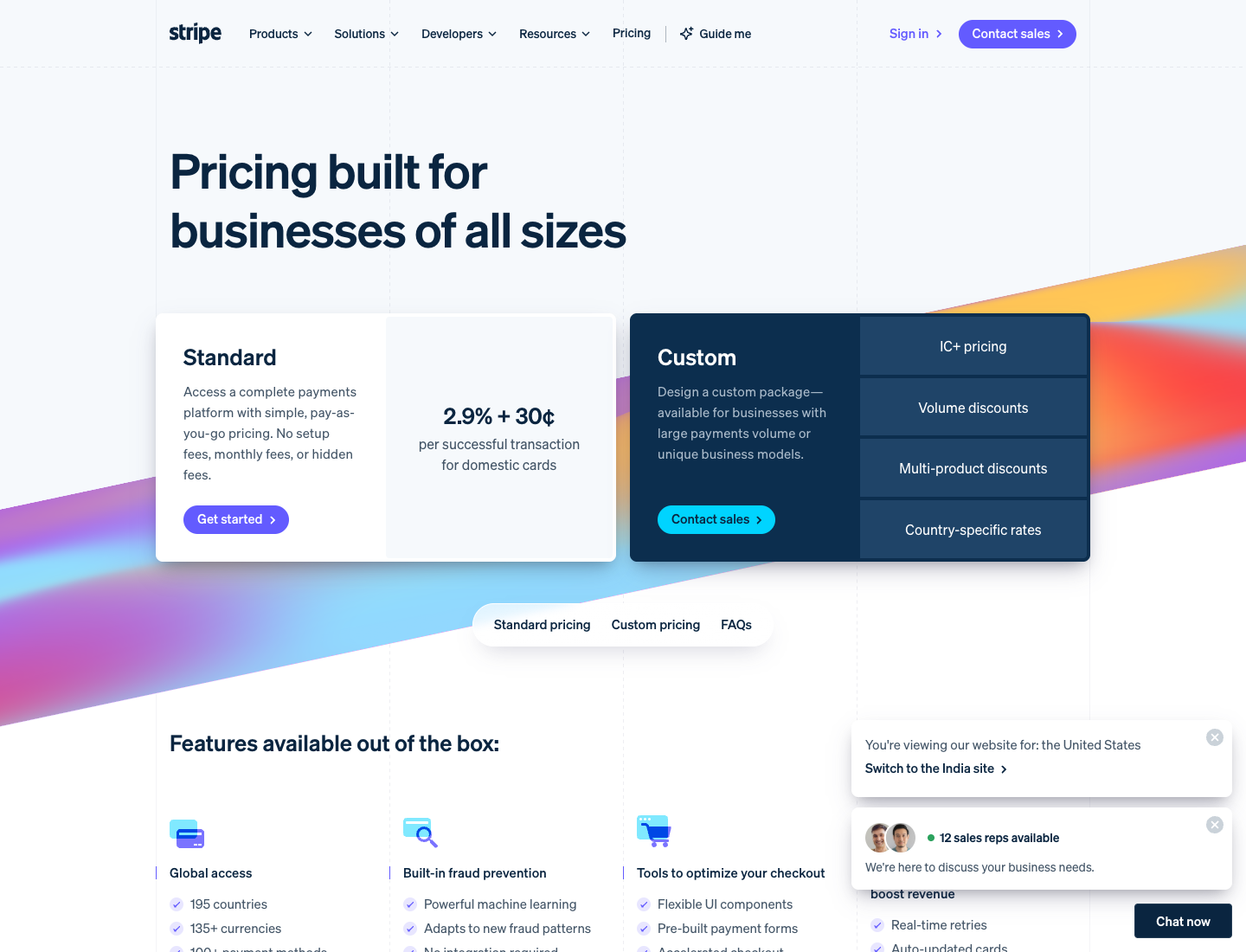
The standard US Stripe pricing page shows 2.9% plus $0.30 for domestic cards, with different treatment for other payment types and circumstances. Our model uses that narrow reference. A store with substantial PayPal, international-card, or currency-conversion volume needs a weighted payment mix instead.
Shopify Payments rates also depend on the plan and payment type. The Basic standard-card reference matches the example, but that does not establish a universal rate advantage. Use the actual account terms and the checkout evaluation guide to keep cost and buyer experience as separate checks.
Before selecting a payment setup, inspect a small acceptance list:
- The methods your actual customers need in the countries you serve.
- The complete fee base, including any relevant shipping and tax collection.
- Refund, dispute, payout, and currency treatment for the account.
- Any extra platform charge when an external provider is involved.
- The resulting order record and confirmation the customer receives.
Big Cartel’s payment-method documentation lists Stripe and PayPal options, with some methods requiring a paid plan. Availability in documentation is a reason to verify your intended configuration; it is not evidence that we completed a checkout or that the method will lift your conversion rate.
Budget the work around each order
After the catalog and payment checks, follow an order from purchase to dispatch. Ask who changes its address, allocates stock, prints the required documents, handles a partial shipment, and answers a customer asking what remains outstanding. The useful platform is the one that can support that sequence with acceptable effort.
Big Cartel’s paid-plan feature list includes inventory tracking, shipping labels, and order tracking. Those capabilities deserve a closer look if the store’s dispatch requirements are simple. They do not establish that every carrier service, warehouse process, or returns rule you need is included.
For a store with more operating systems, map the connection requirements explicitly. The inventory management guide covers stock ownership, while the shipping software guide covers dispatch tooling. Keep the comparison focused on whether each chosen setup connects to those requirements.
Use a concrete order as the acceptance case. A fictional order with two products, one size change, and a split shipment exposes more than a general question about whether a platform “scales.” Record how the intended configuration handles each change and which person must intervene.
| Order requirement | Evidence to request | Budget consequence |
|---|---|---|
| Stock by sellable variant | One representative product and stock adjustment | Extra app or manual reconciliation if needed |
| Shipping documents | A complete and partial order document | Dispatch tool and operator time |
| Return or replacement | Traceable link to the original order | Support work and stock correction |
| Multiple operators | Appropriate access for each role | Plan, app, or operating-policy cost |
| External fulfillment | Correct data sent and status received | Integration and exception handling |
Do not assume that sharing one owner login solves an access requirement. Demonstrate the required permissions in the actual plan and app combination. This comparison does not claim that a public feature list proves separation of refund, stock, and payment responsibilities.
A hypothetical two hours of monthly manual work at $20 per hour costs $40. That exceeds the example’s $24 subscription gap, but it proves nothing about which platform saves those hours. Measure the work in your proposed setup before using labor as the reason to buy the larger platform.
The fulfillment services guide can help you identify the responsible system.
A more expensive storefront does not automatically fix poor receiving or an unclear handoff to a warehouse.
Check variants before importing
For the same 55-listing shop, estimate how many variants you update each week. One product with two finishes and three sizes creates six variants. Big Cartel documents up to three options and 150 variants per product, with stock tracked per variant when enabled. Shopify’s CSV guidance warns that including an SKU without the corresponding option columns can delete the variant option. Reconcile the six variant identities and counts in a trial import before moving a live catalog.
Run the trial with a copy of the catalog before overwriting any existing products.
Match design and integrations to the job
Start with the pages a buyer needs to make a decision: a representative product, the shipping and return information, checkout, and a clear contact route. Evaluate the intended theme with your own images and descriptions. A polished demonstration store is useful inspiration, but it does not establish that your catalog will present well without additional work.
Big Cartel’s plan comparison distinguishes custom-domain and customization capabilities by plan. Shopify’s wider platform and app ecosystem can support more extensive projects, but each dependency needs an owner and a cost. A long app list is not an operating plan.
For every proposed integration, write down the event and record it must handle. “Email integration” is too broad. “Create an opted-in customer record after a paid order, without duplicating an existing subscriber” is a behavior someone can verify.
Check the integration against the actual product and order requirements:
- List the fields that must leave the storefront.
- Identify the system that owns each field after the order.
- Confirm how updates, cancellations, and retries behave.
- Price the required plan and any volume-dependent app tier.
- Define who investigates a failed transfer.
Keep the checkout requirements in view when an app changes the buying experience.
A customization can create an extra maintenance task without improving a requirement the store actually has.
We have not installed and benchmarked matched themes on these platforms. There is no load-speed, conversion, search-ranking, or accessibility winner asserted here. If one of those outcomes determines the purchase, test the proposed pages and devices rather than borrowing a vendor’s general claim.
The same applies to marketing. The storefront needs to expose the products and content your acquisition plan depends on, but it will not supply a proven audience merely because it has more settings. Use the pricing and margin model to decide what additional theme or app spending the store can sustain.
Plan a reversible migration
Move only after you can name the requirement the current setup cannot meet at an acceptable cost. Reaching Platinum’s 50-product cap may justify Diamond. Needing a different operating model may justify Shopify. Those are different decisions and should produce different migration plans.
Before committing, obtain the available exports and inspect their contents. Products, variants, images, customer records, order history, discounts, and stored balances can have different portability rules. Do not assume that a product import also transfers every historical or financial record.
Prepare a small representative set rather than starting with the easiest product. Include a multi-variant item, a sold-out variation, a product with several images, and an order exception. Check descriptions, options, inventory, shipping configuration, tax settings, and the resulting customer emails in the target setup.
Keep a written cutover record:
- The final catalog and stock snapshot, with a clear source system.
- The handling of open orders and customer support during the change.
- A URL mapping for product and information pages that move.
- The intended payment, shipping, and fulfillment connections.
- The point at which the old storefront stops accepting new orders.
- The rollback decision and the records needed to reconcile intervening sales.
A rollback is not simply changing the domain back if both stores have accepted orders. Reconcile transactions and stock before assuming that an earlier snapshot remains accurate. This is a proposed operating check, not a migration we executed for the reader.
If the store’s main uncertainty is the online platform rather than a maker-specific cap, revisit the three-builder comparison. If the uncertainty is counter selling, use the separate Shopify POS versus Square comparison. Keeping those decisions separate prevents a migration from becoming a vague attempt to fix everything at once.
Choose the smallest plan that passes
Choose Big Cartel when the actual catalog, payment methods, presentation, and order handling fit its plan, and the lower bill remains lower after the necessary extras.
For a maker selling to an existing audience, a well-fitting smaller platform can be the sensible choice rather than a temporary embarrassment to outgrow.
Choose Shopify when a specific catalog, integration, checkout, or operating requirement justifies the additional subscription and implementation work. The point is to purchase a capability the store needs, with a demonstrated way to use it. “We plan to grow” is not yet that requirement.
The budget differences change as the qualifying plans change. Platinum versus Basic leaves $24 a month on monthly subscriptions in the matched standard-card example. Diamond versus Basic leaves only $9. Annual commitments change both figures again, while reducing flexibility and requiring upfront payment.
Write the decision as a short requirement statement: which catalog and order cases passed, which plan is required, what the recurring bill includes, and what remains unverified.
Keep payment-rate assumptions and annual commitments visible beside the total.
Open the comparison workbook, enter the actual catalog and checkout inputs, and reject any plan that fails the required product or order case before comparing its price. Use the saved result with the Shopify pricing detail when a higher Shopify tier is part of the proposal.