Comparison
Shopify vs Squarespace vs Wix store costs
Compare Shopify vs Squarespace vs Wix using US store budgets, card fees, staff limits, variants, and booking costs. Includes an editable worksheet.

At 60 US standard-card orders of $48, the Shopify vs Squarespace vs Wix cost comparison ends in a $130.52 monthly tie on annual website plans. That model uses Shopify Basic, Squarespace Core, and Wix Core. The Shopify pricing guide explains the wider Shopify bill if you already know that platform fits.
A plan that cannot run the store creates costs beyond its subscription. A lower subscription can come with a sales fee, an extra booking invoice, or a catalog limit that forces you to rebuild products.
Start with the lowest plan that supports your requirements, then add payment processing and the extras you need. The examples below show that calculation for a solo shop and a staffed apparel operation. They use official US prices and documentation checked on 18 November 2026.
Download the store budget worksheet and compare the same orders, payment method, and required extras before choosing a plan.
Shopify vs Squarespace vs Wix at a glance
The three platforms can tie on entry costs while supporting different operating requirements. Use these dimensions to identify the plans worth testing.
| Decision | Shopify | Squarespace | Wix |
|---|---|---|---|
| Entry plan in the budget | Basic | Core | Core |
| Entry annual monthly equivalent | $29 | $29 | $29 |
| Added admin access | Grow provides additional staff | Core lists unlimited contributors | Core lists five collaborators |
| Variants per product | 2,048 | 250 | 1,000 |
| Option types per product | Three | Six | Six |
| US negotiated carrier account | Eligible connected-carrier setup | US carrier accounts excluded in cited guidance | Verify the required connection |
| Appointment scheduling cost | Add the selected app | Add a separate Acuity subscription | Scheduling listed on Core |
| Standard card-rate reduction | Basic to Grow | Core to Plus | None in the compared card schedule |
| Choice to validate | Catalog, staff, and carrier fit | Catalog, retail shipping, and extras | Catalog, collaborators, and bookings |
The source-linked sections below explain the limits and calculations. A plan that fits your current store is the baseline for the comparison.
Use the same billing and card assumptions
The model covers physical merchandise, US dollars, annual website subscriptions and each platform's own processor.
Orders use domestic standard cards, with one successful charge per order. The examples assume $0 shipping collected and $0 tax collected, so the merchandise amount equals the amount charged.
The tables apply the percentage fee to monthly charges and add the fixed fee for each order.
They use unrounded arithmetic for a budget estimate. Actual order values and settlement rounding can change the amount on your statement.
Your payment processor charges against its applicable transaction amount.
If customers also pay shipping or tax, enter those amounts in the worksheet. Add refunds, premium or international cards, paid apps, domains, themes, and point-of-sale (POS) costs where they apply.
| Plan | Monthly equivalent on annual billing | Annual website commitment | Standard domestic online card rate |
|---|---|---|---|
| Shopify Basic | $29 | $348 | 2.9% + $0.30 |
| Shopify Grow | $79 | $948 | 2.7% + $0.30 |
| Squarespace Basic | $19 | $228 | 2.9% + $0.30, plus a 2% commerce fee |
| Squarespace Core | $29 | $348 | 2.9% + $0.30 |
| Squarespace Plus | $49 | $588 | 2.7% + $0.30 |
| Wix Core | $29 | $348 | 2.9% + $0.30 |
| Wix Business | $39 | $468 | 2.9% + $0.30 |
Shopify figures use Shopify Payments and the annual subscription rates. A third-party payment provider can introduce an additional Shopify transaction fee. The longer Shopify pricing guide covers that cost path. Shopify pricing.
Squarespace card figures use Squarespace Payments. Its current Basic plan adds a 2% commerce fee, while Core and higher charge 0% on the physical-merchandise sales modeled here. Legacy plans and digital-content fees follow different schedules. Squarespace pricing, Squarespace payment and transaction fees.
Wix publishes $29 Core and $39 Business annual-plan monthly equivalents in its own cost guide. Wix Payments lists US standard cards at 2.9% + $0.30 and American Express at 3.7% + $0.30. Wix website costs, Wix Payments fees.
Pricing pages localize by country. Confirm USD, the billing period and the full purchase amount on the upgrade screen. An annual monthly equivalent describes the ongoing budget, while the annual commitment shows the website subscription cash you need upfront. Introductory offers change the first bill.
Shopify's current browser capture shows Indian rupee (INR) pricing because the page localized on this network.
It demonstrates the currency check a merchant needs to make. The US-dollar model uses the separate official references above.
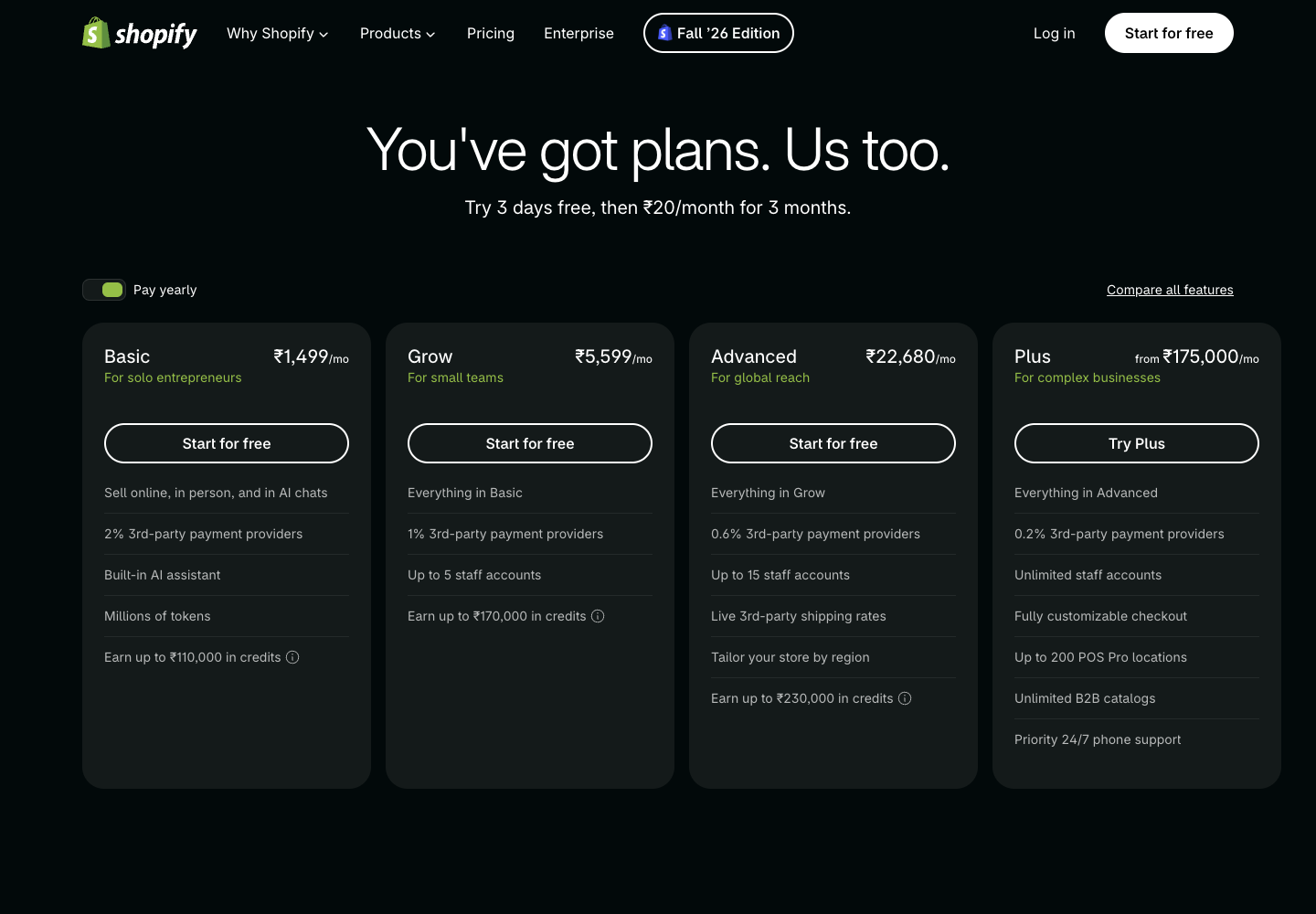
For a new store, compare the first-year cash requirement with the ongoing monthly budget.
Annual website billing brings part of the cost forward before you have taken an order. Themes, setup help, and required apps can bring further upfront charges. Enter actual quotes before judging whether the launch budget is affordable.
Keep launch costs and recurring costs on separate lines in the same budget:
- A theme or setup quote is an upfront amount with its own payment terms.
- A website or booking subscription follows the billing period you choose.
- Processing changes with the orders and payment methods you actually accept.
For an illustrative $240 one-time setup cost spread over 720 first-year orders, the allocation is about $0.33 per order.
That does not turn it into a monthly subscription. It shows how the launch expense changes your first-year unit cost. Keep its actual cash payment in the launch budget as well, so the allocation does not hide when you need the money.
For an established store, use the renewal price and your actual payment mix. An introductory offer can make the first invoice lower while leaving the operating choice unchanged. The ecommerce pricing guide covers how those costs feed into the prices and margins you need to sustain.
A solo shop doing 60 orders a month
Assume one owner, flat-rate shipping and a product catalog that fits all three platforms.
Monthly sales are 60 × $48 = $2,880. At 2.9% plus $0.30 a charge, processing is $83.52 + $18 = $101.52.
| Plan | Website equivalent | Card processing | Commerce fee | Monthly equivalent total |
|---|---|---|---|---|
| Shopify Basic | $29 | $101.52 | $0 | $130.52 |
| Squarespace Basic | $19 | $101.52 | $57.60 | $178.12 |
| Squarespace Core | $29 | $101.52 | $0 | $130.52 |
| Wix Core | $29 | $101.52 | $0 | $130.52 |
These are illustrative operating costs calculated from the stated inputs. They exclude the additional costs listed above.
For this store, Squarespace Core saves $47.60 a month compared with Basic after the commerce fee.
At lower sales, Basic can still be cheaper. The $10 subscription difference divided by 2% gives a $500 monthly fee-bearing sales threshold. At $500, the two plans tie on this fee comparison. Above it, Core costs less when all other charges are equal.
For a store already on Shopify Basic or Wix Core, this example gives little price reason to migrate. Estimate the cost of rebuilding pages, moving products and checking URLs before pursuing a small subscription saving.
The same subscription arithmetic can hide a different checkout experience.
During a trial, test a discounted product, the shipping charge, and a refunded order. Confirm which amounts enter the processor's fee base and where the charge appears in your payment report. Keep a note of any retained processing fee on a refund using the provider's current terms.
This is also where a services business should separate merchandise from appointments or digital products.
A fee schedule for physical products does not establish the schedule for every way the site accepts money. The checkout evaluation guide provides a broader test plan when the payment flow itself is part of your platform decision.
A staffed apparel shop doing 400 orders a month
Now assume 400 orders at $55, or $22,000 in monthly sales.
The owner needs at least one other person in the store admin. Shopify Grow is the first Shopify tier in this comparison with additional staff accounts. Squarespace Core and Wix Core already include additional contributor access.
At 2.9% + $0.30, processing is $758. At 2.7% + $0.30, it is $714.
| Plan | Website equivalent | Card processing | Monthly equivalent total |
|---|---|---|---|
| Shopify Grow | $79 | $714 | $793 |
| Squarespace Core | $29 | $758 | $787 |
| Squarespace Plus | $49 | $714 | $763 |
| Wix Core | $29 | $758 | $787 |
| Wix Business | $39 | $758 | $797 |
Squarespace Plus has the lowest modeled bill at $763, provided its catalog and shipping features suit the store.
Wix Core remains a valid $787 comparison for a team that fits its collaborator allowance. Business needs a separate feature or capacity reason to justify its extra $10.
Without the additional staff requirement, Shopify Basic would cost $787 in this example, which is $6 less than Grow. Paying for a lower card rate starts to save money only after the rate reduction covers the higher plan price.
The bill worksheet contains both store examples. Open the CSV in a spreadsheet app and change the order count, amounts collected, subscription, rates and monthly extras. A CSV has no currency formatting, so percentages are decimal inputs, such as 0.029 for 2.9%.
Staff access should describe the jobs those people perform.
A packer needs enough access to fulfill an order, while the owner may need billing and account administration. Check those actions with separate accounts before concluding that an advertised collaborator allowance covers the operation. Recording roles first also avoids paying for a larger plan solely because the team shares one overloaded login.
Fulfillment adds another dependency. If a warehouse or another service updates stock and shipment status, check where that update enters the store and who can correct it. The fulfillment software guide helps define those responsibilities without assuming the website subscription performs the warehouse's job.
Calculate when a plan upgrade pays for itself
Use the subscription increase divided by the processing-rate reduction.
The following thresholds assume annual website pricing and the standard-card mix above. Features can justify upgrading earlier.
| Upgrade | Extra website cost per month | Fee reduction | Monthly fee-bearing sales at break-even |
|---|---|---|---|
| Squarespace Basic to Core | $10 | 2 percentage points in commerce fees | $500 |
| Squarespace Core to Plus | $20 | 0.2 percentage points on standard cards | $10,000 |
| Shopify Basic to Grow | $50 | 0.2 percentage points on standard cards | $25,000 |
At a $55 average charge, the Shopify threshold is about 455 orders a month. A requirement for staff accounts can force Grow well below that volume. A merchant who stays on Basic would otherwise keep the lower $29 subscription.
Card mix matters. If only half the sales qualify for the lower rate, twice as much total sales volume is needed to recover the same upgrade cost through that saving alone. Enter the rates that actually apply to your payment methods before using the threshold.
Use the higher plan only for a saving you can trace or a feature you need. For example, a lower rate on standard cards cannot offset an expensive bookings app unless the eligible card volume creates enough savings to cover both charges. Keep each extra as its own worksheet input so a change in one quote updates the decision.
Run the calculation at a quieter month as well as your expected volume. Annual commitments can leave you paying for capacity through both. The store cost model is a useful place to connect that subscription decision to the margin left after fulfillment and returns.
Check the product variants before moving a catalog
An apparel product with eight sizes, twelve colors and four lengths has 384 combinations. Test it as one product before signing an annual contract.
| Platform | Option types per product | Variant combinations per product | The 384-combination example |
|---|---|---|---|
| Shopify | 3 | 2,048 | Within documented limits |
| Squarespace | 6 | 250 | Exceeds the variant limit |
| Wix | 6 | 1,000 | Within documented limits |
These limits come from the platforms' own product documentation. A platform limit still requires a compatible theme, app setup and inventory integration. Shopify variants, Squarespace variants, Wix product tutorial.
Splitting that apparel product into separate listings by length can get each listing inside a smaller cap. It also changes product navigation, stock maintenance and the URLs you need to manage. Include that work in the choice. A cheaper platform that requires a different catalog structure has an operating cost the payment table cannot capture.
Choose one difficult product from your real catalog for the trial. Load its option names, prices, stock, shipping weight, and product images. Check that the storefront presents the right combinations and prevents a shopper from selecting a combination you do not sell. Then check what the fulfillment export contains for that order.
The merchandising guide covers the navigation decision if you split one product into several listings. The inventory management guide covers the related stock responsibility. Both can affect whether a technically supported variant count results in a manageable catalog.
Count staff and price the shipping requirement
Shopify Basic provides the owner's access but no additional staff accounts. Grow allows five additional users. The store owner is exempt from that limit, along with other documented exempt user types. An owner plus five staff therefore fits Grow. Shopify user limits.
Squarespace Core and higher list unlimited contributors. Wix Core lists five collaborators and Business lists ten. Check the permissions each person needs as well as the account count. Squarespace plan comparison, Wix plan comparison.
For Shopify, displaying rates from a connected third-party carrier account requires an eligible plan. Grow includes that feature with annual billing or offers it for an extra charge on monthly billing. Basic is outside that availability. This requirement concerns connected-carrier checkout rates. Shopify carrier-calculated shipping.
Squarespace supports US carrier-calculated rates on Core, Plus and Advanced. Its US rates reflect FedEx, UPS and USPS retail pricing. The same documentation says US merchants cannot connect their own accounts for those carriers. Advanced's own-account options in other countries should not be used to promise that connection to a US merchant. Squarespace carrier-calculated shipping.
Run a cart with one light item, a heavy item and a mixed order. Compare what checkout collects with the label cost you expect to pay. Where negotiated carrier rates are essential, require a demonstrated account connection before committing to a platform or extension.
The current Squarespace screenshot shows its regional INR plans. It is evidence of how the public offer appears on this network, rather than a US quote or proof that every country has the same plan lineup.
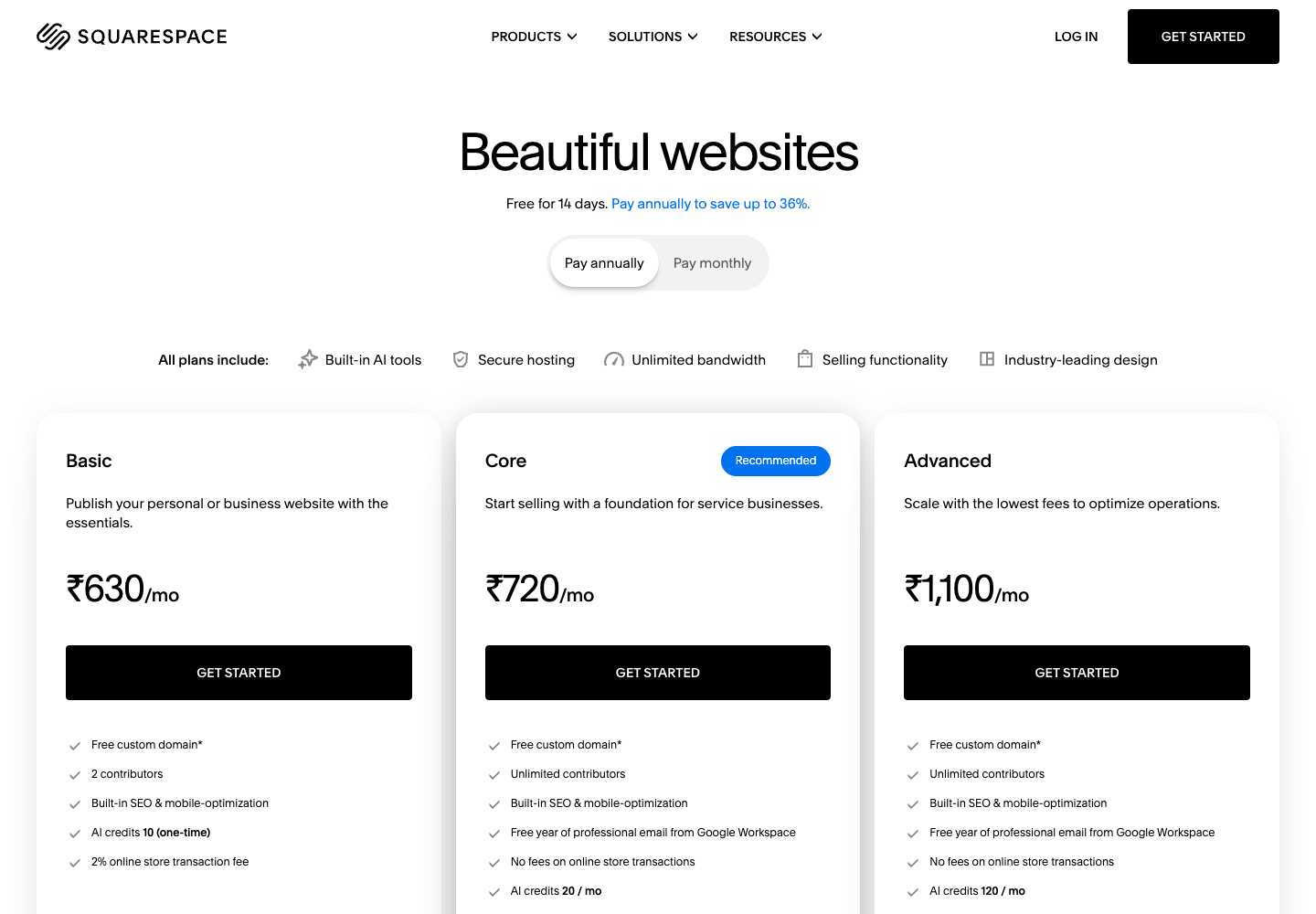
Keep checkout pricing and parcel purchasing as separate tests. One determines what the shopper pays and the other determines your dispatch expense. A store offering free delivery can still need negotiated label rates and accurate shipping weights. Use the shipping software guide if you are choosing the label service alongside the website.
Add the booking invoice for a services studio
Wix Core includes scheduling and services in its plan description. For a studio selling appointments alongside a small merchandise catalog, that makes it worth evaluating early. Check the actual booking requirements, including staff calendars, deposits and cancellation rules. Wix plans.
Squarespace bills Acuity Scheduling separately from the website. Add the selected Acuity subscription to the website cost before comparing it with Wix. Squarespace subscription billing.
A Shopify setup that uses a paid booking app must include that app's quoted cost too. Record the actual quote in the worksheet's monthly extras row. For an illustrative $30 monthly app, the addition to a $29 website is $59 before processing. The $30 is an assumption, not a quoted app price.
Wix's browser capture also shows INR and a regional promotional offer. Confirm your own renewal amount before using an introductory figure in a long-term comparison.

Test one appointment from the customer's side. Check the available time, the amount collected, the confirmation, and the cancellation path. Then check the staff calendar and the merchant's payment record. If the studio also sells a product in the same visit, establish whether that creates one checkout or separate transactions in the setup you selected. Record any extra charges using that actual flow.
Choose after a short trial with your own store
Choose Shopify when the verified setup fits your catalog, staff and carrier-account requirements, and the subscription plus required apps fits the budget. The Shopify review covers the wider operating responsibilities.
Choose Squarespace when the product structure and US retail-rate shipping fit, and the full bill including any Acuity subscription works. In the 400-order standard-card example, Plus saves $24 against Core each month.
Choose Wix when its collaborator allowance, catalog tools and included scheduling cover the store's needs. At the modeled volume, moving from Core to Business needs a feature benefit because the standard-card rate stays the same.
Before paying annually:
- Load a representative product with all its real options and inventory.
- Assign the required people and check their permissions.
- Test shipping on your actual parcel mix.
- Add booking, app, theme and domain costs to the budget.
- Confirm currency, the upfront charge and the renewal price.
- Compare the resulting setup against the cost of staying on your current platform.
If you are moving an existing store, add the migration work to the decision before paying annually. Inventory, product URLs, redirects, order history, and customer access need their own checks. Confirm which records the selected import supports and keep a recovery copy of the source data. The Shopify SEO guide is relevant when product URL changes could affect existing search traffic.
Write down any task the trial could not prove. An unresolved carrier connection or an untested booking requirement should remain a specific question for the vendor. Replacing it with an optimistic assumption changes the apparent cost without making the requirement work.
Open the platform bill worksheet, enter your current quotes, and choose from the plans that passed those store checks.