Review
WooCommerce Review for WordPress Stores and Growing Catalogs
WooCommerce review for WordPress teams: free core and no gateway surcharge, but owners must handle updates and compatibility. Choose it if you can own maintenance.

I would choose WooCommerce for an existing WordPress team that values control and can maintain the chosen stack. The core commerce plugin is free and open source, and it imposes no platform revenue share or surcharge for selecting a third-party payment gateway. Those are real cost advantages when your team already handles site editing and hosting.
My main reservation is ownership of technical upkeep. Official guidance expects a store owner to handle backups, staging, updates, and compatibility checks, and store operators in community discussions describe both flexibility and frustration with theme/editor polish and custom work needed to get the desired UX. I read those reports as a signal that WooCommerce suits teams that treat implementation as their responsibility, not merchants who want the vendor to own maintenance.
This judgment relies on official documentation and pricing pages and on anecdotal community reports, not firsthand store testing.
Verdict for an existing WordPress team and a new store
WooCommerce’s case rests on a free, open source core that shares WordPress’s admin. A team already comfortable with WordPress can manage products and orders without adopting a separate content model, and the core takes no platform revenue share or surcharge for choosing a third-party payment gateway.
The trade-off is ownership. Community accounts from an April 2026 discussion illustrate the split: a self-described developer expresses continued confidence in core flexibility and says implementation is the developer’s job, while a store owner credits WooCommerce with bringing sales but describes a theme/editor experience that feels less polished than hoped and custom work that is heavier than expected. The developer’s confidence speaks to what can be built; the owner’s frustration speaks to what the build requires. Both describe the same product.
Fit therefore depends more on who will maintain the store than on the free license.
| Merchant situation | Workable? | The decisive condition |
|---|---|---|
| WordPress publisher or content-led store | Usually yes | WooCommerce runs in the same admin where the team already manages content, and core product types cover standard goods and downloads without a separate catalog system. |
| Retail with ordinary size/color variants | Yes | Variable products provide variation-specific SKU, price, stock, and shipping. No paid add-on is required merely to create normal size/color variants. |
| Subscription revenue | With planning | WooCommerce Subscriptions is a paid extension tied to gateway capabilities; renewals and failed payments depend on those capabilities. |
| No technical owner | Conditional | Official update guidance expects staging, backups, compatibility checks, and post-update verification. Without an assigned owner, a hosted platform is likely a more manageable operating choice, though catalog and business rules remain yours. |
For a new store, I would choose WooCommerce when the founder is already committed to WordPress and wants control over hosting, checkout, and the plugin stack. If no one is available for ongoing maintenance, that control becomes a burden, and a hosted platform is the safer choice; the free core settles the license question, not who keeps the site updated and secure.
Core handles ordinary products without a stack of paid plugins
WooCommerce’s official product editor documentation lists four core product types: simple, grouped, external/affiliate, and variable. Virtual and downloadable are settings attached to those types, not separate types. A clothing store can model a shirt sold in six size/color combinations as one variable product with six variations. Each variation stores its own SKU, price, stock count, image, and shipping data, so a price change or restock affects only those SKUs. That covers ordinary retail catalogs without paid add-ons.
A variable product is a predefined set of SKUs, not an open configurator. If a catalog needs shopper-entered engraving text, measurements, or option-based pricing, that is a requirement to scope, such as a custom field or pricing engine, rather than a standard core variation. Recurring billing is outside the core product types, so it requires planning, typically an extension or custom implementation chosen for your payment provider, rather than a single mandated add-on.
| Product type or flag | What it covers | Specific requirement to scope |
|---|---|---|
| Simple | One SKU with one price and stock | Shopper-entered configuration or option-based pricing |
| Variable | Predefined variations sharing a parent; each variation owns its own SKU, price, stock, image, and shipping | Shopper-entered engraving or measurement fields, or a dynamic pricing engine |
| Grouped | Lists existing simple products as a collection, each bought separately | A single bundled SKU with combined price and stock |
| External/affiliate | Redirects the buyer to another site for completion | On-site checkout, tax, and order management |
| Virtual/downloadable | Flags that remove shipping or deliver files; not core types | Licensing, membership gates, or recurring delivery |
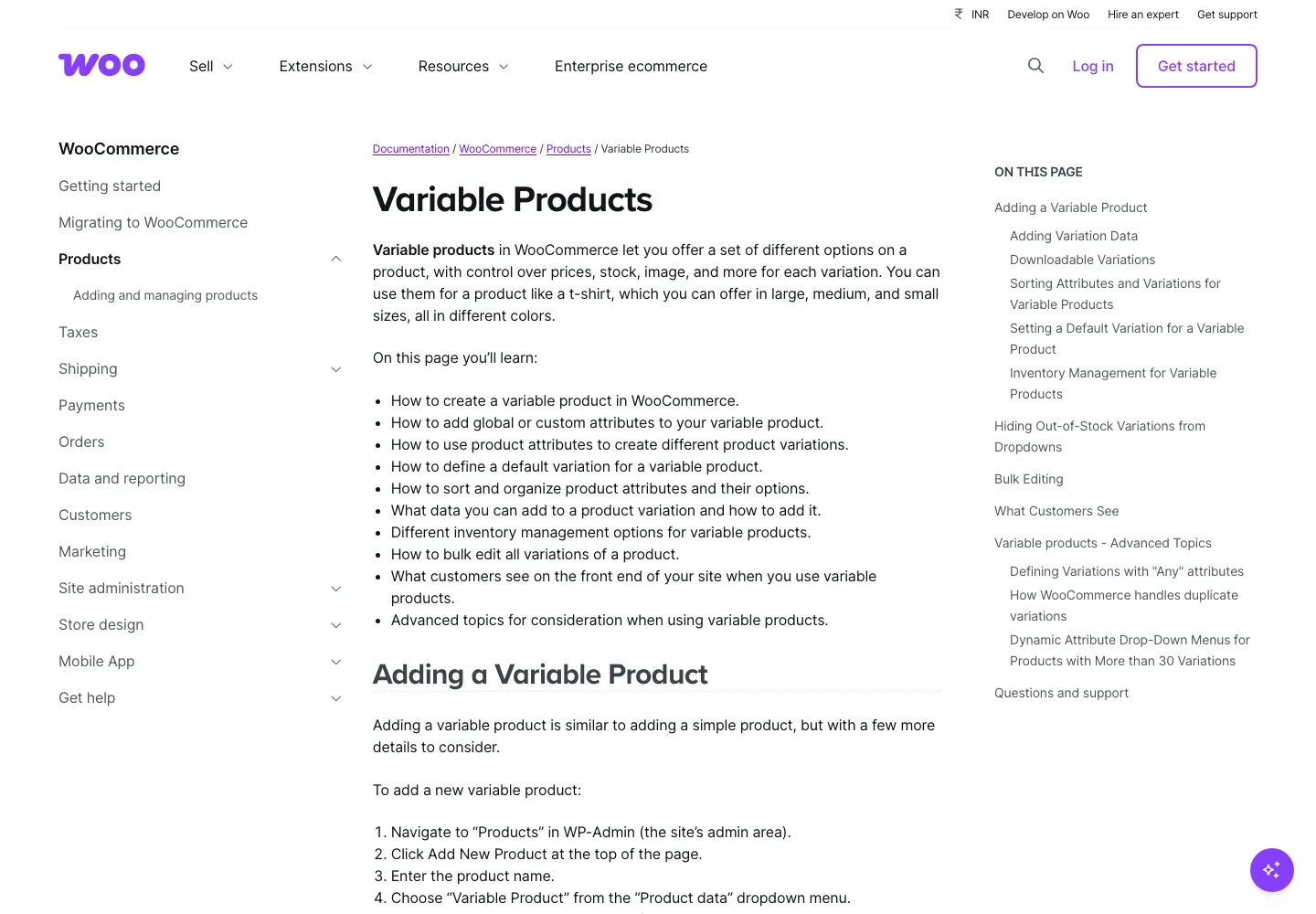
Matching every planned product to a core type answers the catalog question, but that is distinct from overall usability. The definitions explain what WooCommerce represents natively; payment, tax, shipping, and maintenance remain separate decisions. Store owners who complain about theme/editor effort are not disputing catalog coverage, so both assessments can be true.
Shipping behavior depends on zone order
A customer matches only the first eligible shipping zone. A zone groups regions (postcodes, states, countries) and attaches shipping methods, so zone order acts as business logic. If a broad zone appears above a narrower one, the broad zone's methods apply to every address that matches it. This is a configuration hazard, not a platform bug.
Example: a US store sets free local pickup for ZIP codes 10001–10040 and a $9 flat rate for the rest of the country. If the domestic zone is above the local zone, an address in that ZIP range matches the domestic zone first and sees its configured $9 method. The more specific local zone then never contributes; the free pickup option is not offered for that order. Official shipping zone documentation confirms the first-match rule and advises ordering narrow zones before broad ones. Working pattern: smallest geographic region first, country catch-all last.
Core WooCommerce includes three shipping methods: flat rate, free shipping, and local pickup. Flat rate handles fixed per-order prices plus some formula or class rules. Live carrier quotes usually need a selected service or extension and configured courier contracts; complex fulfillment may need extra tools. Shipping rules need configuration on any platform, so the scoping question is whether rates are fixed per region (core likely covers them) or depend on dimensions or courier rates (plan integration work).
When a customer reports an unexpected fee, check zone order first, then method settings, then carrier extension configuration. Identify the winning zone by reading the list top to bottom; reorder by intended specificity or adjust that zone's method. Extension costs for carrier quotes and table rates are part of overall WooCommerce pricing.
Recurring revenue adds a compatibility decision
Subscription selling changes the checkout contract. Instead of a one-time charge, the store must schedule renewals, handle failed payments, and give customers a way to manage their plans. WooCommerce Subscriptions is one documented paid annual option: it adds subscription products and customer subscription management, keeping that data inside the WordPress admin. Custom code or an external subscription service can also work, and each route carries its own compatibility requirements.
The first compatibility filter is the payment gateway. The extension's product page lists supported gateway requirements, such as stored credentials, scheduled renewals, and refunds; compare your chosen gateway against that list before relying on it for renewals. Compatibility is per-solution, not universal: a gateway that suits one store's setup may still miss a requirement for another.
The second filter is lifecycle behavior. Renewals fail when a card expires or is declined, so the store needs a defined answer: retry automatically, notify the customer, or leave the order in a failed state pending manual action. The product page presents gateway capability and customer subscription management as the core deliverables, but it does not guarantee every lifecycle outcome for a particular gateway and settings combination.
Propose acceptance tests for four outcomes: first checkout creates the subscription, a successful renewal creates the next order, a declined renewal behaves in the chosen way, and a customer cancellation stops future orders. Refunds deserve separate attention because reversing a payment does not necessarily change subscription status or cancel future renewals; decide whether a refund should end the subscription or leave it active.
If you prefer a gateway's external billing portal, know where the authoritative record lives. Some integrations mirror subscription data into WooCommerce; others keep it outside. Confirm which side drives cancellations and renewals before launch. For recurring delivery or membership, the Subscriptions extension is a real cost and a gateway-compatibility review item, and it belongs as a separate line in our WooCommerce pricing breakdown.
Order storage and extension compatibility affect growth
Order storage matters for growth mainly because it changes how extensions must be audited. WooCommerce historically kept orders as WordPress posts with details spread across post meta tables. High-Performance Order Storage moves orders into dedicated tables. New installations have used HPOS by default since WooCommerce 8.2; existing stores need a data sync before switching.
The practical risk is extension compatibility. Code written for the older posts/postmeta layout does not automatically read HPOS tables. WooCommerce guards the switch: when an incompatible extension is active, the HPOS toggle is disabled under Settings > Advanced > Features. Click View and manage to see the incompatible extensions listed there, then update or remove them before retrying.
A concrete scenario shows the cost. Suppose an accounting plugin reads order data through direct SQL queries designed for the old layout. While HPOS runs in its synchronized compatibility mode, the legacy tables still receive updates, so that plugin may keep working. If the plugin is not updated and synchronization is later disabled, it could import nothing or miss fields while the admin looks healthy. That is a dependency risk to verify, not an observed failure. Since no benchmark predicts which plugins break, check every extension and custom integration that touches orders, subscriptions, payments, reporting, or inventory against its HPOS status.
HPOS exists partly as a performance upgrade, but it is not a universal speed or capacity guarantee. Assess compatibility first. Before moving an existing store, take a full backup and test on staging. Then verify order totals match, a test order creates correctly, edits and refunds work, subscription renewals still fire, and every integration shows the same records. If something fails, isolate whether the cause is the extension, configuration, data, or the migration itself. For a new store, confirm HPOS compatibility before installing extensions because the default is already active.
Hosting capacity and code quality still determine whether growth stays smooth.
Updates and performance need a practical operating agreement
Updating WooCommerce is routine, but it still needs a definition of done. Official update guidance covers backups, staging, compatibility checks, and post-update verification, and it leaves execution to the store owner. In WordPress, the plugin, theme, and hosting layer change independently, so an update can alter how orders are stored, how payments finish, and what emails reach customers. Define “worked” before starting.
That definition should be observable. Run a backup, test restoration into staging, then place a test order through each payment method and confirm the correct total appears in the admin, the confirmation email arrives, and a refund completes. If subscriptions are active, renew a test subscription. Any failure means the update is not done, no matter what the admin screen says.
Stack choice determines how often that contract becomes painful. A store owner in an April 2026 discussion reports a functioning store with subscriptions and credits plugin and theme quality as much as technical expertise, while another owner values the flexibility of a deliberately short plugin stack but admits it is not the easiest managed experience. Neither report proves a general rule, yet both point the same way: keeping the stack small and well chosen lowers maintenance risk without making WooCommerce maintenance-free. The problem is not that all plugins are bad; it is that unowned dependencies accumulate.
PHP versions also need a calendar. A WooCommerce advisory dated 29 September 2026 says WooCommerce 11.6, planned for February 2027, will require PHP 8.1 or newer. It warns stores on PHP 7.4 and 8.0 to plan ahead and recommends a currently maintained runtime such as PHP 8.3 or newer where your software supports it. Older PHP might still function, but that is not a security endorsement or a compatibility guarantee.
Test the PHP move while the current store still runs. A store on PHP 7.4 with an older booking plugin is blocked only if the plugin, theme, or host does not support the target version. If a dependency fails on newer PHP, that dependency is the blocker. A completed update means the whole stack works, not just that WooCommerce accepted the new version.
What control costs across the store lifecycle
The free core removes only the license line. WooCommerce’s pricing page shows no core fee, revenue share, or surcharge for choosing a third-party gateway. Remaining costs are hosting, extensions, labor, and migration. Vendor guidance places hosting at $25 to $350 per month and extensions at $29 to $299 per year each. Those are guidance, not measured market averages or minimum requirements. Actual budgets depend on whether a technical owner already exists and how many paid extensions the store needs, so a simple store can sit near the lower end while a custom operation may exceed the upper end.
Control is only valuable when someone can exercise it. An existing WordPress team already runs content, so products and orders remain in a familiar admin. Without a technical owner, the cost shifts to hiring one, and the total reflects their time, not the software price.
Lifecycle costs gather around change. Updating core and extensions requires staging, backups, and verification. Changing hosts means checking runtime versions, caches, and scheduled jobs. Migration can become the largest expense when subscription states, saved payment methods, or custom checkout flows depend on the current provider. It is often possible, but it is a project with its own data mapping, not a quick export. Budgeting for these checks makes upkeep predictable; ignoring them invites an outage after a routine update.
The pricing companion models hosting, extension licenses, and labor together. The free license determines who owns the code, not who keeps it updated and secure.
Where WooCommerce wins a place on the shortlist
Choose WooCommerce for a WordPress team that can maintain its own stack and wants no core subscription or platform revenue share. The core is free and open source, and third-party payment gateways are available without a platform surcharge where the provider and your jurisdiction support them. The benefit is conditional: you must own hosting, updates, and extension compatibility.
If your team lacks the upkeep capacity WooCommerce requires, prefer a suitable hosted service instead, even though catalog and business-rule decisions still demand merchant work. Before committing, compare the total scoped cost of hosting, selected extensions, and the labor needed to keep them running against what the hosted option includes. The WooCommerce pricing breakdown provides the baseline for that comparison.
## Related reading - WooCommerce pricing breakdown - Shopify review - PrestaShop review