Review
PrestaShop Review for Stores That Need More Control
Documentation-based PrestaShop review comparing Classic open source vs Hosted bundles, covering catalog, multistore, and maintenance trade-offs for merchants.

PrestaShop is worth a shortlist spot if you deliberately want its configurable catalog and multistore controls and will fund competent maintenance. The free Classic offer is not the main reason to choose it: it is open-source software that leaves hosting, domain, installation, and compatibility responsibilities with you. The Hosted offer bundles hosting, installation, and advertised support six days a week by email, chat, and phone.
The community accounts we reviewed show the same trade-off: long-term users appreciate the admin and customization depth, yet their reservations center on upgrades, module upkeep, and yearly theme/module payments. My main reservation is therefore version and module work, not the license price. Hosted shifts part of that work, but it is not a promise that every maintenance task disappears.
So the practical question is which side should own infrastructure and upgrade verification. This is a documentation-based review of official sources checked 20 October 2026, supplemented by anecdotal community evidence, not hands-on merchant testing.
Verdict for merchants comparing Classic and Hosted
Classic suits two kinds of merchants: those who staff an administrator and technically confident owners who can run updates, resolve module conflicts, and adapt code themselves. The free download comes with those responsibilities rather than removing them. Hosted instead moves hosting, installation, and advertised support onto a fixed invoice, a positive fit for teams without in-house maintenance capacity, as long as the service scope covers their store.
A dated community report shows the same balance. In September 2023, a Reddit user in r/selfhosted described years of satisfactory PrestaShop use while disliking marketplace and yearly theme/module payments. That is a historical self-report, not a current test, but it underscores that even capable owners weigh upkeep against convenience.
So choose Classic when you and full control and can own the maintenance burden, either yourself or through a named contractor you trust. Choose Hosted when its documented service scope matches the stack your store requires, including any server or custom-module needs, rather than automatically just because no maintainer exists. Verify before relying on either option.
Classic and Hosted are separate offers
PrestaShop sells Classic and Hosted as two offers, not one product with optional extras. The Classic page describes free open-source software: you supply hosting and a domain, install it, and carry maintenance and compatibility duties. The Hosted page bundles hosting, currently 50GB, installation, and support six days a week by email, chat, and phone. That allocation decides who runs the environment.
The offer pages also show a version split. Classic points to PrestaShop 9.2; Hosted says it is based on PrestaShop 8. Plan around the hosted release, not the newest Classic documentation. That does not prove any 9.2 feature is absent from Hosted; it means you should verify the hosted release supports the workflows you rely on.
Hosted’s included services are ongoing rather than a one-time setup. The Classic page’s Hosted cross-sell explicitly lists technical help, updates, and essential modules, so updates are part of what is advertised. What is missing is written detail on update schedules, backup restoration, and custom-module compatibility across upgrades. Hosted may not be a locked build, but those responsibilities need specific coverage before you rely on them.
Included hosting and support do not cover every cost of selling. Transaction fees, advertising spend, and shipping labels carry their own charges. The offer page makes no promise of universal regulatory compliance, so market-specific obligations remain a separate work stream.
Before buying, get the upgrade, theme, module, backup restoration, and scheduling responsibilities in writing. That written scope, not the descriptive page, determines who really runs the store.
The catalog model matters more than a theme demo
A theme changes how the store looks; the catalog model determines whether products can be sold accurately. PrestaShop's version 9 catalog guide separates attributes from features, then covers categories, brands, suppliers, discounts, stock, and product management.
Attributes are configurable options that create combinations, according to the attribute documentation, and each combination can carry its own price and stock. Features, per the feature documentation, describe product characteristics without creating combinations. That is a commercial distinction. An apparel brand that stocks Cotton and Linen as separate, purchasable items should treat fabric as an attribute; a brand that merely displays material on a single product page only needs a feature. Choosing the wrong side creates false variety or extra stock cleanup. If the sales model changes, the same field can move between the two.
This is the strongest reason to shortlist PrestaShop when your product data includes configurable options. It is not a promise that every catalog runs well out of the box. Because Classic currently points to PrestaShop 9.2 while Hosted is based on an 8 release, verify the catalog fields on the release you will actually run before building workflows around them.
Community debugging reports point the same way. In an April 2025 forum thread, one merchant exploring a very large catalog traced an immediate product-page problem to two related/recently-viewed modules and resolved it by removing them. That is a single self-reported case, not a capacity benchmark, but it illustrates the recurring trade-off: the catalog model can be sound while module choices decide maintenance burdens.
Unit mapping remains a separate planning task. If a supplier quotes cases of 12 and the store sells single units, an ERP feeding quantities in cases will produce misleading reorder points when PrestaShop stores individual units. That is a hypothetical integration risk, not a documented import failure. Decide the canonical unit first and confirm both sides send it; the PrestaShop pricing analysis treats this as a shared cost across offers.
Multistore gives control through editing contexts
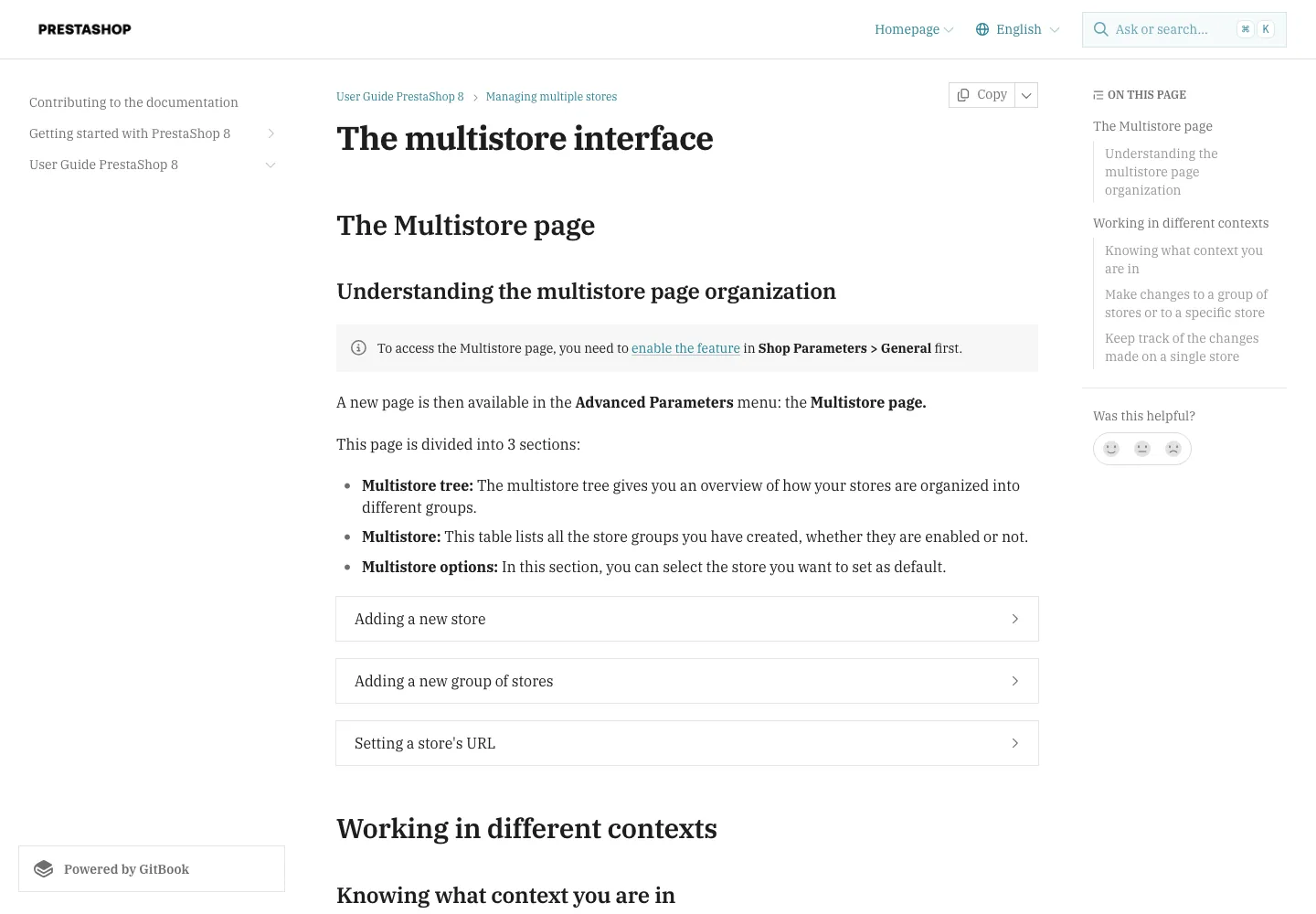
PrestaShop's multistore feature deserves credit for turning a multi-site operation into a scoped editing problem. According to the version 8 multistore guide, you enable it in Shop Parameters > General and manage setup in Advanced Parameters > Multistore. Once active, a change can target All stores, a store group, or a single store. That selector is genuinely useful when you need to replicate a setting across many storefronts or isolate one brand.
Still, the context selector is not a platform-wide guarantee. The documentation does not promise every settings page honors the chosen scope, so treating it as a universal filter can lead to a misapplied save. If the selector points to All stores while you intend a single storefront, the change reaches every store in the network. That is a documented consequence, but the underlying risk is also that record types behave differently, and only the guide for that record type clarifies which sharing rule applies.
Store groups occupy the middle ground. The sample usages and specifics guide explains a content-page case: in All stores context you see all pages, and in group context you see that group's pages. A content page created in a store-group context is one unique page displayed in the group's stores, so editing it alters every store sharing that page. That sharing rule is documented specifically for content pages, not for customers, orders, or products.
The version 8 guides describe the downloadable PrestaShop software, not every Hosted contract. Confirm multistore availability and the allowed contexts against your actual offer before planning a rollout. With that verification, the feature is a strong reason to consider PrestaShop; without it, you are betting on a behavior the document may not cover.
Localization is setup data and ongoing work
PrestaShop's localization pack provides starting data for a market rather than a finished storefront. The version 9 localization settings documentation says importing a pack can import administrative regions, tax rules, currencies, languages, and units. What you receive depends on the selected pack and which components you choose, so inspect those choices before importing.
The tax display option is the setting to check first. The same guide lists a "Change behavior of taxes displayed to groups" setting. When enabled, it replaces how tax-inclusive or tax-exclusive prices are displayed for all groups and countries. That is a global display rule, not an overwrite of actual tax rates or existing tax data. If you customized price display per customer group, confirm the option matches that intent before running the import.
What the pack does not do is translate authored catalog copy. Product descriptions, category names, and marketing pages remain in the language you wrote them in. Languages, currencies, and units import as distinct structures. Activating a currency is one step, and each payment method you select must support that currency. Shipping, checkout rules, and local obligations remain separate tasks. Importing data does not certify compliance. Treat the pack as a setup shortcut, not a completed localization project.
A French merchant selling into the UK illustrates the split. Depending on the selected pack, importing can add English, GBP, administrative regions, and tax and unit data. Existing product pages are still in French until you author translations. A UK customer needs a gateway that processes GBP, a shipping method for that destination, and terms that meet local expectations. Check the tax display option first so the pack does not silently change how prices appear to customers.
Modules and releases determine the maintenance workload
Compatibility belongs to the whole stack: platform release, theme, payment gateway, and installed modules. Changing one part can affect others. On Classic you handle testing; on Hosted, the offer page states what is bundled but not how upgrade checks are run. Confirm the actual split in the contract.
A 2026 French forum thread about migrating a long-lived 1.6 store reports one merchant who found a migration module difficult and described much of the shop as custom, while another argued a fresh 9 rebuild can be defensible when redeveloping internally if required third-party modules exist. That is a specific old/custom migration case, not a 9.2 benchmark or a version verdict.
Custom code and module upkeep are therefore terms to verify. Commissioning code does not mean you alone maintain it; maintenance can be contracted. On Hosted, included services cover hosting, support, and advertised updates, not merely access and setup. Check which upgrade, backup, and recovery tasks the vendor actually performs.
System requirements are release-specific. The PrestaShop 9 requirements document PHP compatibility, extensions, and recommend at least 512 MB per-script memory allocation. Apply that to a 9 install, not to every offer; the Hosted public page currently describes PrestaShop 8, so match requirements to your exact release.
Acceptance testing after an upgrade is its own decision. Copy production data, apply the new version, and test storefront, checkout, and admin on a separate stack before going live. Rollback testing is separate: restore files and database together and confirm operation. On Hosted, confirm which steps the vendor performs and which remain yours.
Payments support and total cost need separate decisions
Payment processing is one volume-driven cost outside the included setup: the gateway connects the store to a processor, and the processor's per-transaction bill is separate from that connection. Assume a charge of 1.5% plus €0.25 per transaction: a €50 order costs about €1.00, and 200 such orders come to €200 a month, €2,400 a year. That arithmetic is hypothetical, not a PrestaShop quote, so your processor's contract sets the real figure. The useful conclusion is that this line moves with order volume and deserves its own forecast column, not a slot inside the platform subscription.
Support is a separate contract question. The Hosted offer page lists email, chat, and phone six days a week, which states channels and days, not a published response time or uptime commitment. Six days also leaves one day outside those channels; any guarantee would sit in the service contract, and none was independently measured for this review. A store that runs evening or weekend sales should keep monitoring and fallback procedures, because availability alone does not promise immediate resolution.
Keep the two decisions apart. Processor rates determine per-order card cost; the platform contract determines how quickly a technical issue gets handled and who escalates it. For a high-volume store, the processor line can outweigh the difference between hosting plans, so judge the total with separate columns. The PrestaShop pricing analysis models that split in a matched-scope budget, and the same question applies to any "included" item: access and setup versus ongoing usage cost.
Choose the operating model around the required store
I recommend Classic when you want deliberate control over the code and hosting and have a competent owner or paid maintainer to handle maintenance, and Hosted when its named hosting, support, and advertised updates genuinely replace the operational work you need done, as defined in the written proposal.
The main reservation is verification. Classic keeps every update, backup, and custom-module compatibility decision on your side. With Hosted, confirm the actual scope of included services: which updates apply to custom modules, whether backups are covered, and what exit responsibilities remain. Included modules and services are not proof that transaction, advertising, or shipping usage is free, and any assumption outside the proposal should be checked before signing.
Related reading
- PrestaShop pricing analysis for the matched-scope budget
- Shopify review for the fully managed SaaS model
- WooCommerce review for the self-hosted open-source alternative