Comparison
ShipStation vs Shippo: Which Shipping App Earns Its Cost?
Shippo Pro undercuts ShipStation on price at 500+ labels. ShipStation Standard earns its premium when orders split/combine or for up to 10 users.

A shipping app earns its cost when it removes work beyond label printing. Consider a concrete before-packing exception: an order contains line items that must be combined into one shipment or auto-split into multiple shipments before anything is packed. Doing that manually takes labor, and the right app saves that labor. The pricing comparison below uses the official public pricing pages at ShipStation pricing and Shippo pricing, checked 21 October 2026; ShipStation was rechecked 23 October 2026. These are published figures, not a production test.
For straightforward parcels that ship one-to-one from a single box, Shippo is the direct pick because its free tier covers low volumes. ShipStation Standard earns its higher monthly price when order combining or auto-splitting happens before packing, or when 10 users need access. If your workflow routinely merges or splits shipments, ShipStation Standard earns its cost. If not, pay for simplicity.
My shortlist starts with the packing bench
Before comparing bills, I sort merchants by what happens at the packing bench. A solo seller printing a couple dozen labels a month has a different problem from a warehouse manager coordinating stations and shift handoffs. This table maps each scenario to its closest fit.
| Merchant scenario | Closest fit |
|---|---|
| Solo, low volume, under 30 labels a month | Shippo Starter (free up to 30 labels/month, one user) |
| Straightforward single-box parcels | Shippo Pro (first paid tier, up to five users at that tier) |
| Combine or auto-split orders, or a ten-operator workflow | ShipStation Standard |
| Bringing in an existing parcel carrier account (to ShipStation) | ShipStation Standard |
Shippo Starter's software plan is free for up to 30 labels per month, not 30 free postage labels; postage costs are separate. Shippo Pro's first tier covers up to five users. ShipStation Starter already includes three users, so staffing alone does not force Standard. The case for Standard is its combine and auto-split workflow: it removes hands-on order sorting; a postage discount can offset labor costs in total-cost math, but it does not remove the manual task.
The case for Shippo is a single-box, one-person bench that never touches those features. For custom label integration, Shippo's API is a separate product outside this app comparison.
Monthly prices at 50 to 5,000 labels
Both vendors sell volume brackets, not one flat fee. This table compares the monthly list price of three plans at four plausible monthly volumes: 50, 500, 1,000, and 5,000 labels. Prices come from the ShipStation pricing page and the Shippo pricing page, both checked 21 October 2026. Postage, taxes, insurance, and global address validation are billed separately. Shippo's free Starter covers 30 labels a month, so the table starts with Shippo Pro; ShipStation's Starter and Standard both cover the whole range.
| Plan | 50 labels | 500 | 1,000 | 5,000 |
|---|---|---|---|---|
| Shippo Pro | $19 | $29 | $54 | $139 |
| ShipStation Starter | $14.99 | $39.99 | $79.99 | $174.99 |
| ShipStation Standard | $29.99 | $89.99 | $149.99 | $249.99 |
ShipStation Starter is the cheapest listed option only at 50 labels; at every volume above that, Shippo Pro carries the lower sticker.
At 500 labels, Shippo Pro is $29, ShipStation Starter $39.99, and ShipStation Standard $89.99. The $60.99 gap to Standard is a workflow price: it covers combine-and-split order handling, which pays off when a shipment leaves the packing bench in more than one box. Check your own order mix before buying that capability.
As a cross-check, a 20-cent difference in effective postage moves a 500-label month by $100, enough to reverse the two bills. That spread is illustrative; carrier rates vary by zone, weight, and negotiated discounts.
At 5,000 labels, the Standard premium over Shippo Pro is $110.99. At that scale, labor savings are the clearest way to justify the extra spend; the automation section runs that calculation.
For store-level budgeting, Shopify's plan stays a separate line; choosing a shipping app does not change that figure.
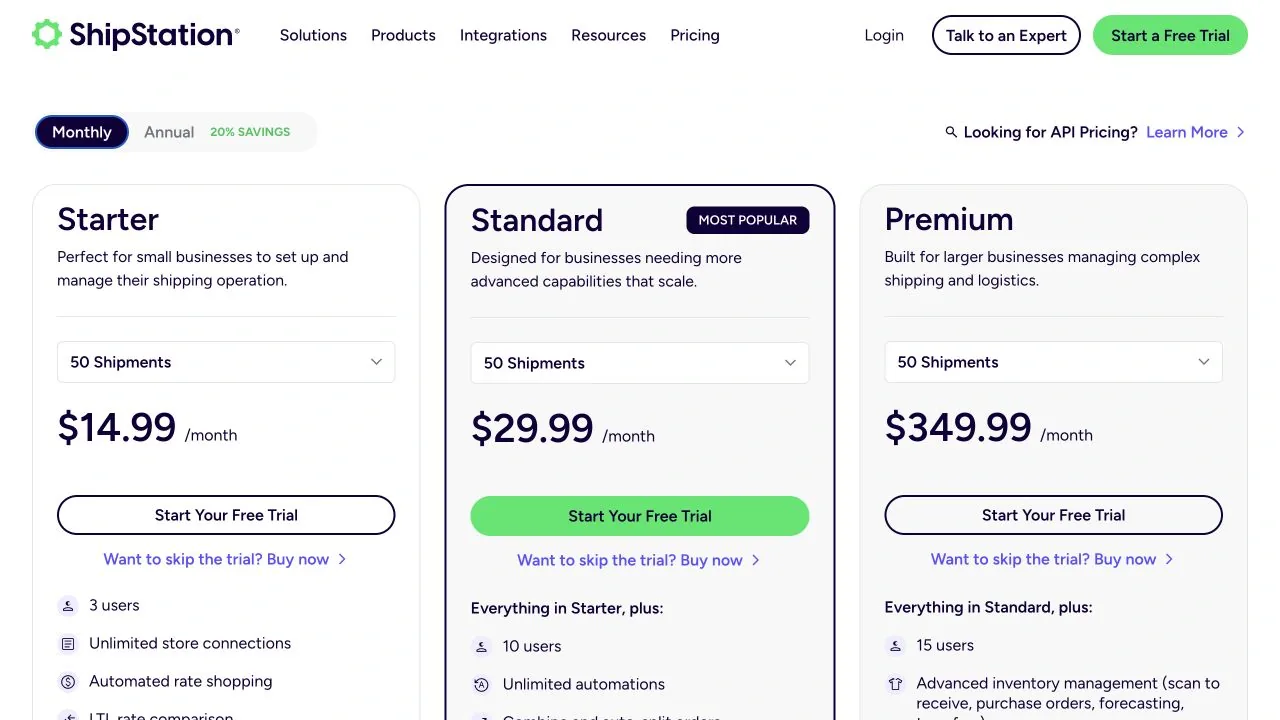
Image source: ShipStation pricing
Check your carrier account before comparing rates
A rate quote is only as strong as the carrier account behind it. Shippo Starter charges $0.05 per label when you use your own carrier account; Shippo Pro removes that five-cent software fee on those labels, though you still pay postage (Shippo pricing). ShipStation Starter only connects own-account LTL freight through Worldwide Express or Unishippers, not parcel carriers. Existing parcel carrier accounts appear in ShipStation Standard (ShipStation pricing).
ShipStation’s FAQ adds that current plans have no carrier-connection fee where the plan permits such connections, but accounts with plans registered before 8 July 2025 may still incur one. Confirm which plan your account carries before comparing its rates.
Percent-off headlines are less reliable than a quote built on your own parcels. Build a representative sample that includes heavy items, distant zones, residential deliveries, and oversize boxes. Pack each as you would ship it, then compare dimensions, weight, origin, destination, and the same service commitment in both tools. Treat the quote as a starting point; the actual bill comes after shipment and may include later adjustments. Before running a trial, ask how rate adjustments, refunds, and insurance claims are handled.
After buying a label, compare the bill against the quote and review any subsequent corrections.
Put a dollar value on the automation
At 5,000 labels a month, ShipStation Standard lists at $249.99 and Shippo Pro at $139, leaving a $110.99 premium for Standard's combine-and-split order handling. That premium is worth paying only if it buys back more labor than it costs.
For illustration, assume the tasks Standard automates take 15 minutes a day of manual sorting and reprinting. Over 22 working days, that is 5.5 hours. Divide the premium by those hours: $110.99 ÷ 5.5 = $20.18 per hour. That is the break-even labor rate: if your loaded hourly cost exceeds $20.18, Standard pays. If the real saving is half the estimate, the break-even rate doubles to $40.36 per hour. If your loaded hourly cost is below $20.18, the assumed 15 minutes of daily sorting would not justify the premium.
Loaded hourly cost should include wages, benefits, and overhead, not just base pay. Onboarding and training also consume hours before savings appear, so amortize that setup time as an additional cost and add it to the premium before comparing. Choosing a shorter payback period raises the monthly amortized setup amount and, with it, the break-even rate; stretching the payback period lowers the rate. The amortized setup amount should reflect the hours actually spent configuring automations, training staff, and testing splits, spread over your planning horizon.
Repair time from order-update failures also counts as unbilled labor, and support tickets that start as WISMO tracking questions add cost the subscription price does not show. Use the $110.99 premium plus amortized setup as the target, then compare measured hours saved multiplied by your loaded hourly cost against that target.
Your split-order share and box mix will move the result. If the measured saving beats the target, Standard earns its premium; otherwise Shippo Pro remains the lower-cost option.
What merchant reviews reveal about the handoff
A handful of dated reviews can't tell you which app breaks more often, but they do show where to aim a trial: the handoff between the shipping tool and the Shopify storefront. Treat these three as leads, not incidence data.
On 17 September 2026, Biota Coffee praised ShipStation's live onboarding walkthrough for tailoring settings to its operation. The next day, Spycraft 101 reported repeated Connect refresh and order-update problems; ShipStation replied the behavior was unexpected and offered to investigate. On 2 July 2026, Black Oak LED reported order-status sync problems and support frustration with Shippo; Shippo acknowledged the sync issue and said it had contacted the account.
The two negative reports converge on the same movement: order updates and shipment status traveling between Shopify and the shipping tool. Biota's positive review credits setup help, not daily behavior, so it does not speak to this handoff.
Build the handoff checks into your own test. Use a low-value order so any failure won't disturb a real shipment. In Shopify, edit the order after it enters the shipping tool and see whether the new details appear before packing. Then mark it shipped and confirm the tracking number writes back to the Shopify order without manual entry. If either step stalls, that order becomes a WISMO risk.
Choose after reconciling one packing cycle
Compare plans only after running one controlled packing cycle through each tool. Build a test set with staff before live orders: a single-box order, a changed address, a multi-item order that should split, a cancelled order, and an oversize parcel. Pull live quotes for that exact mix first; subscription savings disappear if rates on your parcels are worse.
Run the same set in both apps with the people who normally pack. Track what each system does when an address changes after a label prints, when a split needs corrected box weights, and whether cancellation clears the label charge or leaves a void to chase.
Reconcile three artifacts per order: the final label charge versus the checkout quote, the order status in Shopify, and the tracking number visible to the customer. Time each batch including repairs such as reprints, manual syncs, and support chats, then compare against the break-even figure from earlier.
Enter your potential daily time saved and realized fraction into the labor break-even worksheet, then compare its required hourly labor value with your own loaded hourly cost.
Choose after the cycle. If Shippo Pro covers the required functions and its total cost, including rates and labor, is lower, choose it. If ShipStation Standard's combine and auto-split handling cuts enough measured repair minutes to justify its premium, pay for it. For returns-heavy volume, both tools provide return labels; for eligibility rules or refund/exchange automation beyond labels, review returns automation tools alongside the shipping workflow instead of deciding on outbound volume alone.