Implementation
Packing slip template for full, partial and gift orders
Download a packing slip template for full, partial, and gift orders. Get editable Word and PDF files with completed shipment examples.
Download a packing slip
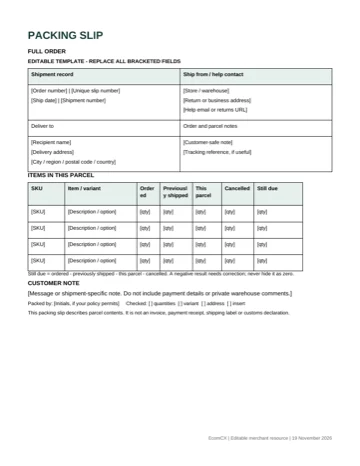
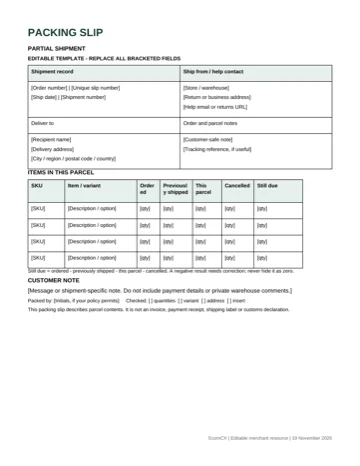
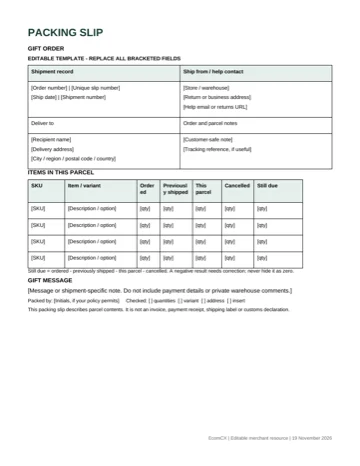
A packing slip template should show what is inside this parcel, not simply repeat everything the customer ordered. Use the full-order copy for a complete shipment, the partial copy to reconcile earlier dispatches, and the gift copy when the recipient should not see prices. The files below work alongside your shipping software, without replacing its order record.
When a second parcel carries the original order quantities, the recipient can mistake previously shipped items for missing items.
The packer has the same problem: a tidy document can still authorize the wrong contents.
Download the individual Word or PDF file above for this shipment. The partial layout records cancellations separately from quantities still due, so readers can see what will arrive later.
Download the editable packing-slip pack, or start with the printable PDF. If you need all three layouts, keep the combined pack as a reference.
Choose the right packing slip
Choose the page from the shipment you are preparing. A full-order slip belongs with all uncanceled items in one dispatch. A partial slip belongs with a dispatch that leaves items outstanding or follows an earlier shipment. A gift slip changes the customer-facing presentation while retaining enough detail to check the contents.
| Copy | Use it when | Keep visible |
|---|---|---|
| Full order | All uncanceled units leave together | Item, variant, ordered quantity, quantity in this parcel |
| Partial shipment | Items leave at different times or from different locations | Earlier shipments, current contents, cancellations, still due |
| Gift order | The recipient should not receive prices | Product identifiers, quantities, message, help contact |
These are original general-purpose layouts. Shopify describes a packing slip as a record of package items and related order details, and supports printed slips from order records. Its default layout and your store’s configuration can differ from this download. Shopify packing-slip documentation.
Each individual file contains one page. The combined pack keeps all three variants together. Print only the version that matches this parcel. The completed example PDF is for reference; its names, addresses, order numbers, and products are fictional.
Keep the slip separate from the carrier label. The label routes the parcel. The slip lets someone compare the parcel with an order. Carrier choice and subscription costs belong in the Shippo versus Pirate Ship comparison, not on the customer’s contents list.
Fill the fields that identify this parcel
Start with an order number and a unique slip or shipment reference. Reuse the order number across split dispatches, but give each dispatch its own reference. That distinction lets a customer identify the relevant parcel without guessing which version of the order your team printed.
Add the dispatch date and shipping destination from the order record. Check the recipient’s name and postal details against the label immediately before sealing. Editing one document does not update the other, so the last comparison needs to use the actual label that will travel with the box.
For each item, retain the product name, variant, and stock keeping unit, or SKU. “Mug” is insufficient when the order contains both sand and charcoal finishes. A stable SKU reference makes the line easier to match to a bin and to a later support conversation.
Use the fields in a consistent sequence:
- Confirm the order and dispatch reference.
- Copy the correct recipient and destination.
- Identify the exact item and variant.
- Reconcile quantities against earlier dispatches and cancellations.
- Add a customer-safe shipment note and help contact.
A packing slip does not need your internal payment notes, fraud review comments, wholesale costs, or warehouse access instructions. Include information the recipient or packer can act on. Keep private operational records in the order system.
If another warehouse or fulfillment partner packs the order, agree which system owns the final dispatch reference. The fulfillment services and software guide covers that responsibility more broadly. This template records the decision; it does not synchronize two systems.
Reconcile a partial shipment
The partial layout uses five quantity states: ordered, previously shipped, this parcel, canceled, and still due. Keep the states separate even when one happens to be zero. A blank can mean “not checked,” while zero is a deliberate quantity.
Use this reconciliation for each line:
Still due = ordered − previously shipped − this parcel − canceled.
Suppose a customer orders five mugs. One shipped last week, two go in today’s parcel, and the customer canceled one. The last mug is still due. The four quantities in this fictional example answer different questions.
| Ordered | Previously shipped | This parcel | Canceled | Still due |
|---|---|---|---|---|
| 5 | 1 | 2 | 1 | 1 |
Show the canceled unit as canceled in the order record too. If you leave it in the outstanding quantity, the next packer might send two mugs when the customer expects one. The separate filled slip below shows a shipment where both lines have zero remaining.
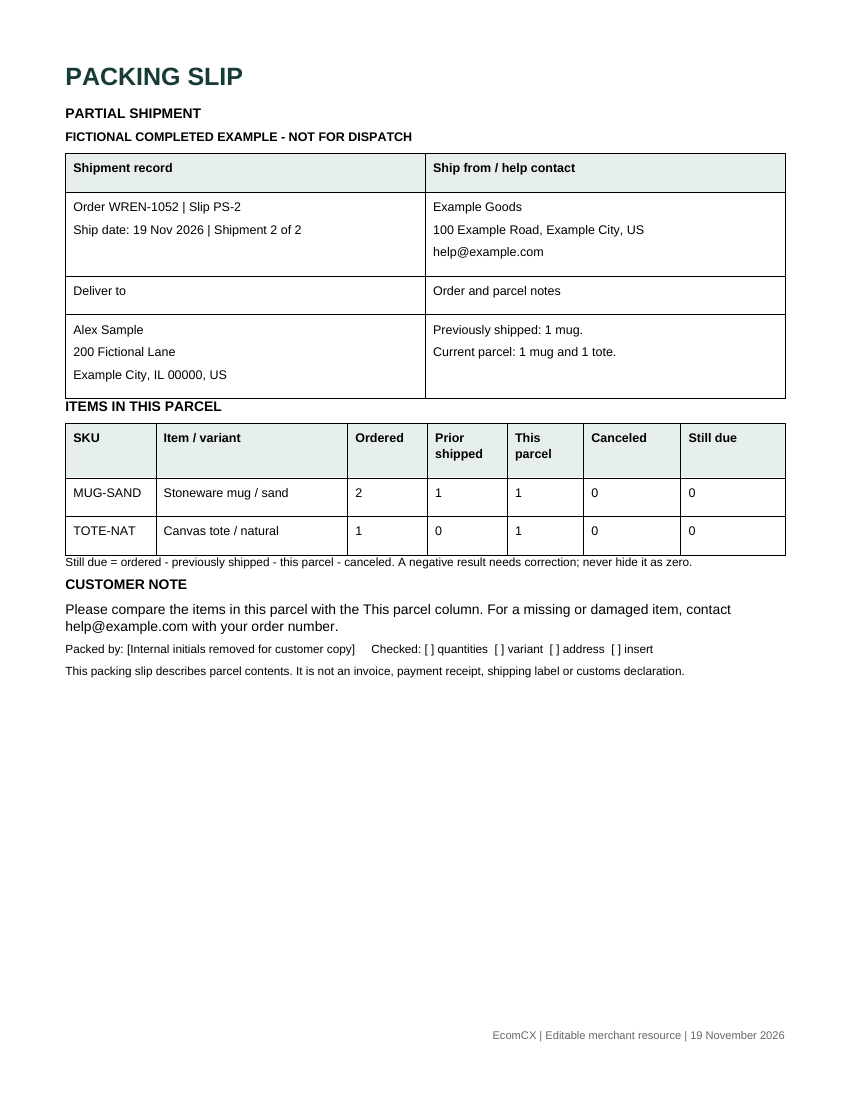
Do not replace a negative balance with zero to make the slip look complete. A negative result can reveal a duplicate dispatch, an incorrect earlier quantity, or a cancellation counted twice. Stop and resolve the order record before using the document as packing authority.
The Word file does not calculate these quantities automatically. Its columns make a manual check visible. If split shipments become routine, use the order system as the quantity ledger and print a shipment-specific record from it. A handwritten correction on a slip should not become the only record of stock leaving the warehouse.
Prepare a gift copy without prices
The gift layout deliberately omits product prices, tax totals, payment methods, and billing details. It retains the item descriptions, quantities, order reference, and help contact. Those details let the recipient report a missing or damaged item without disclosing the purchase amount.
Copy the gift message exactly as approved by the purchaser.
A packer should not rewrite it or expose an internal instruction such as “hide invoice from recipient.” If the buyer requests no message, remove the message prompt rather than printing an empty placeholder.
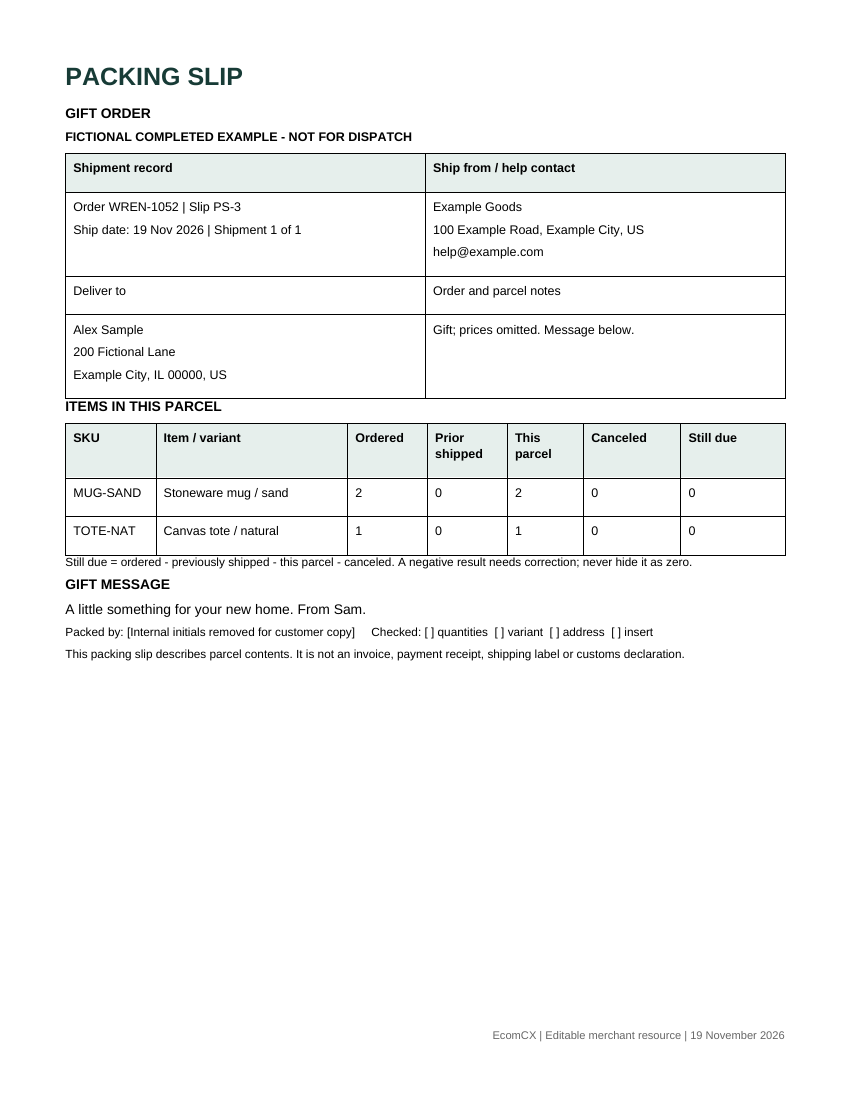
Gift handling does not erase fulfillment history. If the gift ships in two parcels, keep the partial-shipment arithmetic in the underlying order record and use a customer-facing copy that accurately describes each parcel. A gift message should not imply that an outstanding item has already arrived.
Return eligibility also needs its own source of truth. A packing slip can point to your returns page, but a generic download cannot establish a store-specific return window. Use the policy that applied to the transaction, and avoid printing a promise your support team cannot honor.
Print a readable Letter or A4 copy
The supplied Word pages use US Letter dimensions. The PDFs preserve that layout, so the editable and printable versions show the same fields. The blank pack and completed example pack each contain three pages. Print only the page you actually need.
For A4 paper, inspect the print preview and select the option that fits the full page inside the printer’s printable area. Do not stretch the page merely to fill the sheet. Confirm that the last quantity column and customer note remain visible before sending a batch to the printer.
The files were exported from Word format and visually checked as PDFs. That establishes document layout, not the behavior of your physical printer. Test one actual sheet on the equipment and paper you use, including any grayscale or economy setting that changes text contrast.
Check these details on the test sheet:
- The SKU and variant stay legible at normal reading distance.
- The first and last quantity columns remain on the same page.
- The order reference is visible without unfolding the entire sheet.
- The help address is readable and contains your real contact information.
- Unused template prompts and fictional example data are gone.
Long product descriptions need a further check. Let the row grow or move excess detail to a second page with the same shipment reference. Shrinking the whole document until every row fits can make a formally complete slip unusable at a packing bench.
Connect the slip to Shopify order records
If Shopify owns the order, its native document tools may remove the need to copy quantities into Word. Current documentation describes printing documents from order details, selected orders, and purchased shipping labels. Paper-size and document choices depend on the store’s templates and permissions. Shopify printing order documents.
Use this download as a field checklist or a manual exception form. It is a Word document, not a Liquid theme file, and cannot be pasted into Shopify’s template editor as working code. Decide whether you need a printable file or a store-connected document before changing the live setup.
For a split order, verify that the generated document reflects the selected shipment or location rather than assuming that any print action produces the right contents. Compare one known partial order with the actual package. We have not executed that account-specific test for your store.
Shopify also documents customizing packing slips. A custom template needs its own review after fields or conditions change, particularly if the same layout supports both full and partial orders. Shopify packing-slip customization.
Keep the final reference in the same place your support team checks shipment history. If a customer asks where the order is, the agent needs to distinguish an outstanding item from a parcel already in transit. A contents list and a tracking record answer different parts of that question.
Check exceptions before sealing the carton
Run exceptions through the same quantity states rather than adding unexplained notes. A canceled item belongs in the cancellation count. A substituted item needs a distinct description and an approved change in the order record. A replacement shipment should identify the original order and its own dispatch reference.
| Exception | Check before printing | Record to keep |
|---|---|---|
| Cancellation | The line is no longer expected in a later parcel | Canceled quantity and order update |
| Substitution | The customer-approved variant matches the physical item | Approval and corrected item description |
| Replacement | A new dispatch is not mistaken for an additional sale | Original order plus replacement reference |
| Two warehouses | Each slip describes that warehouse’s parcel | Location and separate shipment references |
| Missing component | A kit is not treated as complete merely because its box is present | Component discrepancy and resolution |
For a kit, decide whether the recipient sees one sellable kit or its individual components. Either presentation can work when the packer has a separate, explicit component check. A single “kit: 1” line cannot prove that all pieces are inside.
International dispatches need particular care with document names. This packing slip does not replace the commercial invoice or other customs information required for an import. US invoice rules require transaction and merchandise details that a price-free parcel list intentionally omits. US invoice contents.
Store the final shipment-specific copy with its order reference.
Keeping only the latest reusable template does not establish what a particular parcel was supposed to contain.
Release the parcel with a usable record
At the bench, place the slip beside the physical contents and read the current-parcel column aloud or check it line by line. Compare the exact variant, count the units, confirm the destination against the label, and remove unused pages. The check should reconcile a real parcel, not merely confirm that a document printed.
For a first use, choose one complete order and one partial order that your team already understands. Have another person reconstruct what has shipped and what remains from the printed records. If they cannot, revise the field labels before using the layout across a batch.
Keep document choice and software choice separate. The shipping software guide helps with the wider dispatch process; this resource gives the parcel a clear contents record. When a manual file becomes a second stock ledger, move that responsibility back into the order system.
Open the Word packing-slip pack, keep the page for the parcel you are preparing, and replace every bracketed field.
Use the completed examples to verify the quantity states before the carton leaves.