Implementation
Landed cost calculator for one import order
Use the landed cost calculator online to compare cost per ordered and saleable unit. Try the worked shipment or download the editable Excel workbook.
Calculate landed cost per unit
Fictional shipment. The duty assumption is 5%. The estimate covers one product and one shipment.
- Total landed cost
- $1,194.00
- Per ordered unit
- $2.39
- Per saleable unit
- $2.44
Enter a customs value and duty rate confirmed for your shipment. Enter 1 for the exchange rate when the supplier prices in USD.

Use the landed cost calculator above to estimate the total for one shipment and the cost per usable item. Its fictional order costs $1,194: $2.39 per ordered unit at 500 units, or $2.44 per saleable unit when only 490 can go into stock. Use the saleable figure in your pricing model when the same import bill has to cover fewer items.
Change the inputs above or download the landed cost workbook to keep a copy with your supplier quote. The 5% example rate illustrates the arithmetic. Confirm the customs value and applicable duty for your shipment before budgeting.
Use the landed cost calculator
The calculator updates both per-unit results when you change the shipment figures. Open “Exchange rate and other charges” to change the remaining worked-example inputs, or choose “Clear fields” to start with a blank calculator. The workbook has two tabs with the same calculation. “Your shipment” starts without invented quotes. “Example” contains a fictional 500-unit order and clearly labels its 5% duty as an assumption. Change the example to learn the model, then work from your actual records on the blank tab.
The calculation follows this structure:
Landed total = converted goods cost + freight + insurance + duty assumption + brokerage + other named costs + nonrecoverable tax + packing not already included.
Divide that total by saleable received units for the per-unit result used here. The sheet also displays cost per ordered unit, so the effect of shortages remains visible rather than becoming an unexplained adjustment.
| Output | What it tells you | What it does not establish |
|---|---|---|
| Total landed cost | The sum of the named model inputs | The final carrier or customs bill |
| Cost per ordered unit | Cost spread across the purchase quantity | The amount of stock available to sell |
| Cost per saleable unit | Cost spread across usable received stock | Your retail price or margin target |
| Unsaleable units | Ordered quantity less saleable quantity | Whether a supplier will reimburse you |
FedEx’s landed-cost guide identifies product, shipping, customs, risk, and other charges as components of the wider import bill. This workbook makes its chosen components explicit instead of claiming that one universal fee schedule applies to every shipment.
Keep the result with the supplier quote and its date. Your inventory plan needs the order quantity and timing as well as the cost. A low unit cost cannot compensate for receiving stock after the period in which you expected to sell it.
Gather inputs without counting a charge twice
Begin with the supplier’s price, quantity unit, currency, and stated delivery terms. Determine which costs the price already includes. If ordinary packing sits inside the unit price, enter zero in the separate packing row; do not add it again because the workbook offers a field.
The same discipline applies to freight and insurance. A bundled quote needs an explained treatment before you split it into components. Otherwise, a more detailed spreadsheet can produce a less accurate total by counting one charge twice.
Collect the following records before treating the result as an ordering basis:
- The supplier quote or invoice, including its quantity and currency.
- A freight quote showing the covered transport legs.
- Insurance terms or the named charge included elsewhere.
- The importer’s or broker’s valuation and duty assumptions.
- Brokerage, entry, handling, and other relevant quoted charges.
- The receiving count and any known unusable units.
Trade.gov explains how Incoterms allocate tasks, costs, and risks. Use the actual agreed term and named place to ask which costs belong to each party. A label such as FOB or DDP is not a replacement for reading the quote’s inclusions.
The workbook does not decide whether tax is recoverable. Enter only the nonrecoverable amount in its cost row under the accounting treatment that applies to your business. Recoverable tax can still consume cash temporarily, so the landed-cost figure is not a complete cash-flow forecast.
The fulfillment guide covers the broader operating responsibilities. Here, keep the cost record narrow enough that someone can trace each amount to a quote or an explicit assumption.
Keep the duty basis separate
The “confirmed customs value” row is an input, not a formula that adds goods, freight, and insurance. US Customs and Border Protection (CBP) explains that a cost, insurance, and freight (CIF) price including freight and insurance is not automatically the value to declare for US customs purposes. CBP guidance on CIF and duty.
The valuation examples in 19 CFR 152.103 also illustrate the difference between transaction value and separately identified international freight and insurance. Apply the rules to the actual transaction rather than treating a delivery-term label as a valuation decision.
That distinction prevents a common spreadsheet shortcut: applying a duty percentage to the entire landed total. It would also create circular arithmetic, because duty is itself part of that total. Obtain the appropriate basis independently and enter it in the designated row.
The duty calculation is deliberately simple: confirmed basis multiplied by the entered rate.
A shipment with specific duties, multiple tariff lines, additional duties, exclusions, or a different assessment method needs a confirmed combined treatment before this single-rate model is suitable.
CBP’s invoice valuation guidance also discusses additions and the distinction from future resale price.
The fact that your supplier charged a particular total does not settle every valuation question.
Do not read the example’s 5% as a current tariff on its product or origin. It is an arithmetic assumption chosen to make the model understandable. The workbook neither looks up a classification nor checks entry-date rules. Replace it with your confirmed treatment, and use a more detailed model when one percentage is insufficient.
Work through the 500-unit example
The fictional order contains 500 units at $1.80, already denominated in US dollars. Goods cost $900. International freight is $180, insurance is $9, the duty assumption is $45, brokerage is $50, and a named destination-handling assumption adds $10. Packing is already included in goods, and the example enters zero nonrecoverable tax.
| Cost component | Illustrative amount |
|---|---|
| Goods, 500 × $1.80 | $900 |
| Freight | $180 |
| Insurance | $9 |
| Duty assumption, $900 × 5% | $45 |
| Brokerage | $50 |
| Other named handling | $10 |
| Total | $1,194 |
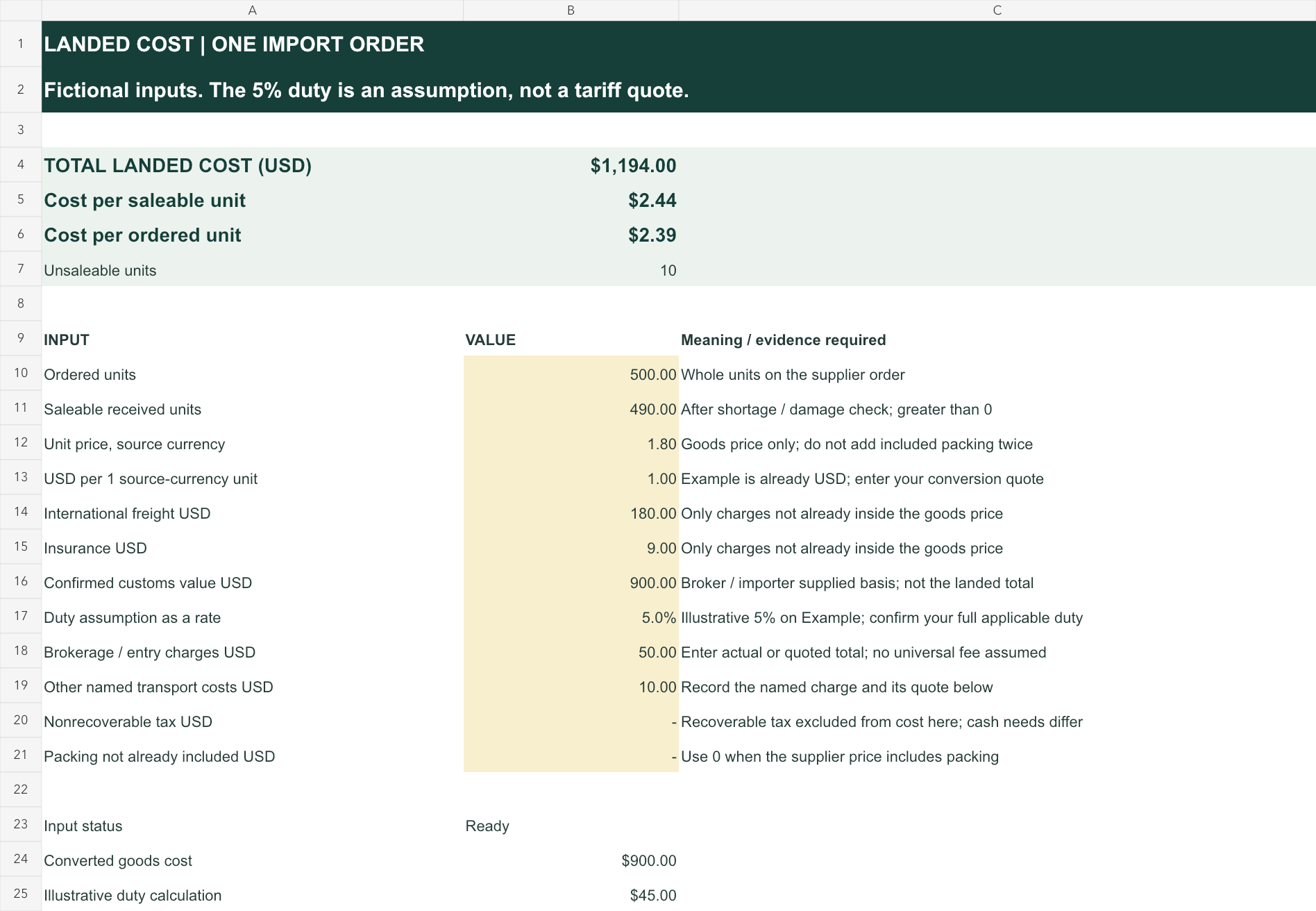
At 500 ordered units, $1,194 divided by 500 is $2.388 per unit. With only 490 saleable units, the same total becomes approximately $2.4367 per saleable unit. The workbook displays $2.39 and $2.44 while retaining the underlying precision.
That difference is not a new supplier charge. It is the effect of spreading the same order cost over fewer units available to sell. Before negotiating another purchase, use the pricing guide to assess what that usable-stock cost does to the selling decision.
Convert currencies in one direction
The exchange-rate field asks for US dollars per one source-currency unit. A quote of 1.10 means one unit of the supplier’s currency costs $1.10. Multiplying the source unit price by that factor converts it to dollars before the workbook multiplies by quantity.
Do not enter the reciprocal because a bank page happens to present the pair in the opposite direction. If your source says one dollar buys two units of the supplier’s currency, the factor for this field is $0.50 per source unit, not 2.00.
For example, a fictional 10-unit order priced at 20 source-currency units each, with a $0.50 conversion factor, has $100 in converted goods cost. Entering 2.00 would show $400. The spreadsheet cannot infer that you reversed the currency pair, because both are valid positive numbers.
Use a dated quote and record whether bank conversion costs are already reflected. The freight, insurance, customs-value, and other charge rows are entered in USD in this model. Convert those amounts consistently before entering them; the single exchange-rate field only converts the goods unit price.
Reconcile the currency and charge statements with the commercial invoice preparation guide.
The invoice and worksheet should describe the same transaction even though their final totals serve different purposes.
Handle shortages and damaged units
The sheet accepts a saleable quantity greater than zero and no greater than the ordered quantity. That keeps a shortage visible and prevents a denominator that implies more units than the model purchased. A zero saleable quantity withholds the unit result rather than dividing by zero.
Count saleable units using a defined receiving check. A damaged carton does not necessarily mean every unit inside is unsaleable, and a visually complete carton does not prove the count. Keep the receiving evidence with the SKU record so the cost basis can be reconstructed.
If you expect a credit or replacement, keep that recovery separate until its amount and treatment are confirmed. Reducing the model’s goods cost because a supplier “should reimburse us” would mix a known bill with an unconfirmed recovery.
For recurring issues, record the same quantity and quality facts in the supplier scorecard. The landed-cost workbook shows the financial effect of a shipment; the scorecard examines supplier performance across a defined set of orders.
This workbook is intentionally one SKU and one order. A shipment of heavy ceramics and lightweight prints needs an allocation policy before its freight can become a fair per-SKU cost. Do not divide all costs equally across those items simply because the single-order model is convenient.
Test the workbook before using a supplier quote
The saved example recalculates when its inputs change. Raising freight from $180 to $280 increases total landed cost from $1,194 to $1,294. Setting saleable units to zero withholds the per-unit result. Removing the duty-rate input withholds the total rather than treating a missing rate as confirmed zero.
The blank tab uses the same calculation. Enter a deliberate zero for a charge that does not apply, and leave an unknown field unresolved until you obtain the relevant quote. The status cell distinguishes incomplete inputs from a complete model.
Run a short check on a copy of the downloaded workbook:
- Increase one named charge by $100 and confirm the total rises by $100.
- Reduce saleable units while leaving costs unchanged and confirm unit cost rises.
- Clear a required amount and confirm the result becomes unavailable.
- Restore the original values and compare the result with the completed example.
These tests validate the arithmetic and input behavior. They do not validate your freight quote, tariff treatment, bank rate, or receiving count. A correctly calculating workbook still needs correct records.
Turn the result into an ordering decision
Use the per-saleable-unit result to compare a supplier quote with the amount your store can support. Then assess order timing, cash tied up, minimum quantities, and expected sell-through separately. The inventory planning guide addresses those broader ordering constraints.
For a repeat purchase, preserve the earlier completed worksheet and create a new dated copy. Update the freight quote, exchange factor, expected saleable quantity, and duty assumptions together. Reusing an old duty rate while updating only the supplier price can make a revised total look more current than its inputs.
Keep a short note beside each amount that remains uncertain. If a cost can materially change the decision, calculate the plausible quoted alternatives instead of presenting the first total as a promise. The workbook’s explicit rows make that comparison easier to explain.
Open the landed cost calculator, complete the blank shipment tab from your quotes, and compare its saleable-unit result with the order you intend to place. Resolve any missing input before treating that result as an acceptable purchase cost.