Best tools
Best AI Tools for Ecommerce Customer Data Readiness
Compare ecommerce customer data readiness tools by CDP, warehouse, reverse ETL, catalog data, consent, governance, field ownership, and AI failure prevention.
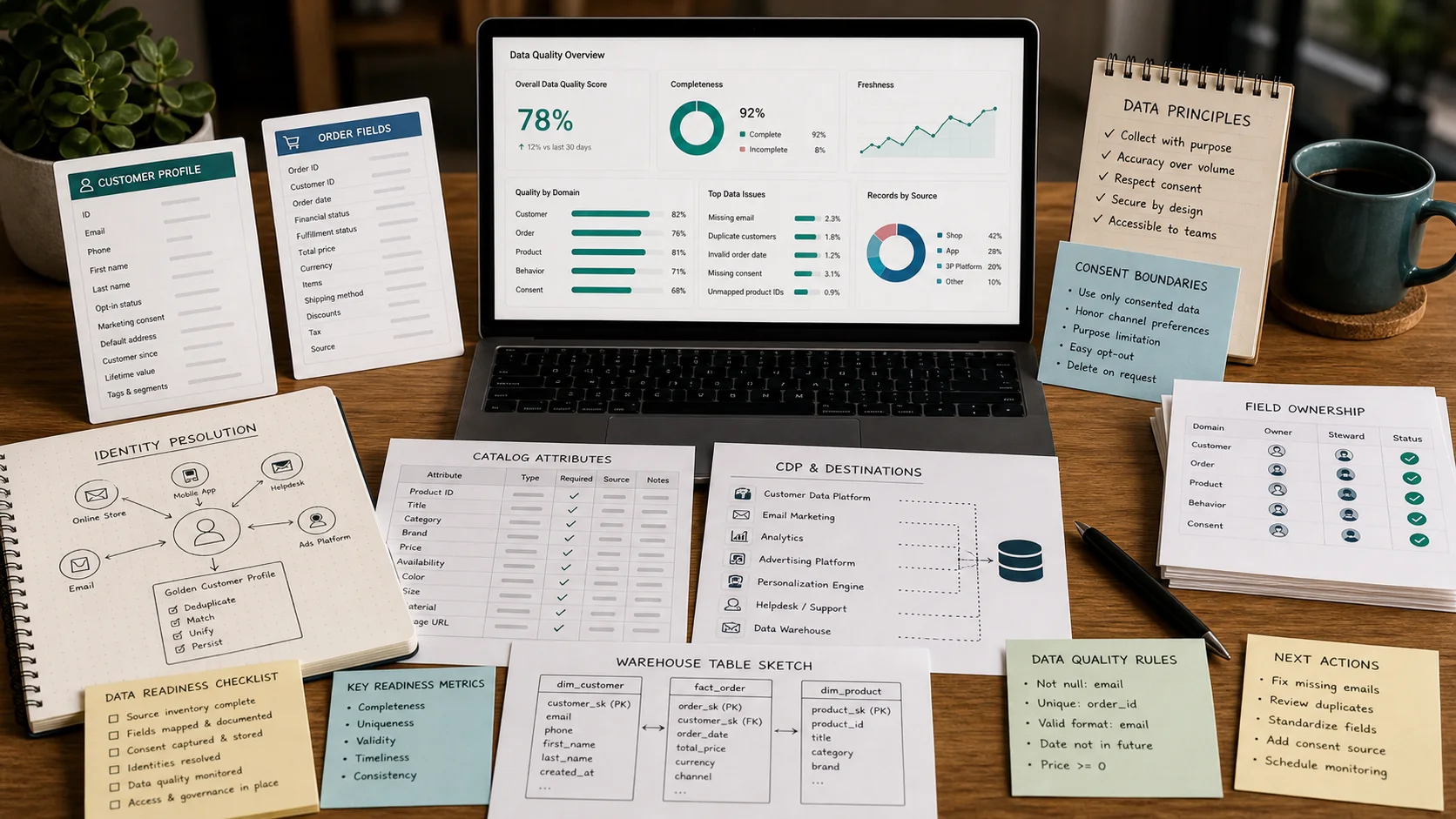
Before you buy another AI app, decide where customer truth lives. Most ecommerce AI failures are not model failures; they are field-ownership failures. The personalization tool recommends a product the customer already returned. The churn model flags a subscriber who cancelled six months ago. The support bot quotes an old price because the catalog feed is stale. The "intelligent" segment emails people who opted out.
The real decision is not which AI vendor to pick. It is which combination of Shopify, a CDP, a warehouse, reverse ETL, and an activation layer will keep customer records, events, product data, consent flags, and order history accurate enough that an AI can use them without embarrassing the brand or violating privacy. This guide compares the practical paths, the setup work each one hides, and the proof you should demand before signing a contract.
TLDR
- Start with Shopify customer data and privacy controls and customer segmentation as your operational baseline, but do not treat Shopify as the only source of truth once you have multiple marketing and service tools.
- Add a CDP such as Segment or RudderStack when identity, event governance, and cross-tool consent matter more than raw cost.
- Move to a warehouse such as Snowflake or BigQuery when you need modeled customer features, long-term retention, margin-aware reporting, and controlled AI training data.
- Use Hightouch or Census to push warehouse-defined audiences and fields back into marketing, support, and ad tools without building custom integrations.
- Use Klaviyo as the activation layer when fast event-to-email value matters, but keep its data model honest with upstream governance.
- Fix catalog data with a PIM such as Akeneo, Plytix, or Salsify before you let AI generate product copy, recommendations, or ads.
- Do not turn on AI features until you have documented field owners, freshness targets, consent boundaries, and a human review loop for high-stakes outputs.
Who this guide is for / who should skip it
This guide is for ecommerce operators, data leads, and founders who are choosing or auditing the data layer that feeds AI tools. If you run a single Shopify store with one email tool and no plans to add personalization, predictive inventory, or AI support, you do not need most of this stack. Read the Shopify section and skip the rest.
If you are a pure data engineer looking for pipeline architecture, this is too commerce-focused. If you are a vendor shopping for a feature list, this will frustrate you. If you are an operator who has already seen an AI tool confidently recommend an out-of-stock SKU to a VIP customer, keep reading.
Comparison table
| Tool | Best fit | Strength | Caution | Proof to demand in demo |
|---|---|---|---|---|
| Shopify Customer Events | Single-store Shopify brands that need fast, native event capture | Built-in consent, privacy controls, and tight order context | Becomes a silo once you add headless storefronts, POS, or non-Shopify tools | Show event payload for an order including product IDs, customer ID, consent status, and refund flag |
| Segment | Brands with many tools and a need for governed event taxonomy | Protocols, identity resolution, and a large destination catalog | Event-volume pricing and governance overhead can scale fast | Show identity graph for a customer who browsed on mobile, bought on desktop, and opted out by email |
| RudderStack | Warehouse-first teams that want CDP events loaded cheaply | Open-source core, warehouse loading, and data residency options | Smaller destination library and more engineering work than Segment | Show a raw event loaded into your warehouse within 5 minutes and the SQL to build a customer feature from it |
| Snowflake / BigQuery | Teams with analysts or data engineers who need modeled features | Full query control, long-term storage, and secure sharing | Not an activation layer; query costs and governance gaps can surprise you | Show a dbt model that joins orders, returns, margin, and consent into one customer row |
| Hightouch | Warehouse-backed teams that want no-code syncs to marketing tools | Fast audience syncs and strong observability | Quality depends entirely on warehouse models; can overwrite destination data | Sync a warehouse segment to an ad platform and show the diff log when a row changes |
| Census | dbt-native teams that want field-level reverse ETL | Deep warehouse integration and sync diffing | Fewer pre-built destinations than some competitors; needs clean SQL | Show a dbt model mapped to a CRM field with a full audit of inserts, updates, and deletes |
| Klaviyo | Shopify-first brands that want event-to-email activation quickly | Native Shopify event sync, predictive features, and consent lists | Not a general-purpose CDP or warehouse; can become its own silo | Show how a returned order updates a customer's segment and suppresses a win-back flow |
| Akeneo / Plytix / Salsify | Brands where product catalog quality is the weakest link | Structured attributes, channel-specific exports, and enrichment workflows | Adds process overhead; AI still needs clean inbound data | Show how a single product attribute flows to Shopify, Google, and a recommendation API |
Shopify Customer Events and Customer Privacy
Shopify is the default operational database for most DTC brands. Customer profiles, orders, products, inventory locations, and checkout events all live there. For AI use cases that stay inside Shopify's ecosystem, such as Shopify's own customer segmentation, native personalization, or app-based recommendations, this is often enough.
It wins when the storefront, checkout, and post-purchase experience are all on Shopify and you need low-latency event capture without engineering. Shopify's customer data and privacy tools give you consent banners, data request workflows, and regional settings that smaller brands would otherwise have to wire together manually. Shopify customer segmentation lets you build audiences from order history, location, and predicted spend without leaving the admin.
It fails when the truth is split. A headless storefront, a subscription app, a B2B portal, a wholesale phone channel, or a loyalty program running outside Shopify can create multiple customer records that never reconcile. Returns processed in a third-party logistics tool may not update Shopify's order status in time. Margin data usually lives in a separate accounting or ERP system, so AI recommendations based on Shopify revenue can silently push low-margin SKUs. Consent captured in Shopify may not propagate to your email, SMS, or ad tools unless you explicitly engineer it.
Setup work: configure Shopify's web pixels and custom pixels to capture the events your AI tools need, define a consistent data layer for product IDs and variant IDs, map consent flags to customer profiles, and validate that events match what downstream tools expect. Do not assume "Shopify integration" means identical field names across apps.
Risks: event duplication across pixels, missing offline events, returns and cancellations that arrive late, PII leaking through event payloads, and treating Shopify's customer ID as a universal identity key.
Demo script
- Show me the raw event payload for a completed checkout, and confirm it includes customer ID, email, product IDs, variant IDs, price paid, discount code, and consent status.
- How does a return or cancellation update the customer record and any segments already built?
- If a customer opts out in the privacy banner, which downstream tools stop receiving their data automatically?
- Can I add a custom field such as "subscription status" or "lifetime margin" and expose it to Shopify's segmentation UI?
- Show me the log of events that failed to reach a destination in the last 30 days, including the reason.
Segment
Segment is the safe choice when you have a dozen tools that all want customer events and you are tired of each tool defining "order completed" differently. It collects events from web, mobile, server, and warehouse sources, applies a taxonomy through Protocols, resolves identities, and routes clean events to destinations.
It wins when governance is the problem. If your marketing team calls a purchase "Checkout Completed," your product team calls it "Order Placed," and your support tool calls it "Transaction," Segment forces a single spec. Its identity resolution can link anonymous browsing to a known customer after login, which is a prerequisite for useful personalization AI. Its destination catalog is large, so switching email or ad tools does not require re-instrumenting your site.
It fails on cost and complexity at volume. Event-based pricing means high-traffic stores can see bills climb quickly. Identity stitching is not magic; it works best when you consistently send a stable user ID and respect consent boundaries. If you feed Segment dirty events, it will route dirty events everywhere faster.
Setup work: implement identify, track, and page calls using Segment's ecommerce spec, define event naming and property rules in Protocols, set up privacy controls and data retention policies, and connect only the destinations you can govern. Plan for identity resolution rules and a process to handle merged profiles when customers use multiple emails.
Data needs: a unified customer ID, anonymous IDs, order events with product and revenue fields, catalog metadata, and consent categories per channel. Margin, returns, and inventory data usually require a warehouse or ERP source.
Risks: event bloat, stale traits, identity collapse when merge rules are too aggressive, consent not enforced downstream, and the false comfort that routing data is the same as cleaning it.
Demo script
- Show me a live identity graph for a customer with multiple email addresses, devices, and opt-out channels.
- How do Protocols block or quarantine an event that does not match the approved taxonomy?
- What is the cost model at 2× and 10× current monthly event volume?
- How does a consent opt-out in one destination propagate to all other active destinations?
- Show me the audit trail for a profile merge and how to reverse it if it was wrong.
RudderStack
RudderStack is the warehouse-first alternative to Segment. It collects events, transforms them, and loads them into your warehouse as a first-class citizen. From there, you can route events to destinations or build models directly on the warehouse.
It wins when you want ownership of your event data and lower long-term costs. The open-source core and data residency options appeal to brands with compliance requirements or engineering capacity. Because events land in your warehouse in near real time, you can build customer features without paying a CDP to store them.
It fails when you need a polished marketer UI and a massive destination library. The destination catalog is smaller than Segment's, and self-hosting adds infrastructure work. Teams without a data engineer often stall on transformations and identity stitching.
Setup work: deploy the event stream source, define warehouse schema and load frequency, write transformations for event enrichment, configure identity stitching rules, and set up reverse ETL or destination syncs. Expect to spend more time in SQL and less time in a visual audience builder.
Data needs: raw event stream, customer and order tables in the warehouse, product catalog mapping, consent flags, and a reliable user ID graph. You will also need a clear plan for backfilling historical data.
Risks: self-hosted maintenance, transformation bugs that corrupt downstream data, identity stitching that drifts, and the temptation to build a full CDP inside your warehouse without admitting the cost.
Demo script
- Show me an event arriving in my warehouse within a defined time window, including the raw and transformed JSON.
- How do I write a custom transformation to add margin or return status to an order event?
- What is the destination coverage for my exact email, ad, and support tools?
- How is identity stitching handled, and can I inspect the merge logic?
- What is the total cost of ownership for self-hosted versus cloud at my event volume?
Snowflake / BigQuery
A warehouse is where you stop pretending that one tool can answer every question. Snowflake and BigQuery let you store orders, events, customer attributes, product catalog data, inventory, returns, and margin in one place and model them the way your business actually works.
It wins when AI needs context that no single SaaS tool provides. A churn model needs returns, support tickets, email engagement, and purchase frequency. A margin-aware recommendation engine needs cost of goods sold and shipping costs. A customer lifetime value model needs subscription history and cancellations. Only a warehouse can join these sources cleanly.
It fails as a real-time activation layer. If your primary need is "send an abandoned-cart email within 15 minutes," a warehouse alone is too slow and too much work. It also fails when no one owns the data model; without dbt or equivalent discipline, warehouses become swamps.
Setup work: choose an ELT/ETL tool or custom pipeline to load Shopify, ad platforms, email tools, support systems, and ERP data, build dbt models for customers, orders, products, and consent, set up role-based access and column-level masking, and schedule refreshes that match your AI use case. For AI training, build feature tables with clear freshness SLAs.
Data needs: normalized order, customer, event, product, inventory, returns, and margin tables; a consent and suppression table; a stable identity key; and documented lineage so you know which field feeds which AI tool.
Risks: stale data, query cost surprises, PII exposure through broad access, model drift when training data is not refreshed, and the assumption that a warehouse automatically produces actionable insights.
Demo script
- Show me a dbt model that joins Shopify orders, a returns table, and a margin table into one customer feature row.
- What is the refresh latency and cost at my data volume?
- How do you enforce row-level security or column masking for PII?
- Can I export a modeled audience to an ad platform or email tool without engineering?
- Show me lineage: which source table feeds which model, and which model feeds which AI or marketing tool?
Hightouch
Hightouch turns your warehouse into the brain and your marketing tools into the muscles. It reads modeled SQL tables and syncs rows to destinations such as email platforms, ad audiences, CRMs, and support tools.
It wins when you already trust your warehouse and want to stop manually exporting CSVs. Marketing teams can build audiences in SQL or a visual builder, and data teams can enforce freshness and correctness in one place. Its observability shows exactly what changed in each sync.
It fails when warehouse data is unreliable. Hightouch will happily overwrite a CRM field with stale or wrong data if the underlying model is wrong. It also adds cost per synced record, so syncing huge audiences daily can get expensive.
Setup work: connect the warehouse, define source models, map entities to destinations, set sync schedules and alerting, and build a process to test syncs before they go live. For consent, create suppression models that exclude opted-out customers from every destination.
Data needs: modeled tables with stable primary keys, clean entity mapping, consent-aware segments, and product recommendation outputs if you want to push AI-generated suggestions.
Risks: sync conflicts with destination data, identity mismatches, consent boundaries bypassed by manual audience overrides, and stale warehouse data being propagated faster than it is corrected.
Demo script
- Sync a sample audience from my warehouse to an email tool and show the diff log.
- How do I set up a suppression model that removes opted-out customers from all destinations?
- What happens if the same field is updated in the destination and in the warehouse between syncs?
- Show me the cost at my expected number of synced records and destinations.
- How do I alert the team when a sync fails or when the row count changes by more than 10%?
Census
Census is another strong reverse ETL option, especially for teams that already live in dbt. It treats warehouse models as the source of truth and syncs them to operational tools with field-level diffing and strong observability.
It wins when your data team wants tight control over what gets written and when. The dbt integration means models, tests, and documentation live in one workflow. Field-level diffing helps you understand exactly what changed and avoid overwriting good data with bad.
It fails when you need a huge library of pre-built destinations or when marketers want a fully self-service audience builder without SQL help. Like Hightouch, it cannot fix bad warehouse data.
Setup work: connect the warehouse, import dbt models, map fields to destinations, configure sync behavior, and set up tests for row counts, primary keys, and consent flags. Document which dbt model owns each field the AI uses.
Data needs: dbt-modeled entities, clean primary keys, consent and suppression tables, and clear ownership of each synced field.
Risks: dbt test failures blocking syncs, stale models, consent mismatches, and the same overwrite risks as any reverse ETL tool.
Demo script
- Show me a dbt model synced to a CRM field, including the full insert/update/delete audit.
- How does a failed dbt test prevent or pause a sync?
- Which destinations are supported out of the box for my stack?
- How do I map a warehouse customer ID to a destination's user ID when the formats differ?
- Show me how to exclude opted-out or high-risk customers from a sync without writing new SQL.
Klaviyo as activation layer
Klaviyo is the activation layer many Shopify brands already have. Its native Shopify integration pulls orders, products, customer profiles, and site events into email, SMS, and push flows quickly.
It wins when speed matters. You can go from Shopify event to abandoned-cart flow in hours, not weeks. Its predictive features, such as churn risk and expected next purchase date, are useful out of the box for brands that do not have a data team. Consent management for email and SMS is built in.
It fails when treated as a full customer data platform or warehouse. Cross-tool identity is limited. If a customer browses on a mobile app, buys through a subscription portal, and contacts support via chat, Klaviyo may not see the full picture unless you feed it clean events. It also has no native view of margin, returns, or inventory cost, so AI-driven recommendations inside Klaviyo can push products that hurt profitability.
Setup work: connect Shopify, configure onsite tracking, map custom events, set up lists and consent preferences, build a product feed, and define flows that respect opt-outs. If you use a warehouse, send modeled attributes and segments into Klaviyo via its API or a reverse ETL tool.
Data needs: customer profile fields, order and product events, site behavior, consent status, and optionally warehouse-derived features such as lifetime value tier or churn risk.
Risks: over-reliance on one activation tool, consent misalignment with other channels, product catalog discrepancies, margin blindness, and stale predictive scores when customer behavior changes.
Demo script
- Show me how a Shopify order, refund, and customer update appear as events in Klaviyo.
- How does a customer opt-out suppress them from email, SMS, and ad sync simultaneously?
- Can I import a warehouse-modeled lifetime value or churn score into a profile property?
- How do product feed updates handle out-of-stock or discontinued SKUs in flows?
- Show me a flow that was automatically paused because the underlying segment became invalid or empty.
How to evaluate in a 14-day pilot
- Pick one AI use case, not ten. Start with a narrow bet, such as abandoned-cart personalization, win-back timing, or low-stock recommendations. A wide pilot hides failure.
- Map the data lineage by hand. For every field the AI will use, write down the source system, the owner, the refresh frequency, and the last known error. If you cannot find an owner, the field is not ready.
- Run a consent audit. Verify that opt-outs, regional restrictions, and channel preferences are enforced at the source, in the CDP or warehouse, and in the activation tool.
- Test returns, cancellations, and edge orders. Create test orders, process refunds, and check whether segments, recommendations, and flows update correctly within your SLA.
- Add margin or cost data if the AI touches pricing or recommendations. A model that ignores cost will recommend your worst-margin products eventually.
- Instrument identity stitching. Use real customer journeys across mobile, desktop, and email to see if the identity graph merges them correctly or creates duplicates.
- Check catalog quality. Validate product IDs, variant IDs, categories, images, and descriptions. If the catalog is wrong, AI output will be wrong.
- Build a human review queue. For the first 200 AI-driven outputs, have a human check recommendations, segments, or messages before they go live.
- Measure latency end to end. Time how long it takes from an event happening to the AI acting on it. Many use cases fail because the delay is too long, not because the model is bad.
- Document failure modes. Before launch, write down what the AI should do when data is missing, stale, conflicting, or non-consented. Test at least three of those scenarios.
Metrics that matter (and vanity metrics to ignore)
Metrics that matter:
- Data freshness SLA: percentage of fields refreshed within the promised window.
- Identity match rate: percentage of events successfully tied to a known customer without over-merging.
- Consent-correct activation rate: percentage of campaigns or AI outputs that respected opt-outs and regional rules.
- Return and cancellation propagation time: hours from refund to segment or recommendation update.
- Catalog error rate: percentage of products with missing or conflicting required attributes.
- AI output error rate: percentage of AI-generated recommendations, segments, or messages that a human reviewer flags as wrong or harmful.
- Margin-aware revenue: revenue weighted by contribution margin for AI-driven recommendations.
Vanity metrics to ignore:
- Total events collected. More events often means more noise.
- Number of integrations connected. Connections that no one owns create risk, not value.
- "AI accuracy" from a vendor benchmark unless it was run on your data and your labels.
- Segment size. A huge audience with low intent is worse than a small audience with high intent.
- Data warehouse storage volume. Storage is cheap; correctness is expensive.
Common failure modes
- Identity stitching collapses. One bad merge rule combines two customers, and the AI starts recommending products based on someone else's history.
- Catalog data has no owner. Product titles, categories, and images drift across channels, and the AI trains on inconsistent labels.
- Consent is captured but not enforced. A customer opts out in Shopify, but the warehouse or activation layer never receives the update.
- Returns and cancellations are ignored. The model treats refunded revenue as real revenue and targets churned customers.
- Margin is missing from training data. The AI pushes discount-heavy or low-margin SKUs because it only sees gross revenue.
- Stale data is treated as fresh. A nightly warehouse refresh is fine for reporting but too slow for real-time personalization.
- Tool sprawl replaces governance. Adding Segment, Hightouch, and a warehouse without a field owner just moves the mess around.
- No human review for high-stakes outputs. AI-generated product descriptions, pricing suggestions, and win-back messages can damage trust if no one checks them.
Recommended stacks by store stage
Startup: Shopify + Klaviyo. Use Shopify's native customer events and privacy controls, keep product catalog disciplined in Shopify, and use Klaviyo for activation. Add a PIM such as Akeneo, Plytix, or Salsify only if you sell across many channels. Do not buy a warehouse or CDP until you have a clear use case.
Growing: Shopify + Segment or RudderStack + BigQuery or Snowflake + Hightouch or Census + Klaviyo. Use the CDP for clean event collection and identity, the warehouse for modeling customer value and margin, and reverse ETL to push segments back into Klaviyo and ad tools. Add a PIM when catalog complexity becomes the bottleneck.
Multi-brand: Shopify + RudderStack or Segment + Snowflake or BigQuery + Hightouch or Census + Klaviyo + PIM. Centralize the warehouse across brands for cross-brand analytics and governance, but keep consent and activation boundaries strict per brand and region. Invest heavily in field ownership, dbt tests, and human review workflows before turning on AI at scale.
FAQ
Do I need a CDP if I already use Shopify and Klaviyo?
Not at first. If your entire customer journey happens on Shopify and Klaviyo, Shopify's native events and Klaviyo's activation layer are enough. Once you add a mobile app, a subscription tool, a support platform, or strict consent requirements, a CDP becomes worth the cost.
Can I use a warehouse instead of a CDP?
Yes, but they solve different problems. A warehouse is for storage, modeling, and controlled analysis. A CDP is for real-time event collection, identity, and routing. Many growing brands use both: CDP for event plumbing, warehouse for truth, reverse ETL for activation.
When should I add a PIM to the stack?
Add a PIM when product data quality is the blocker. If AI-generated descriptions, ad feeds, and recommendation engines are producing inconsistent results because attributes are scattered across spreadsheets, a PIM such as Akeneo, Plytix, or Salsify will pay for itself faster than another AI tool.
How do I prevent AI from using data it should not use?
Document field-level consent and purpose rules, enforce them in the warehouse or CDP, and use reverse ETL suppression models or CDP destination filters. Then test: create an opted-out test customer and verify they do not appear in any AI-driven segment or message.
What is the minimum data readiness check before launching AI?
For every field the AI uses, confirm an owner, a freshness target, a source system, a consent rule, and a failure-mode response. If any of those are missing, delay launch.
Should I trust vendor benchmarks for AI accuracy?
No, unless the benchmark was run on your data with your labels and your failure definitions. Vendor benchmarks are planning assumptions at best. Run your own pilot and measure AI output error rate against human review.