Ecommerce field guide
PrestaShop Customer Support Automation Guide
PrestaShop support automation is not just a chatbot module on the storefront. A useful setup needs to understand PrestaShop customer-service threads, webservice keys, order states, RMA rules, multistore context, languages, and the modules that hold tracking or return data. This guide shows how to automate the right support work without over-granting access to an AI tool or trusting generic vendor claims.



TL;DR
Decision brief
PrestaShop support automation is not just a chatbot module on the storefront.
What matters
- Start with PrestaShop's native support workflow
- Create least-privilege webservice access
- Map the workflows AI can safely answer
- Audit the current workflow before choosing software.
- Apply the steps in order, then test handoff quality.
- Measure the result before expanding automation to more channels.
1. Start with PrestaShop's native support workflow
Before adding AI, document how support already moves through PrestaShop. The built-in customer service area can centralize conversations from contact forms, but only when the selected contact is configured to save messages. Otherwise, the message is sent by email and does not become a stored PrestaShop thread. Review your contacts, default replies, file upload settings, IMAP retrieval, employee routing rules, and the order messages your team sends from order pages.
This matters because many chatbot pages promise PrestaShop support automation without saying where the conversation continues after handoff. Decide whether PrestaShop remains the source of truth for customer-service threads, whether a helpdesk owns the inbox, or whether the AI platform only manages web chat. Then review 90 days of tickets and mark which questions depend on native data: order status, tracking, return eligibility, refund progress, product availability, account access, damaged-item complaints, payment disputes, and requests tied to a specific order.
If you need a broader audit method before touching PrestaShop, use the ecommerce support automation guide and the repetitive ticket reduction guide as companion workflows. Keep the first automation scope narrow enough that every answer can trace back to a PrestaShop record, an approved policy, or a human owner.
2. Create least-privilege webservice access
PrestaShop's webservice is the usual path for external tools to read store data. It is disabled until the merchant enables it, and each webservice key can be granted resource-level permissions by method. Treat that key like a production secret, not a setup detail. Create a dedicated key for the support tool, give it a description that names the vendor and workflow, and start with read-only access.
For order lookup, the tool may need GET access to orders, order details, order states, customers or guests, addresses, languages, and possibly customer-service threads or messages. It should not receive every resource, delete permissions, or write access simply because a vendor onboarding screen asks for a broad key. Use authorization headers instead of placing keys in URLs, confirm that the /api/ endpoint works on the exact store domain or subfolder, and test with display filters so the tool reads only the fields it needs.
This is the same least-privilege principle used in our WooCommerce support automation guide, but PrestaShop adds its own resource and XML schema details. A serious vendor should explain which resources it reads, which fields it stores, whether it supports XML-only write paths on older stores, how it redacts API keys from logs, and how quickly you can disable or rotate a key.
3. Map the workflows AI can safely answer
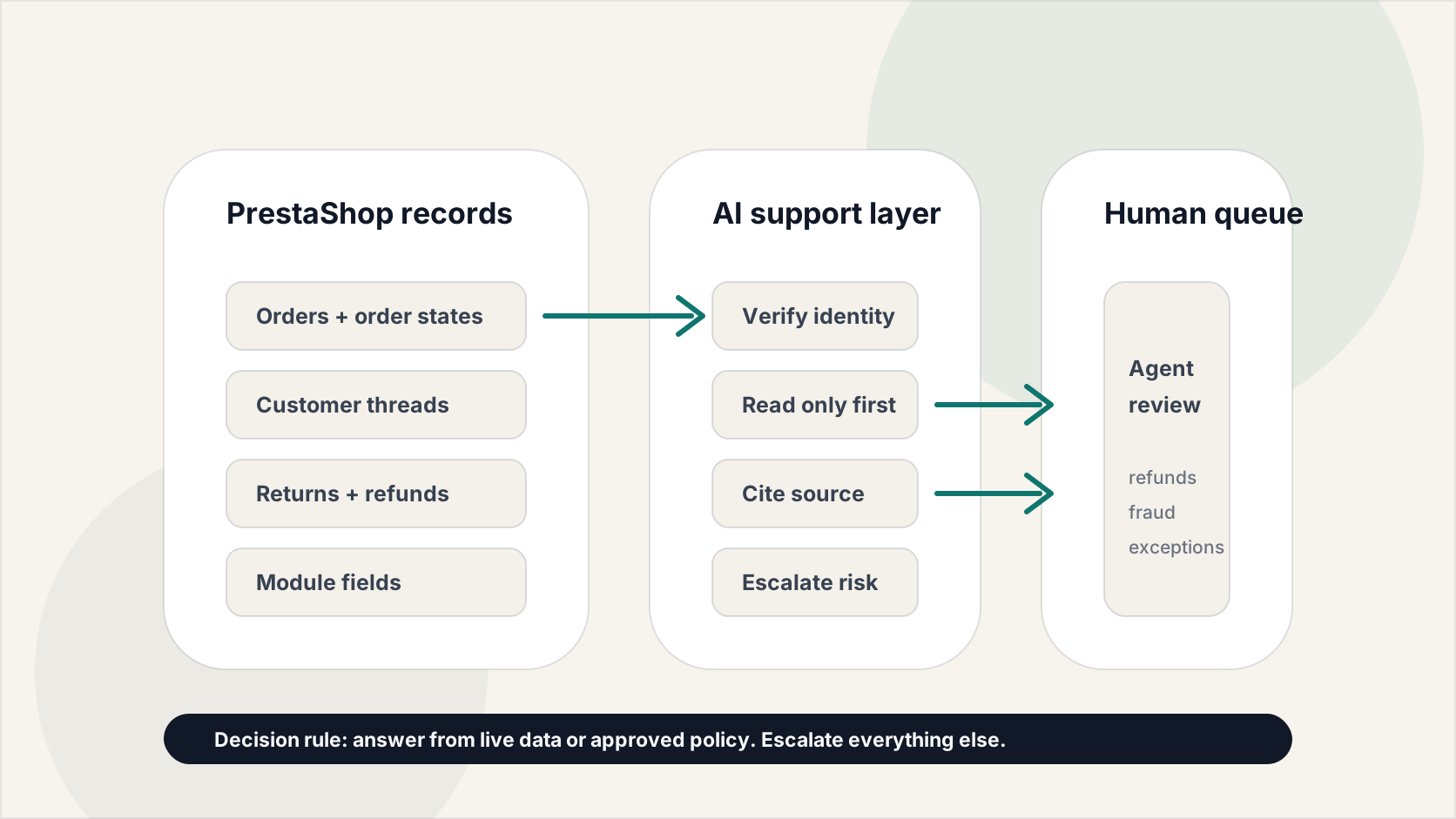
Do not start with the vague goal of adding a PrestaShop AI chatbot. Start with customer jobs that are factual, repeatable, and low risk. Order status usually comes first: verify the customer, find the order by reference or approved identifier, read the current state, order lines, shipping number, carrier context, and localized order-state name, then explain the next step without exposing payment details, internal notes, secure keys, or unrelated order history.
Return eligibility works only when your RMA settings and policy are clear. PrestaShop returns depend on returns being enabled, the request window, and the order status that marks the order as paid and shipped. AI should summarize eligibility and the path into the return process; it should not approve edge cases by itself. Product availability can work when stock and variant data are reliable. Refund status is safer as a read-only explanation than as a write action.
For a broader category evaluation, pair this section with the AI chatbots for ecommerce page so you separate chatbot UI claims from live store data access. Keep address changes, post-fulfillment cancellations, chargeback threats, fraud concerns, damaged-item complaints, high-value refunds, and legal language in human-owned queues. The rule is simple: automate lookup and navigation before automating judgment or money movement.
Automation map
The PrestaShop Support Automation Stack
- Threads
- Orders
- Modules
- AI rules
- Handoff
4. Test order lookup against real PrestaShop data
The demo that matters is not a polished chatbot answer. It is whether the tool can handle your store's real PrestaShop records. Build a staging test pack with a guest checkout, a registered customer, a split or partially shipped order, an order with no tracking scan, a cancelled order, a refunded order, a return request, a custom order state, a product with variants, an out-of-stock product, a customer with multiple recent orders, and a multistore order if you use multistore.
For each test, record the customer's question, the exact PrestaShop resources queried, the fields displayed, the response shown, the escalation result, and whether the customer had to repeat context after handoff. Use the ecommerce support automation checklist as the launch-control version of this test pack.
Pay close attention to order states. Status labels can be customized and translated, so the AI should not infer paid, shipped, or delivered state from English label text alone. It should use state flags and your approved mapping. Also test failure paths: webservice disabled, key revoked, API rate or hosting error, missing carrier data, unsupported language, stale cache, and a module field the vendor cannot read. If the AI gives a generic answer when live data is unavailable, treat that as a failed order-lookup workflow.
5. Audit module, multistore, and language dependencies
PrestaShop stores often rely on modules for tracking, returns, payments, marketplaces, loyalty, B2B pricing, subscriptions, GDPR handling, and custom checkout fields. Support automation breaks when a vendor assumes a clean demo store but your production answer lives in module metadata or a custom webservice resource. Ask vendors to show how they discover available resources from /api/, whether they can read module-created fields, and whether a connector module extends the webservice for support-specific data.
In multistore setups, every lookup must preserve id_shop or shop-group context so the AI does not answer with the wrong catalog, policy, currency, language, carrier, or return window. Language changes the data shape too: product names, order-state labels, contacts, templates, and CMS content may return multilingual fields. Before launch, test the same question in every active storefront language.
For privacy-sensitive stores, define which conversation data is stored, where it is processed, how long it is retained, how access or deletion requests are handled, and whether the automation module participates in your GDPR workflow. GDPR compliant is not a feature label. It is a set of records, controls, and deletion behaviors you can verify.
6. Choose the integration model deliberately
PrestaShop support tools usually come in four forms. A native module can sit closer to the store, use PrestaShop hooks, expose custom webservice resources, and feel simpler for merchants who want everything managed from the back office. It may also create higher maintenance risk when PrestaShop, PHP, the theme, or other modules change. A script-only widget is quick to install and can work for general FAQs or lead capture, but it usually has weaker order context unless a separate connector handles API access.
A helpdesk integration is strongest when your team already works from an inbox and needs assignment, SLAs, reporting, and human handoff across email, chat, WhatsApp, or Messenger. A standalone AI agent can be flexible across channels, but the burden is proof: it must demonstrate least-privilege data access, source-grounded policy answers, clean handoff payloads, and pricing that holds up at your real conversation volume.
YourGPT AI is one example worth reviewing in this category because there is a PrestaShop-specific module writeup for it. Treat that article as a demo starting point, not proof that it fits your store. Compare tools by workflow evidence, not chatbot adjectives. Ask a vendor to prove order lookup, return eligibility, product availability, multilingual answers, privacy controls, API failure behavior, human takeover, and transcript review on your data before you judge the product. If you also operate hosted stores, compare this with the Shopify support automation guide so the platform-specific permission model stays clear.
7. Roll out with QA, handoff rules, and regression tests
Launch one channel and one workflow first, usually web-chat order status or return navigation. Review every AI-handled conversation and every escalation during the first week. Track the error type: wrong identity match, missing order, stale state, unreadable module data, unsupported language, policy hallucination, broken handoff, privacy exposure, or customer frustration.
The handoff rule should be conservative. Escalate when the customer asks for a person, sentiment turns negative, the answer requires judgment, the order has a dispute or fraud signal, the workflow would change money or fulfillment, or the AI cannot cite the record or policy behind the answer.
Keep a regression pack and rerun it after PrestaShop upgrades, module updates, theme changes, hosting moves, new languages, new stores, vendor changes, return-policy changes, and vendor releases. Measure automation rate, ticket reopen rate, CSAT for AI-resolved versus escalated conversations, API failure rate, handoff completeness, and support contact rate per 100 orders. Expansion should be earned by cleanly reviewed conversations, not by a vendor dashboard showing more automated replies.
Written by David Okonkwo, Ecommerce Platform Specialist. Last updated: May 2026. We research and review ecommerce support tools using publicly available information, official documentation, and credible third-party sources. We do not accept payment for rankings or inclusion. Read our full editorial policy.
Common questions
Frequently asked questions
Can you automate customer support in PrestaShop?
Yes, but the safest first workflows are read-only and source-grounded: order status, return navigation, product availability, shipping-policy answers, and routing. PrestaShop automation usually depends on a module, helpdesk connector, or webservice access to orders, customers, order states, messages, and language-specific content.
Which PrestaShop webservice permissions should an AI support tool use?
There is no universal permission set. For a read-only pilot, start with the limited resources required by the workflow, such as orders, order details, order states, customers or guests, addresses, languages, and possibly customer-service threads or messages. Avoid all-resource keys, delete permissions, and write permissions until a specific action is designed, tested, logged, and approved.
Can AI handle PrestaShop refunds or returns?
AI can explain return eligibility, guide customers to the RMA path, summarize refund status, and prepare context for an agent. It should not independently approve exceptions, issue refunds, restock returned products, create vouchers, or change order states unless those write actions have explicit permissions, customer verification, audit logs, and human-approved guardrails.
Is a PrestaShop chatbot module better than a standalone AI agent?
A native module is better when the workflow depends on PrestaShop hooks, module data, back-office configuration, or custom webservice resources. A standalone AI agent is better when the team needs omnichannel coverage, helpdesk routing, analytics, and human handoff across web chat, email, WhatsApp, Messenger, or other channels. The right choice depends on the data path and handoff model, not the chatbot label.
Can a PrestaShop AI chatbot retrieve order status?
Yes, if it can safely read the right PrestaShop records and verify the customer. The test should include order-reference lookup, guest checkout, customer email matching, current order state, carrier or tracking data, custom states, missing tracking numbers, and multistore context. If the bot cannot explain which record it used, it should escalate.
What should I ask a PrestaShop AI vendor in a demo?
Ask the vendor to show order lookup in a staging store, requested webservice resources, field-level data exposure, failed API behavior, custom order-state handling, return eligibility, multilingual answers, human takeover, transcript review, and pricing at your expected conversation volume. Do not treat a marketplace listing or integration logo as proof.
Does PrestaShop multistore change support automation?
Yes. Multistore affects shop context, languages, currencies, catalogs, carriers, policies, and sometimes API-key behavior. Every lookup should preserve the relevant shop or shop-group context so the AI does not answer from the wrong storefront or policy.
Which support questions should stay human in PrestaShop?
Keep chargebacks, fraud concerns, legal complaints, high-value refunds, damaged-item disputes, post-fulfillment cancellations, payment failures, special-order exceptions, and angry customers in human queues. AI can gather context and summarize records, but it should not make judgment-heavy or money-moving decisions without approval.





Operator brief
Plan the next ecommerce AI workflow.
Use the guide to turn the workflow into requirements, guardrails, test cases, and a rollout plan before choosing software.
- Workflow audit worksheet
- AI vendor demo questions
- Data, rollout, and measurement checks